Web based School
Chapter 4
The Basics of Graphics
CONTENTS
- Graphics in Games
- The GIF Image Format
- Creating and Editing Graphics
- Graphics Utilities
- Line-Art Graphics
- 3-D Rendered Graphics
- Scanned Photography and Video-Captured Graphics
- Background Graphics and Textures
- Animated Graphics
- Line-Art Graphics
- Finding Graphics
- Summary
- Q&A
- Workshop
- The GIF Image Format
The graphical appearance of a game is the first impression a user has of the game. And even though game play is the ultimate measure of how engaging a game is, weak graphics can often kill a potentially cool game. For this reason, it's important for you to take the time to carefully create graphics and animation for your games that are sure to catch someone's attention. You'll learn more about the technical details of using graphics in Java tomorrow. ToChapter, the focus is on how to create game graphics and animation.
If you aren't fortunate enough to have a staff of artists at your disposal, then you are like the rest of us and have to work graphical magic with the limited resources at hand. Even if you decide to get help from an artist on your game graphics, you still need to have a solid understanding of the role of the graphics in your game. Either way, any insight that a game developer has into the process of creating game graphics can only serve to ease the development and improve the visual appeal of the game. ToChapter's lesson gives you a good dose of this insight.
The following topics are covered in toChapter's lesson:
- Graphics in games
- The GIF image format
- Graphics utilities
- Creating and editing graphics
- Finding graphics
- The GIF image format
Graphics in Games
Before you begin any actual graphics creation, it's important to decide exactly what you need in terms of game graphics. You already should have the game pretty well defined before progressing to this stage. The next step is to take what you know about the game and assess the graphical content required to make it a reality. This consists of making decisions regarding the game's graphical elements and itemizing the graphics needed.
Game Window Size
The first major decision to make regarding a game's graphics is the size of the game window.
The game window is the rectangular surface on the screen where the game applet is displayed.
Because Java games typically run within the confines of a Web page, you have pretty wide control over the size of the game window. The only potential limitation on the game window is performance.
You might wonder how performance could be related to the size of the game window. In games with animation, the game window is usually constantly redrawn with animation frames. The amount of time it takes to redraw the game window is based on the window's size; the larger the game window, the longer it takes to redraw, because there is more to draw. Therefore, in games that use extensive animation, you need to weigh the game window size against the performance of the game. I've found that a game window size in the range of 200 to 300 pixels in both width and height yields decent performance results on a wide variety of systems.
Keep in mind that games that don't use animation aren't necessarily restricted to the game-window size limitation. However, it is still generally a good idea to keep the game window size within reason, because the game will be embedded inside a Web page.
Target Audience
The target audience for your game can impact the graphics requirements a great deal. Games for children typically use graphics with bright colors to help keep their interest. Games aimed at very young children often use highly contrasting bright colors and larger graphic images. Very young children have much more difficulty with mouse precision and timing, so you need to address these issues in your game design. Most children are drawn toward animals and cartoon-type characters. These types of graphics make a good addition to almost any children's game.
If you're developing a game aimed at teenagers or an older crowd, the graphics pretty much depend on the game itself. Many teens and young adults are attracted to games with realistic violence and a lot of gory graphics. Both inside and outside the commercial game community, there has been much debate about violence in video games, and the decision to include bloody graphics in your game is ultimately your own to make. I personally don't see gory graphics as being any different than special effects in movies; they have their place in some games and certainly can add to the excitement.
Movies are a good example of how the target audience dictates the graphic detail. Children gravitate toward cartoons; the characters are easily recognizable and contrast well with the background. Within cartoons, there are varying levels of graphic detail typically associated with the target age group for the cartoon. Older kids usually are more interested in cartoons that more closely approach realism. Similarly, most adults prefer movies with human actors instead of cartoons.
| Note |
It is sometimes possible to aim primarily for a particular target audience while also including elements that appeal to other audiences. This approach is sometimes referred to as shotgun marketing because the appeal of a game spreads across a wide group of people. Shotgun marketing is regularly employed in movies with great success. As examples consider the immensely popular Disney animated movies which clearly target children but always include plenty of humor that adults can appreciate. |
Setting and Mood
Perhaps even more important than the target audience of your game is the setting and mood of the game. Where is your game taking place, both in time and in location? If it's a futuristic space game, your graphics might include metallic colors contrasting with dark space back-grounds. A gothic vampire game probably would have dark, gloomy graphics based mostly at night. By using dark colors, you can more effectively portray the gloomy mood of the game, with creatures emerging from the moonlit shadows.
| Note |
Keep in mind that the setting of the game can also be enhanced with graphics in the surrounding Web page containing the embedded game applet. |
In these two game examples, I've alluded a great deal to the colors used for the graphics. This is important because colors can really dictate the mood of a game more effectively than specific graphical images. The best way to understand the impact of the colors on the mood of a game is to think about the dimmer switch on a light. Have you ever dimmed the lights in a room and noticed the immediate change in mood reflected by the dimming? Whether the mood is interpreted as gloomy or romantic, it is altered nevertheless. This lighting technique is used frequently in movies and certainly can be used in games as well.
You can easily apply the dimmer idea to your game graphics by altering the brightness of the graphics in a graphics editor. Most graphics editors provide image filtering features that enable you to specifically alter the brightness of an image. You learn some popular shareware graphics editors a little later toChapter in the "Graphics Utilities" section.
Graphics Style
The style you choose for your game graphics is the final requirement you need to address before moving on to creating them. You more than likely already have an idea of the style, so this decision probably won't take too much time. Graphics style basically means the look of the images, such as cartoon style, lifelike, rendered, and so on. Lifelike graphics, such as scanned photographs or digitized video, usually contain a very broad range of colors. On the other hand, cartoon-type graphics usually consist of black edges with solid color fills.
After you select a graphics style, you should try to keep all the graphics consistent throughout the game. It probably wouldn't be a good idea to have a scanned background with cartoon characters moving around in front of it. On the other hand, maybe your game has some Roger Rabbit-type theme to back up this mix of graphics. It's totally up to you; just remember that a more consistent style used for graphics results in a more absorbing and realistic game.
The graphics style of the game is related closely to how the graphics are created. It will be hard to commit to a cartoon style for the graphics if you don't have access to an artist and have no artistic abilities yourself, for example. So, while you're thinking about the style you want for the game, weigh into your decision the resources you have for carrying out the graphics development.
The GIF Image Format
Graphic images in Java are usually represented using the GIF image format. The GIF (Graphics Interchange Format) image format is a platform-independent format created by CompuServe in 1987 to help facilitate image compatibility across a wide range of computer systems. At the time of the GIF format creation, most other image formats were designed around a specific computer platform, and therefore were difficult to transport to other platforms. This isn't much of a problem toChapter, but the GIF format has lived on and thrived nevertheless.
The most current version of the GIF image format is version 89a, which provides a lot of neat features beyond the primary purpose of encapsulating a bitmapped image. The GIf89a format supports up to 256 colors with a transparency color, data compression, and interlacing.
Transparency colors are colors in an image that are unused, meaning that they aren't drawn when the rest of the colors in the image are drawn. The significance of trans-parency colors is that they allow the background behind an image to show through.
Data compression is a technique involving the conversion of data into a smaller, more efficient format so that it takes up less space in memory or on a hard drive or takes less time to transfer over a modem connection.
Interlaced images are images that can be displayed in incremental stages as they are being loaded. You've no doubt witnessed this effect in Web pages when images go from blurry to clear as they are being loaded.
More advanced features of the GIf89a format include hidden text comments, multiple animation frame sub-images, and animation frame rate, among others.
Hidden text comments are comments you can insert into an image that aren't displayed. These comments are sometimes useful for making notes about an image.
Java doesn't currently support all these features, namely animation, but it supports enough of them to still make GIFs a very viable format for image representation in Java games.
| Note |
The animation support in the GIf89a format consists of the capability to specify a sequence of images (frames) that are displayed in succession to give the illusion of movement. You can specify a frame rate, which determines how fast the frames are displayed or animated. |
I mentioned that the GIf89a format supports up to 256 colors, which means that there can be less than 256 colors in an image. GIF images can contain anywhere from 2 to 256 colors; the number of colors impacts the size of the image greatly.
A color palette is a group of colors available to an image. All 256-color GIF images have an associated color palette defining the colors that the image can contain.
You can reduce the colors used in a GIF image by using a graphics utility that supports the GIF format. You find out about some of the popular shareware graphics utilities that support the GIf89a format in the next section.
| Note |
When working with GIF images you have the ability to specify which colors make up the 256 color palette. Tweaking the color palette to fit the particular color needs of an image is referred to as palette optimization. Using palette optimization you can usually get pretty good results with 256 colors. |
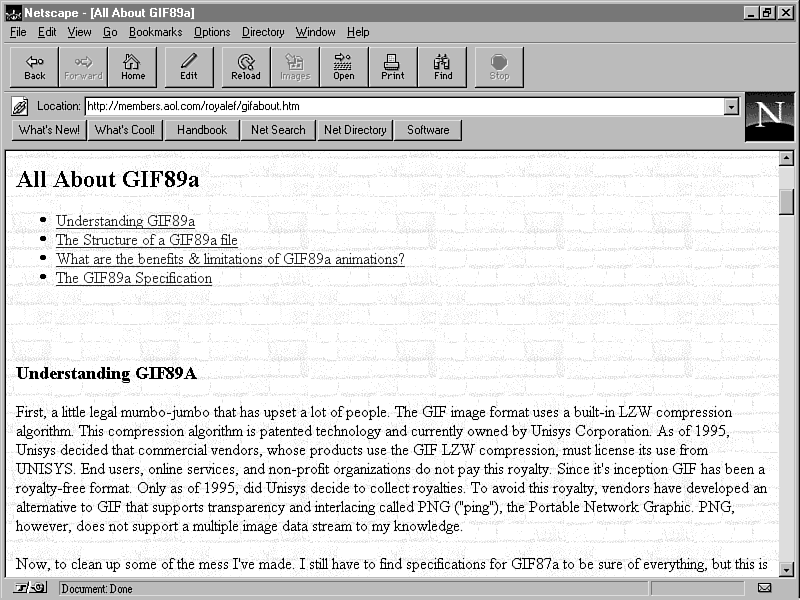
If you want more detailed information about the GIF image format, check out the All About GIf89a image format Web site at http://members.aol.com/royalef/gifabout.asp. This site also contains a link to the original CompuServe GIF image format specification, for inquiring minds that have to know! Figure 4.1 shows what the All About GIf89a image format Web site looks like.
Figure 4.1 : The All About GIf89a image format Web site.
Creating and Editing Graphics
You've learned how to assess the graphical requirements for games and the different types of game graphics, but you still haven't really covered the specifics of how to create graphics. Unfortunately, there is no simple explanation of how to create graphics. As in all art forms, there is much about the subject that must be grafted out of experience. However, I want to cover the basic techniques of creating graphics for games, and then you can chart your own course. Before getting into these techniques, however, let's take a quick look at some of the shareware graphics utilities that are available on the Web.
Graphics Utilities
Whether you create your own graphics or hire an artist, you will need a graphics utility at some point in the graphics development process. Even if you don't need to change the content of the graphics, you often will need to resize or change the transparency color of the images. A nice graphics editor is the most important tool for developing and maintaining game graphics. Although you might end up wanting to invest in a professional graphics editor with a wider range of features, such as Adobe Photoshop, you can't go wrong by starting out with a good shareware editor.
The rest of this section focuses on some popular shareware graphics editors you can use to create and edit GIF images for Java games. They all support the GIf89a graphics format and provide varying degrees of image processing features.
Image Alchemy
Image Alchemy, by Handmade Software, is a very extensive graphics editor and conversion utility with versions available on a wide range of platforms. Image Alchemy reads and writes over 70 different image formats. Although it is geared more toward image conversion than editing, its strong conversion features and incredibly wide support for multiple platforms make it a very useful graphics utility to have.
Handmade Software has versions of Image Alchemy for almost every major computer platform. It even has an online version that enables you to convert images over the Web via a connection to its Image Alchemy server. Very cool!
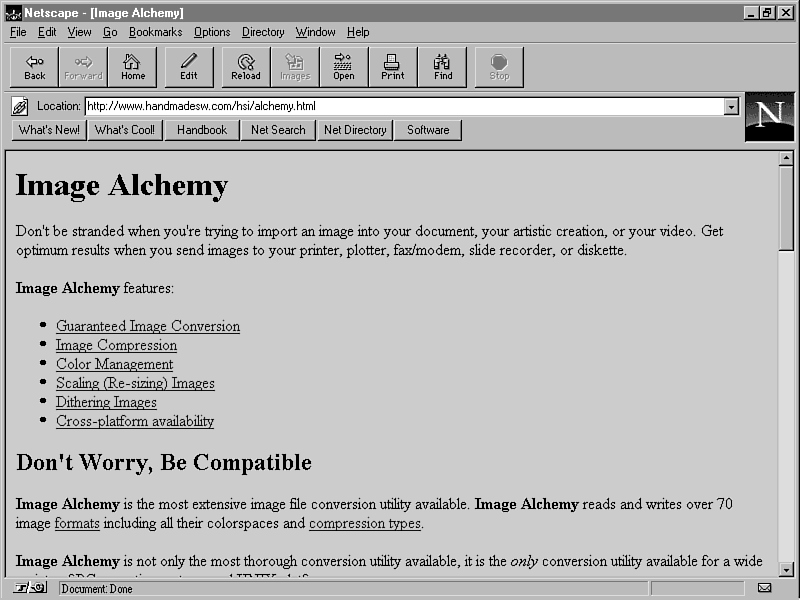
You can get information about Image Alchemy and download the latest version from the Image Alchemy Web site, which is located at http://www.handmadesw.com/hsi/alchemy.asp. Figure 4.2 shows the Image Alchemy Web site.
Figure 4.2 : The Image Alchemy Web site.
Paint Shop Pro
Paint Shop Pro, by JASC Software, is a graphics editor for Windows 95 with a full suite of editing, conversion, and image processing tools. Paint Shop Pro contains a wide variety of paint tools, as well as image filters and conversion features for most of the popular image formats. Paint Shop Pro is arguably the best shareware graphics editor for Windows 95.
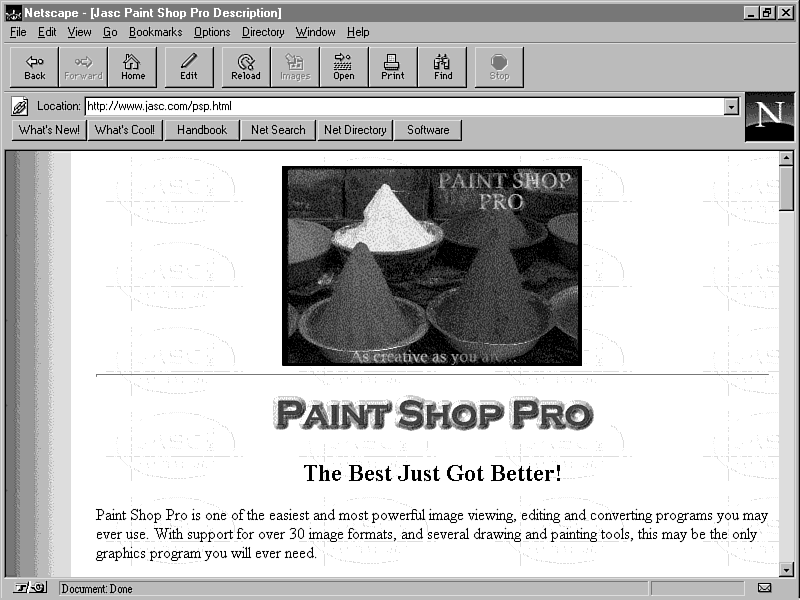
You can get information about Paint Shop Pro and download the latest version from the Paint Shop Pro Web site, which is located at http://www.jasc.com/psp.asp. Figure 4.3 shows the Paint Shop Pro Web site.
Figure 4.3 : The Paint Shop Pro Web site.
Graphics Workshop
Graphics Workshop, by Alchemy Mindworks, is another graphics editor for Windows 95 that is comparable to Paintshop Pro. Graphics Workshop is geared more toward image conversion rather than editing. However, you might find some useful features in it that complement Paintshop Pro, so definitely take a look at them both.
You can get information about Graphics Workshop and download the latest version from the Graphics Workshop Web site, which is located at http://www.mindworkshop.com/alchemy/gww.asp. Figure 4.4 shows the Graphics Workshop Web site.
Figure 4.4 : The Graphics Workshop Web site.
Imaging Machine
Imaging Machine, by E. I. du Pont de Nemours and Company, puts an interesting twist on the concept of image manipulation. The entire graphics utility is online and consists of a variety of image processing tools that are accessible from the Imaging Machine Web site. The goal of Imaging Machine is to free users from the unwanted hassles of downloading, installing, and configuring complex imaging software. There is also a stand-alone non-network version called ImageMagick that runs on most UNIX systems. The ANSI C++ source code is available for ImageMagick, so you can rebuild it for your platform if you desire.
You can find information about Imaging Machine and try it out for yourself at the Imaging Machine Web site, which is located at http://www.vrl.com/Imaging. Figure 4.5 shows the Imaging Machine Web site.
Figure 4.5 : The Imaging Machine Web site.
Line-Art Graphics
Getting back to graphics creation, the first method of creating graphics is called line-art graphics. I call this method line art because it encompasses practically all hand-drawn graphics, whether drawn and scanned from paper or drawn in a software paint program. Either way, you have total control over the colors used and the resulting image. Cartoon-type graphics fall in this category.
You usually draw line-art graphics by hand on paper and scan them with a digitizing scanner, or you use a graphics editor to draw and modify the image. The freehand technique is useful if you have some traditional art experience. The graphics editor approach usually is better if you don't have any art experience, because you can "cheat" to a certain extent by using software image processing tools. An in-between solution is to draw rough outlines of what you want on paper, scan them as digitized images, and color and clean them up in a graphics editor. This is a really nice way to create graphics because you get to draw freehand and still benefit from software tools, while ultimately maintaining complete control over the image.
3-D Rendered Graphics
You don't have to look far these Chapters to see how popular 3-D rendered graphics have become in the game world. There is a reason for this; rendering provides the capability to create incredibly complex and realistic 3-D graphics that sometimes aren't even possible with freehand drawing, especially when it comes to animation. Before I get into that, you should quickly learn how modeling and rendering works.
Using 3-D modeling software such as Caligari's trueSpace or AutoDesk's 3D Studio, you create mathematical wireframe 3-D objects. Of course, the majority of the math is hidden, so all you really have to worry about is learning how to model 3-D objects using the software tools. These modeling programs provide all kinds of methods for creating and manipulating the wireframe objects into just about any shape you can imagine. After you come up with a shape with which you're happy, you specify the surface of the object along with any sources of light. You even can place cameras to get different views of the object. After specifying all these attributes, you tell the application to render the image of the object.
Rendering is the process of composing a graphical image of a purely mathematical object.
Rendering can yield incredible results for game graphics, and I highly suggest looking into it. However, it usually takes a fair amount of practice to get good at creating and working with wireframe objects to a point where you can create complex models. On the other hand, it might come easy to you. Either way, rendering can be a lot of fun and can yield results far beyond the artistic grasp of most game programmers.
Generally speaking, rendered objects have a certain graphical style that is hard to shake. Remember that rendering is a computer process, so it's hard to make rendered objects show emotion like you can with hand-drawn images. Keep in mind that a delicate balance of tools usually generates the most effective results. You might find that rendering is great for producing backgrounds, whereas hand-drawn images are better for individual characters. If you do decide on a mixture of graphics-creation techniques, be sure to blend their respective styles with each other as best you can.
One final note about rendering: I mentioned that rendering can make creating animations much easier. Most modeling/rendering software packages come with tools that enable you to place and move a camera. You usually have the option of moving individual objects, as well as the camera, over time to generate animations. You can generate amazing animations with very little work using these types of tools.
Scanned Photography and Video-Captured Graphics
Another interesting way to create graphics for games is by using scanned photography and video-captured graphics. Scanned photography basically consists of scanned photographic images captured with a digitizing scanner. These can be useful, but because of the two-phase photographic development/image scan process, they aren't used too much in games. On the other hand, video-captured graphics, which rely on a very similar concept, have been used a great deal; these graphics were used in DOOM. Using video-captured graphics involves setting up a video camera and grabbing frames of video of an object as bitmapped images. Video-captured graphics differ from video sequences in that video-captured graphics are used to generate snapshots of different views of an object, and not a real-time animation.
This technique is useful primarily because it enables you to create real-world models of the objects in your game and then convert them to images automatically. The primary problem with video capturing is that the resulting images have a broad range of colors that usually have to be dithered down to the 256-color GIF format. However, sometimes an optimized palette can help yield better results.
Dithering is a process in which the colors in an image are reduced to a lesser amount of colors. This is carried out by using different patterns of the lesser colors to represent the colors lost. Many graphics editors provide dithering features.
The only other problem with video capturing is that it usually involves having to build a small video studio with lighting and a backdrop, not to mention buying the video camera and video hardware that supports NTSC (National Television Standards Committee) video input. You also have to be able to somehow construct physical models of the game objects. However, if you are willing to go the extra step and do these things, the results certainly are worth the trouble.
NTSC video is the type of video signal used by many televisions, VCRs, and video cameras. To be able to retrieve images in this format, you need to have graphics hardware that supports NTSC input.
Background Graphics and Textures
Background graphics are any graphics that appear behind the main objects in the game, such as walls, forests, clouds, and so on.
Many background graphics, such as walls, benefit from textured bitmap images.
A texture is an image that models a piece of a graphical surface that can be tiled without notice.
Textures are very useful primarily because they take up relatively little space; this is because they are tiled repeatedly to create a larger image at runtime. I highly recommend using textures whenever possible. You've no doubt already seen many textures at work as backgrounds in Web pages.
There are libraries of royalty-free textures that often serve as a good resource. Of course, you are free to draw your own textures, but be warned that drawing a textured image so that it can be tiled correctly with the edges blending smoothly is pretty tricky. Although textures are nice for creating tiled backgrounds, you can also draw the background graphics as complete images; just remember that the size of the images will usually increase. You can find much texture artwork at The Clip Art Connection Web site, which you learn about a little later toChapter in the "Finding Graphics" section.
Animated Graphics
Although you don't learn about the details of animation until later this week, it's okay now to look at the graphical requirements of animated graphics. Because animation typically involves a series of images, most animated graphics will be in the form of a series of animation frame images.
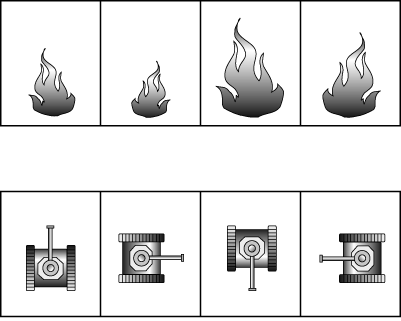
The animation frames for an object in a game sometimes are referred to as phases of the object. The phases depict the movements that the object goes through independent of positional motion. The phase animations usually mean different things for different objects. A fire object might have four frames of animation that depict the movement of the flames, for example. On the other hand, a tank's phases in a battle game might consist of the rotations of the tank. Figure 4.6 shows these two types of animation frames.
Figure 4.6 : Animation frames for a fire and a tank.
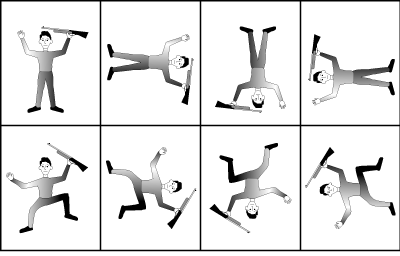
It also is possible for objects to change phase in more than one way. In this case, you will have a two-dimensional array of animation frames rather than a horizontal strip. An example would be a crawling soldier with different animations reflecting the crawling motion. You might have eight rotations for the soldier along with two different frames to show the leg and arm crawling movement. Figure 4.7 shows how these animations might look.
Figure 4.7 : Animation frames for a crawling soldier.
Practically speaking, you would need more frames of animation than these examples show, especially when it comes to rotation. Four frames is hardly enough to depict smooth rotation of an object. I recommend a minimum of eight frames when you are showing an object rotating, unless the object is very small, in which case four frames might work.
I mentioned earlier that the GIf89a image format supports animation by enabling you to include multiple frame images in a single GIF image. Unfortunately, the current release of Java doesn't support animated GIF images, so you'll have to implement Java animations using multiple separate GIF images. You learn much more about this later this week on Chapter 6, "Sprite Animation."
Finding Graphics
If you've decided that creating game graphics isn't for you, you have a few options. The first is to try to find royalty-free art. This isn't always a very viable option, because games typically require very unique graphics. However, you might be able to find interesting clip art that will work for your game graphics. The last thing I want to do is to discourage you from trying a possibly useful outlet for obtaining graphics.
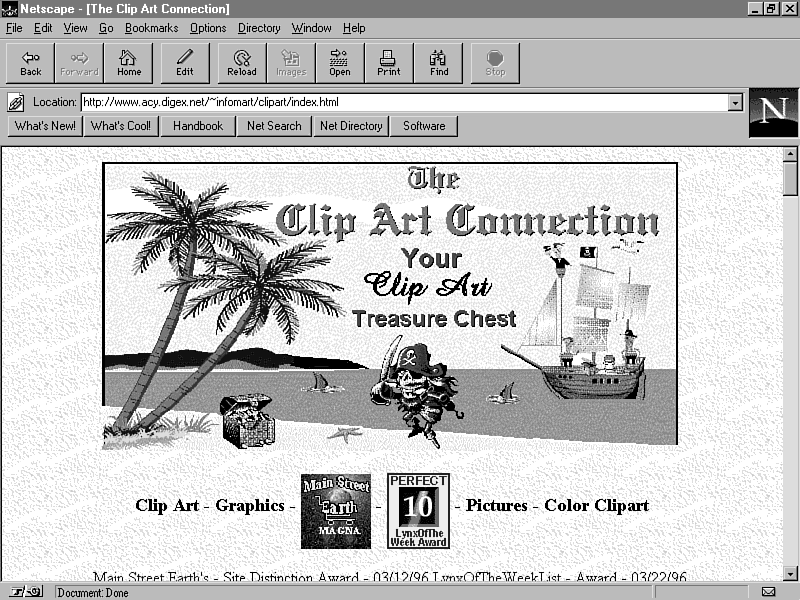
A good starting point for finding existing clip-art graphics is The Clip Art Connection Web site, which is located at http://www.acy.digex.net/~infomart/clipart/index.asp. The Clip Art Connection contains links to many different clip-art sites, as well as sites to artists and commercial stock art collections. This site is definitely worth checking out! Figure 4.8 shows what The Clip Art Connection Web site looks like.
Figure 4.8 : The Clip Art Connection Web site.
Another option, and the one I suggest when you don't have the ability to create your own graphics, is to hire an artist to draw or render the graphics for you. You might be surprised by how inexpensive it can be; some people might even be willing to draw the graphics for free just to be involved in a Java game (just don't forget to give them full credit, a free copy of the end product, and probably a nice thank-you card or e-mail).
The best place to look for artists is on the Internet or online services such as CompuServe. Finding artists through one of these channels has an additional benefit; the artists are probably already comfortable with computers and software drawing tools. This will ease the communication gap between you and them. Additionally, they probably will already have a scanner and can handle any image conversions. Some of the art-related forums on CompuServe are the Artist Forum (ARTIST), Computer Art Forum (COMART), and the Computer Animation Forum (COMANI). On the Internet, you can either search for artists using one of the popular search engines, such as Yahoo!, or you can start with the artist list provided at The Clip Art Connection Web site.
Before you contact an artist, be sure to have a very solid idea of what you want. It's a good idea to write down all your thoughts on the game and what it should look like, including sketches or written descriptions of the graphics. The better the communication between you and the artist, the more likely he or she will deliver graphics to your liking. You might want to ask for some samples of the artist's work to check out the style and see whether it matches what you have in mind. The last step is to work up a formal agreement with the artist, outlining exactly what is expected on both ends of the deal, along with a due date that is agreeable to both parties.
Summary
ToChapter's lesson covered the basics of creating graphics for games. Along with establishing what is required of game graphics, you learned about some specific techniques for creating them. Unfortunately, I don't have the space (or the qualifications!) to try to teach you art, which is exactly what game graphics are. If you are weak in the art area, you might want to hire an artist to draw or render the graphics for your game.
The main goal toChapter was to give you enough background information about game graphics to give you a better idea of what you will need to create graphics for your own games. As fun as creating graphics can be, the real joy is seeing them in action. Tomorrow's lesson gets into the specifics of using graphics in Java.
Q&A
| Q | Does Java support any image formats other than GIF? |
| A | Yes. Java also supports the JPEG image format, which is geared more toward photographic images. |
| Q | If the GIF format supports only 256 colors, what do I do about images using more than 256 colors? |
| A | The reality is that you can have a maximum of 256 colors in GIF images, and therefore a maximum of 256 colors in your game graphics. However, you can side-step this limitation a little by using a graphics utility to dither images that have more colors down to 256-color GIF images. |
| Q | I have no artistic abilities, I haven't found any interesting graphics on the Web, and I don't know if I can afford hiring an artist. Is there anything I can do? |
| A | Yes! In this case, your best bet is to buy a color scanner and start looking for interesting artwork everywhere you go. The best source is to look in guidestores for stock art guides. I have a little confession to make: Much of the artwork used for games in this guide was scanned from stock art guides and then resized, colored, and cleaned up using a graphics editor. I'm not incredibly artistic, just resourceful! |
| Q | I have a game idea that has graphics consisting of lines, rectangles, and other simple graphics primitives. Do I still need to create images? |
| A | Absolutely not. If your game needs only graphics primitives, you can easily use the Java awt graphics features to generate the graphics at runtime. This is cool because it completely eliminates the delays associated with transferring images over the Internet. |
Workshop
The Workshop section provides questions and exercises to help you get a better feel for the material you learned toChapter. Try to answer the questions and at least peruse the exercises before moving on to tomorrow's lesson. You'll find the answers to the questions in appendix A, "Quiz Answers."
Quiz
- Who created the GIF image format and why?
- What is interlacing?
- What is dithering?
- What is a phased graphical object?
- What things should you consider when hiring an artist?
- What is interlacing?
Exercises
- Play a few commercial games and pay special attention to the
style of the graphics used in different scenes.
- Find a cool graphics editor and learn how to use its basic features.
- Get on the Web and check out some of the clip-art graphics archives. See anything that might be useful in a game?
- Connect to the Imaging Machine Web site and try it out on some of the clip-art graphics you found.
- Find a cool graphics editor and learn how to use its basic features.




Popular Tutorials
-
 MS Access
1109
MS Access
1109
-
 C++
1222
C++
1222
-
 HTML
584
HTML
584
-
 JavaScript
616
JavaScript
616
-
 Vbscript
873
Vbscript
873
-
 Oracle
473
Oracle
473
-
 VC++
875
VC++
875
-
 SQL
2959
SQL
2959
-
 XML
514
XML
514
-
 Java
814
Java
814
-
 Perl
455
Perl
455
-
 Linux
451
Linux
451