Web based School
Chapter 3
Object-Oriented Programming with Java
CONTENTS
Object-oriented programming (OOP) is a programming paradigm that is fundamentally different from traditional procedural programming styles. It is centered around the concept of objects-programming constructs that have both properties and the procedures for manipulating those properties. This approach models the real world much more closely than conventional programming methods and is ideal for the simulation-type problems commonly encountered in games.
You're probably already aware that Java is an object-oriented language, but you might not fully understand what that means. To successfully use Java to write Internet games, you need to embrace object-oriented programming techniques and design philosophies. The goal of toChapter's lesson is to present the conceptual aspects of object-oriented programming as they relate to Java. By the end of toChapter's lesson, you will fully understand what OOP means to Java and maybe even have some new buzz words to share with your friends! More important, you will gain some insight into why the OOP paradigm built into Java is a perfect match for game programming.
The following topics are covered in toChapter's lesson:
- What is OOP?
- OOP and games
- Java and other OOP languages
- OOP and games
What Is OOP?
If you've been anywhere near the computer section of a guidestore or picked up a programming magazine in the last five years, you've certainly seen the hype surrounding object-oriented programming. It's the most popular programming technology to come about in a long time, and it all revolves around the concept of an object. The advent of Java has only served to elevate the hype surrounding OOP. You might wonder what the big deal is with objects and object-oriented technology? Is it something you should be concerned with, and if so, why? Is it really that crucial when working with Java? If you sift through the hype surrounding the whole object-oriented issue, you'll find a very powerful technology that provides a lot of benefits to software design.
But the question still remains: What is OOP? OOP is an approach to programming that attempts to bridge the gap between problems in the real world and solutions in the computer programming world. Prior to OOP, a conceptual stumbling block always existed for programmers when trying to adapt the real world into the constraints imposed by a traditional programming language. In the real world, people tend to think in terms of "things," but in the pre-OOP programming world people have been taught to think in terms of blocks of code (procedures) and how they act on data. These two modes of thinking are very different from each other and pose a significant problem when it comes to designing complex systems that model the real world. Games happen to be very good examples of complex systems that often model the real world.
OOP presents an approach to programming that allows programmers to think in terms of objects, or things, much like people think of things in the real world. Using OOP techniques, a programmer can focus on the objects that naturally make up a system, rather than trying to rationalize the system into procedures and data. The OOP approach is a very natural and logical application of the way humans already think.
The benefits of OOP go beyond easing the pain of resolving real world problems in the computer domain. Another key issue in OOP is code reuse, when you specifically design objects and programs with the goal of reusing as much of the code as possible, whenever possible. Fortunately, it works out that the fundamental approaches to OOP design naturally encourage code reuse, meaning that it doesn't take much of an extra effort to reuse code after you employ standard OOP tactics.
The OOP design approach revolves around the following major concepts:
- Objects
- Classes
- Encapsulation
- Messages
- Inheritance
- Classes
Objects
Objects are bundles of data and the code, or procedures, that act on that data.
The procedures in an object are also known as methods. The merger of data and methods provides a means of more accurately representing real-world objects. Modeling a real-world problem through traditional programming constructs, without objects, requires a significant logical leap. Objects, on the other hand, enable programmers to solve real-world problems in the software domain much more easily and logically.
As evident by the name, objects are at the heart of object-oriented technology. To understand how software objects are beneficial, think about the common characteristics of all real-world objects. Lions, cars, and calculators all share two common characteristics: state and behavior.
The state of an object is the condition that the object is in, as defined by its attributes.
The behavior of an object is the collection of actions that the object can take.
For example, the state of a lion might include color, weight, and whether the lion is tired or hungry. Lions also have certain behaviors such as roaring, sleeping, and hunting. The state of a car includes the current speed, the type of transmission, whether it is two- or four-wheel-drive, whether the lights are on, and the current gear, among other things. The behaviors for a car include turning, braking, and accelerating.
Just like real-world objects, software objects possess two common characteristics: state and behavior. To relate this back to programming terms, the state of an object is determined by its data and the behavior of an object is defined by its methods. By making this connection between real-world objects and software objects, you begin to see how objects help bridge the gap between the real world and the world of software living inside your computer.
Because software objects are modeled after real-world objects, you can more easily represent real-world objects in object-oriented programs. You could use the lion object to represent a real lion in an interactive software zoo. Similarly, car objects would be very useful in a racing game. However, you don't always have to think of software objects as modeling physical real-world objects; software objects can be just as useful for modeling abstract concepts. For example, the standard Java API provides a thread object that represents a stream of execution in a multithreaded program.
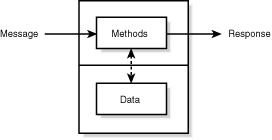
Figure 3.1 shows a visualization of a Java software object, including the primary components and how they relate.
Figure 3.1 : A software object.
The software object in Figure 3.1 clearly shows the two primary components of an object: data and methods. The figure also shows some type of communication, or access, between the data and the methods. Additionally, it shows how messages are sent through the methods, which result in responses from the object. You'll learn more about messages later toChapter in the "Messages" section.
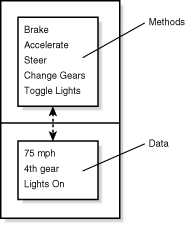
The data and methods within an object express everything that the object knows (state), along with what all it can do (behavior). A software object modeling a real-world car would have variables (data) that indicate the car's current state: it's traveling at 75 mph, it is in 4th gear, and the lights are on. The software car object would also have methods that enable it to brake, accelerate, steer, change gears, and turn the lights on and off. Figure 3.2 shows what a Java car object might look like.
In both Figures 3.1 and 3.2 you probably noticed the line separating
the methods from
the data within the object. This line is a little misleading,
because methods have full access to the data within an object.
The line is there to illustrate the difference between the visibility
of the methods and the data to the outside. In this sense, an
object's visibility refers to what parts of the object another
object has access to. Because object data defaults to being invisible,
or inaccessible to other objects, all interaction between objects
must be handled via methods. This hiding of data within an object
is called encapsulation.
Classes
Throughout this discussion of object-oriented programming, you've only dealt with the concept of an object already existing in a system. You might be wondering how objects get into a system in the first place. This question brings you to the most fundamental structure in object-oriented programming: the class.
A class is a template or prototype that defines a type of object.
A class is to an object what a blueprint is to a house. Many houses can be built from a single blueprint; the blueprint outlines the makeup of the houses. Classes work exactly the same way, except that they outline the makeup of objects.
In the real world, there are often many objects of the same kind. Using the house analogy, there are many different houses around the world, but as houses they all share common characteristics. In object-oriented terms, you would say that your house is a specific instance of the class of objects known as houses.
An instance of a class is an object that has been created in memory using the class as a template. Instances are also sometimes referred to as instantiated objects.
All houses have states and behaviors in common that define them as houses. When a builder starts building a new development of houses, he or she typically will build them all from a set of blueprints. It wouldn't be as efficient to create a new blueprint for every single house, especially when there are so many similarities shared between each one. The same thing applies in object-oriented software development; why rewrite a lot of code when you can reuse code that solves similar problems?
In object-oriented programming, as in construction, it's also common to have many objects of the same kind that share similar characteristics. And like the blueprints for similar houses, you can create blueprints for objects that share certain characteristics. What it boils down to is that classes are software blueprints for objects.
As an example, the class for the car object discussed earlier would contain several variables representing the state of the car, along with implementations for the methods that enable the driver to control the car. The state variables of the car remain hidden underneath the interface. Each instance, or instantiated object, of the car class gets a fresh set of state variables. This brings you to another important point: When an instance of an object is created from a class, the variables declared by that class are allocated in memory. The variables are then modified via the object's methods. Instances of the same class share method implementations but have their own object data. Classes can also contain class data.
Object data, or instance data, is the information that models an object's state. Each object in memory has its own set of instance data, which determines what state the object is in.
Class data is data that is maintained on a class-wide basis, independent of any objects that have been created.
There is only one instance of class data in memory no matter how many objects are created from the class. Class data is typically used to store common information that needs to be shared among all instances of a class. A common example of class data is a count of how many instantiated objects exist of a particular class. When a new object is created, the count is incremented, and when an existing object is destroyed, the count is decremented.
Objects provide the benefits of modularity and information hiding, whereas classes provide the benefit of reusability. Just as the builder reuses the blueprint for a house, the software developer reuses the class for an object. Software programmers can use a class over and over again to create many objects. Each of these objects gets its own data but shares a single method implementation.
Encapsulation
Encapsulation is the process of packaging an object's data together with its methods.
A powerful benefit of encapsulation is the hiding of implementation details from other objects. This means that the internal portion of an object has more limited visibility than the external portion.
The external portion of an object is often referred to as the object's interface, because it acts as the object's interface to the rest of the program. Because other objects must communicate with the object only through its interface, the internal portion of the object is protected from outside tampering. And because an outside program has no access to the internal implementation of an object, the internal implementation can change at any time without affecting other parts of the program.
Encapsulation provides two primary benefits to programmers:
- Implementation hiding
- Modularity
Implementation hiding refers to the protection of the internal implementation of an object.
An object is composed of a public interface and a private section that can be a combination of internal data and methods. The internal data and methods are the sections of the object that can't be accessed from outside the object. The primary benefit is that these sections can change without affecting programs that use the object.
Modularity means that an object can be maintained independently of other objects.
Because the source code for the internal sections of an object is maintained separately from the interface, you are free to make modifications and feel confident that your object won't cause problems. This makes it easier to distribute objects throughout a system, which is a crucial point when it comes to Java and the Internet.
Messages
An object acting alone is rarely very useful; most objects require other objects to really do anything. For example, the car object is pretty useless by itself with no other interaction. Add a driver object, however, and things get more interesting! Knowing this, it's pretty clear that objects need some type of communication mechanism in order to interact with each other.
Software objects interact and communicate with each other via messages. When the driver object wants the car object to accelerate, it sends a message to the car object. If you want to think of messages more literally, think of two people as objects. If one person wants the other person to come closer, they send the other person a message. More accurately, one might say to the other person "come here, please." This is a message in a very literal sense. Software messages are a little different in form, but not in theory; they tell an object what to do. In Java, the act of sending an object a message is actually carried out by calling a method of the object. In other words, methods are the mechanism through which messages are sent to objects in the Java environment.
Many times, the receiving object needs more information along with a message so that it knows exactly what to do. When the driver tells the car to accelerate, the car must know by how much. This information is passed along with the message as message parameters.
From this discussion, you can see that messages consist of three things.
- The object to receive the message (car)
- The name of the action to perform (accelerate)
- Any parameters the method requires (15 mph)
- The name of the action to perform (accelerate)
These three components are sufficient information to fully describe a message for an object. Any interaction with an object is handled by passing a message. This means that objects anywhere in a system can communicate with other objects solely through messages.
Just so you don't get confused, understand that "message passing" is another way of saying "method calling." When an object sends another object a message, it is really just calling a method of that object. The message parameters are actually the parameters to a method. In object-oriented programming, messages and methods are synonymous.
Because everything that an object can do is expressed through its methods (interface), message passing supports all possible interactions between objects. In fact, interfaces enable objects to send messages to and receive messages from each other even if they reside in different locations on a network. Objects in this scenario are referred to as distributed objects. Java is specifically designed to support distributed objects.
Inheritance
What happens if you want an object that is very similar to one you already have, but with a few extra characteristics? You just derive a new class based on the class of the similar object.
Inheritance is the process of creating a new class with the characteristics of an existing class, along with additional characteristics unique to the new class.
Inheritance provides a powerful and natural mechanism for organizing and structuring programs.
So far, the discussion of classes has been limited to the data and methods that make up a class. Based on this understanding, you build all classes from scratch by defining all of the data and all of the associated methods. Inheritance provides a means to create classes based on other classes. When a class is based on another class, it inherits all of the properties of that class, including the data and methods for the class. The class doing the inheriting is referred to as the subclass (child class) and the class providing the information to inherit is referred to as the superclass (parent class).
| Note |
Child classes are sometimes referred to as descendants, and parent classes are sometimes referred to as ancestors. The family tree analogy works quite well for describing inheritance. |
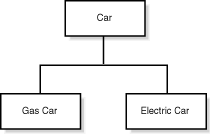
Using the car example, gas-powered cars and cars powered by electricity can be child classes inherited from the car class. Both new car classes share common "car" characteristics, but they also have a few characteristics of their own. The gas car would have a fuel tank and a gas cap, and the electric car might have a battery and a plug for recharging. Each subclass inherits state information (in the form of variable declarations) from the superclass. Figure 3.3 shows the car parent class with the gas and electric car child classes.
Figure 3.3 : Inherited car objects.
The real power of inheritance is the ability to inherit properties and add new ones; subclasses can have variables and methods in addition to the ones they inherit from the superclass. Remember, the electric car has an additional battery and a recharging plug. Subclasses also have the capability to override inherited methods and provide different implementations for them. For example, the gas car would probably be able to go much faster than the electric car. The accelerate method for the gas car could reflect this difference.
Class inheritance is designed to allow as much flexibility as possible. You can create inheritance trees as deep as necessary to carry out your design. An inheritance tree, or class hierarchy, looks much like a family tree; it shows the relationships between classes. Unlike a family tree, the classes in an inheritance tree get more specific as you move down the tree. The car classes in Figure 3.3 are a good example of an inheritance tree.
By using inheritance, you've learned how subclasses can allow specialized data and methods in addition to the common ones provided by the superclass. This enables programmers to reuse the code in the superclass many times, thus saving extra coding effort and therefore eliminating potential bugs.
One final point to make in regard to inheritance: It is possible and sometimes useful to create superclasses that act purely as templates for more usable subclasses. In this situation, the superclass serves as nothing more than an abstraction for the common class functionality shared by the subclasses. For this reason, these types of superclasses are referred to as abstract classes. An abstract class cannot be instantiated, meaning that no objects can be created from an abstract class. An abstract class cannot be instantiated because parts of it have been specifically left unimplemented. More specifically, these parts are made up of methods that have yet to be implemented, which are referred to as abstract methods.
Using the car example once more, the accelerate method really can't be defined until the car's acceleration capabilities are known. Of course, how a car accelerates is determined by the type of engine it has. Because the engine type is unknown in the car superclass, the accelerate method could be defined but left unimplemented, which would make both the accelerate method and the car superclass abstract. Then the gas and electric car child classes would implement the accelerate method to reflect the acceleration capabilities of their respective engines or motors.
| Note |
The discussion of inheritance naturally leads to the concept of polymorphism, which is the notion of an object having different forms. Using polymorphism, it is possible to have objects with similar interfaces but different responses to method calls. In this way, an object is able to maintain its original interface within a program while taking on a different form. |
OOP and Games
So far, I've talked a lot about the general programming advantages of using objects to simplify complex programming tasks, but I haven't talked too much about how they specifically apply to games. To understand how you can benefit from OOP design methods as a game pro-grammer, you must first take a closer look at what a game really is.
Think of a game as a type of abstract simulation. If you think about most of the games you've seen or played, it's almost impossible to come up with one that isn't simulating something. All the adventure games and sports games, and even the far-out space games, are modeling some type of objects present in the real world (maybe not our world, but some world nevertheless). Knowing that games are models of worlds, you can make the connection that most of the things (landscapes, creatures, and so on) in games correspond to things in these worlds. And as soon as you can organize a game into a collection of "things," you can apply OOP techniques to the design. This is possible because things can be translated easily into objects in an OOP environment.
Look at an OOP design of a simple adventure game as an example. In this hypothetical adventure game, the player controls a character around a fantasy world and fights creatures, collects treasure, and so on. You can model all the different aspects of the game as objects by creating a hierarchy of classes. After you design the classes, you create them and let them interact with each other just as objects do in real life.
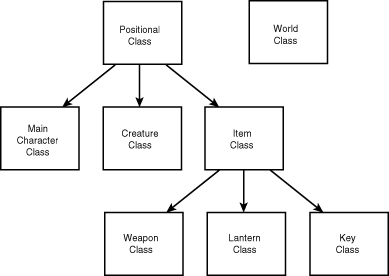
The world itself probably would be the first class you design. The world class would contain information such as its map and images that represent a graphical visualization of the map. The world class also would contain information such as the current time and weather. All other classes in the game would derive from a positional class containing coordinate information specifying where in the world the objects are located. These coordinates would specify the location of objects on the world map.
The main character class would maintain information such as life points and any items picked up during the game, such as weapons, lanterns, keys, and so on. The character class would have methods for moving in different directions based on the player's input. The items carried by the character also would be objects. The lantern class would contain information such as how much fuel is left and whether the lantern is on or off. The lantern would have methods for turning it on and off, which would cause it to use up fuel.
There would be a general creature class from which all creatures would be derived. This creature class would contain information such as life points and how much damage the creature inflicts when fighting. It would have methods for moving in different directions. Unlike the character class, however, the creature's move methods would be based on some type of intelligence programmed into the creature class. The mean creatures might always go after the main character if they are on the same screen together, for example, but passive creatures might just ignore the main character. Derived creature classes would add extra attributes, such as the capability to swim or fly. Figure 3.4 shows the class hierarchy for this hypothetical game.
Figure 3.4 : Class hierarchy for a hypothetical adventure game.
I've obviously left out a lot of detail in the descriptions of these hypothetical objects. This is intentional because I want to highlight the benefit of the object approach, not the details of fully implementing a real example. Although you already might see the benefits of the object design so far, the real gains come when you put all the objects together in the context of the complete game.
After you have designed all the object classes, you just create objects from them and let them go. You already will have established methods that enable the objects to interact with each other, so in a sense the game world is autonomous. The intelligence of any object in the game is hidden in the object implementation, so no external manipulation is required of them. All you really must do is provide a main game loop that updates everything. Each object would have some method for updating its status. For creatures, this update would entail determining the direction in which to move and whether they should attack. For the main character object, an update would involve performing an action based on the user input. The key point to understand here is that the objects are independent entities that know how to maintain themselves.
Of course, this game also could be designed using a procedural approach, but then there would be no concept of an object linked with its actions. You would have to model the objects as data structures and then have a bunch of functions that act on those structures. No function would be more associated with a particular data structure than any other. And more importantly, the data structures would know nothing about the functions. You also would lose all the benefits of deriving similar objects from a common parent object. This means that you would have duplicate code for all these types of objects that would have to be maintained independently.
| Note |
Procedural programming is the precursor to object oriented programming. In procedural programming, the focus to solving programmatic problems is on using blocks of code called procedures that independently act on data. This is in direct contrast to object oriented programming, in which procedures and data are combined in a single unit: the object. |
A more dramatic benefit of using OOP becomes apparent when you develop new games in the future. By following an OOP design in the first game, you will be able to reuse many of the objects for new games. This is not just a side effect of using OOP techniques, it is a fundamental goal of OOP design. Although you can certainly cut and paste code in a procedural approach, this hardly compares to reusing and deriving from entire objects. As an example, the creature class developed in the hypothetical adventure game could be used as a base class for any kind of creature object, even those in other games.
Although this example is brief, it should illustrate the advantages of using an OOP design for games. If nothing else, I wanted to at least get you thinking about how OOP design techniques can make games easier to develop, which ultimately makes your job more fun!
The good news about all this OOP stuff is that Java is designed from the ground up as an OOP language. As a matter of fact, you don't even have the option of writing procedural code in Java. Nevertheless, it still takes effort to maintain a consistent OOP approach when you are writing Java games, which is why I've spent so much time toChapter discussing OOP theory.
Java and Other OOP Languages
You've learned that OOP has obvious advantages over procedural approaches, especially when it comes to games. OOP was conceived from the ground up with the intention of sim-ulating the real world. However, in the world of game programming, the faster language has traditionally always won. This is evident by the amount of assembly language still being written in the commercial game-development community. No one can argue the fact that carefully written assembly language is faster than C, and that even more carefully written C is sometimes faster than C++. And unfortunately, Java ranks a distant last behind all these languages in terms of efficiency and speed.
However, the advantages of using Java to write games stretch far beyond the speed benefits provided by these faster languages. This doesn't mean that Java is poised to sweep the game community as the game development language of choice; far from it! It means that Java provides an unprecedented array of features that scale well to game development. The goal for Java game programmers is to write games in the present within the speed limitations of Java, while planning games for the future that will run well when faster versions of Java are released.
| Note |
In fact two separate speed issues are involved in Java game programming. The first is the issue of the speed of the Java language and runtime environment which will no doubt improve as better compilers and more efficient versions of the runtime environment are released. The second issue is that of Internet connection speed which is limited by the speed of the modem or physical line used to connect to the Internet. Both of these issues are important but they impact Java games in different ways: The first speed limitation affects how fast a game runs while the second limitation affects how fast a game loads. |
Due to languages such as Smalltalk, which treats everything as an object (an impediment for simple problems), and their built-in memory-allocation handling (a sometimes very slow process), OOP languages have developed a reputation for being slow and inefficient. C++ remedied this situation in many ways but brought with it the pitfalls and complexities of C, which are largely undesirable in a distributed environment such as the Internet. Java includes many of the nicer features of C++, but incorporates them in a more simple and robust language.
| Note |
For more information about exactly how Java improves C++ see appendix C "Differences Between Java and C/C++." |
The current drawback to using Java for developing games is the speed of Java programs, which is significantly slower than C++ programs because Java programs execute in an interpreted fashion. The just-in-time compilation enhancements promised in future versions of Java should help remedy this problem. You learn about some optimization techniques to help speed up Java code near the end of this guide on Chapter 20, "Optimizing Java Code for Games."
| Note |
Currently, Java programs are interpreted, meaning that they go through a conversion process as they are being run. Although this interpreted approach is beneficial because it allows Java programs to run on different types of computers, it greatly affects the speed of the programs. A promising solution to this problem is just in time compilation, which is a technique in which a Java program is compiled into an executable native to a particular type of computer before being run. |
ToChapter, Java is still not ready for prime time when it comes to competing as a game programmer's language. It just isn't possible yet in the current release of Java to handle the high-speed graphics demanded by commercial games. To alleviate this problem, you have the option of integrating native C code to Java programs. This might or might not be a workable solution, based on the particular needs of a game.
Regardless of whether Java can compete as a high-speed gaming language, it is certainly capable of meeting the needs of many other types of games that are less susceptible to speed restrictions. The games you develop throughout this guide are examples of the types of games that can be developed in the current release of Java.
Summary
ToChapter you learned about object-oriented programming and how it relates to Java. You saw that the concept of an object is at the heart of the OOP paradigm and serves as the conceptual basis for all Java code design. You also found out exactly what an object is, along with some of the powerful benefits of following an object-centric design approach.
You learned in toChapter's lesson how OOP design principles can be applied to games. Games are a very natural application of OOP strategies, because they typically resemble simulations. You then learned that OOP game programming in Java is not without its drawbacks. Execution speed is often the killer in game programming, and Java game programming is no exception. However, future enhancements to Java should lessen the performance gap between Java and other popular OOP languages such as C++.
Now that the conceptual groundwork for Java game programming has been laid, you are ready to move on to more specific game programming issues. To be exact, you now are ready to learn about the basics of using graphics in games, which are covered in tomorrow's lesson.
Q&A
| Q | What is an object-oriented language? |
| A | A language that supports the concept of an object, which is the merger of data and methods into a logically single element. Furthermore, object-oriented languages typically support features such as encapsulation, inheritance, and polymorphism, which combine to encourage code reuse. |
| Q | What is the difference between a class and an object? |
| A | A class is a blueprint, or template, that defines the data and methods necessary to model a "thing." An object is an instance of a class that exists in the computer's memory and can be interacted with much like a "thing" in the real world. You can create as many objects from a single class as memory will allow. |
| Q | What's the difference between a message and a method? |
| A | Nothing, really. "Sending a message" is another way of saying "calling a method" and is often used in more general OOP discussions. |
Workshop
The Workshop section provides questions and exercises to help solidify the material you learned toChapter. Try to answer the questions and at least study the exercises before moving on to tomorrow's lesson. You'll find the answers to the questions in appendix A, "Quiz Answers."
Quiz
- What is an object?
- What is encapsulation?
- Why is implementation hiding important?
- What is the major problem with Java in regard to game programming?
- What is encapsulation?
Exercises
- Develop a class hierarchy for a game idea of your own, similar
to the one created for the hypothetical adventure game.
- Play some computer games, paying particular attention to how they can each be broken down into groups of objects.
- If you are a C or C++ programmer new to Java, read appendix C, "Differences Between Java and C/C++."
- Play some computer games, paying particular attention to how they can each be broken down into groups of objects.




Popular Tutorials
-
 MS Access
1109
MS Access
1109
-
 C++
1222
C++
1222
-
 HTML
584
HTML
584
-
 JavaScript
616
JavaScript
616
-
 Vbscript
873
Vbscript
873
-
 Oracle
473
Oracle
473
-
 VC++
875
VC++
875
-
 SQL
2959
SQL
2959
-
 XML
514
XML
514
-
 Java
814
Java
814
-
 Perl
455
Perl
455
-
 Linux
451
Linux
451