Web based School
Chapter 19
NetConnect4: Human versus Human
CONTENTS
In yesterChapter's lesson, you learned how Java supports network communications through a client/server model. You even built a simple socket class to help make network communications a little easier. In toChapter's lesson, you carry the client/server approach a step forward and build a complete network game supporting multiple players. Actually, instead of writing a whole new game, you modify a game you already wrote to support network play. By the end of toChapter's lesson, you'll have the skills necessary to begin developing your own network games.
ToChapter you take the Connect4 game you wrote on Chapter 16 and adapt it to network play between two players. In doing so, you put the socket class developed yesterChapter to good use; you use the socket class as a basis for implementing a complete network game protocol facilitating game communication between multiple clients and a server. Sounds like fun, right? You bet!
The following topics are covered in toChapter's lesson:
- Designing NetConnect4
- Sample applet: NetConnect4
Designing NetConnect4
If you recall, the Connect4 game you wrote in Chapter 16's lesson was a single-player game utilizing artificial intelligence to simulate an intelligent computer player. The goal now is to take that game and adapt it for two human players playing the game over the Web. This task might sound a little daunting, but keep in mind that the game itself is already written; you're just adding the network support code.
As you learned yesterChapter, the core of Java network game programming revolves around a client/server communication strategy. Knowing this, you've probably guessed that a Java network game design will involve some type of client/server arrangement. In fact, the design of the NetConnect4 game can be divided cleanly into the client side and the server side. These two components are logically separate, communicating entirely through a game protocol defined between them. Let's take a look at what each of these pieces is responsible for.
The Server
In any Java game, the server side of the game acts almost like a referee, managing the different players and helping them communicate effectively. More specifically, a game server takes on the role of handling the network connection for each player, along with querying for and responding to events for the players. The role of a generic game server can be broken down into the following actions:
- Initialize the server socket.
- Wait for a client to connect.
- Accept the client connection.
- Create a daemon thread to support the client.
- Go back to step 2.
- Wait for a client to connect.
The most crucial aspect of this series of events is step 4, when the server creates a daemon thread to support the client. You're probably wondering what I mean by "support." Well, in a generic sense, I don't know what I mean. The reason is that the daemon thread is where the applet-specific code goes. So a generic server only knows that it needs to create a daemon thread; it doesn't know or care about what that thread actually does. You'll learn more about daemon threads a little later toChapter when you actually get into the code for NetConnect4.
A daemon is a process that runs in the background of a system performing some type of support function.
You now have an idea about the role a generic game server plays in the context of a network game. The question, then, is what role does such a server play in the context of a specific game, namely NetConnect4? The role of the NetConnect4 server ends up being not much different from that of the generic server, but it is important that you understand exactly what it needs to do differently.
Because Connect4 is a two-player game, the first job of the server is to pair up players (clients) as they connect to the game. A more limited approach would be to permit only the first two players who connect to play the game. But you're smarter than that and hopefully demand a more powerful game server. Your game server enables multiple games to be played at once simply by pairing additional client players together for each game. In this way, a typical NetConnect4 server session might have six or eight players playing at once. Of course, the players know only about the other player in their immediate game.
| Note |
To keep things a little simpler, don't worry about players choosing who they play against; in other words, just pair players on a first-come first-served basis. |
After the server has detected two players and paired them up for a game, it becomes the responsibility of the server's daemon thread to dictate the flow of the game between the players. The daemon accomplishes this by informing each player of the state of the game, while also modifying the state according to each player's turn. The responsibilities of the NetConnect4 server and daemon can be summarized as shown here:
- Accept client player connections.
- Pair up players to form separate games.
- Manage the flow of the game.
- Communicate each player's move to the other player.
- Notify the players of the state of the game.
- Pair up players to form separate games.
The Client
The other side of a Java network game is the client. The client portion of a network game corresponds to the applet being run by each player. Because game players interact with the client, the client program is usually much fancier than the server in regard to how information is displayed. As a matter of fact, game servers typically don't even have user interfaces; they crank away entirely behind-the-scenes doing all the dirty work while the client applets dazzle the users.
The basic responsibility of a game client is to connect to the server and communicate the user's actions, along with receiving game state information from the server and updating itself accordingly. Of course, along with this comes the responsibility of displaying the game graphics and managing the entire game interface for the user. You can probably already see that game clients tend to require the most work, at least from a strictly design perspective.
The good news is that you've already written most of the client for NetConnect4. The Connect4 game you wrote on Chapter 16 is essentially a non-networking game client in that it handles all the work of managing a game with a user; it displays the graphics, interfaces with the user, and keeps up with the state of the game. The focus of building a NetConnect4 client then becomes modifying the original Connect4 code to transform it into a full-blown client that can communicate with the NetConnect4 server. The following is a summary of what functionality the NetConnect4 client needs to provide:
- Connect to the server.
- Notify the player of the connection/game state.
- Communicate the player's move to the server.
- Receive the other player's move from the server.
- Update the game with the state received from the server.
- Notify the player of the connection/game state.
Putting Them Together
You might be wondering how this whole client/server game scenario works in regard to a Web server, because it's apparent that the game server must be running at all times. For a network game to work, you must have the game server always running in the background, meaning that it must somehow be launched by the Web server or by some type of system startup feature. This makes it available to connect clients who come along wanting to play.
When a Web client shows up to play a game, the game server accepts the client's connection and then takes on the role of hooking the client up with another client to play a game. The game server is entirely responsible for detecting when clients arrive as well as when they leave, creating and canceling game sessions along the way. Because the game server is being run in the background all the time, it must be extremely robust.
Because the game server is responsible for detecting and pairing clients, it is imperative that the server be running at all times. Without the server, you have no knowledge of or communication between clients. |
Sample Applet: NetConnect4
The NetConnect4 sample applet demonstrates all the details of using Internet network communication to develop a multiplayer Java game. Even though the focus of toChapter's lesson is on the actual programming involved in making NetConnect4 a reality, you'll probably find the code a little easier to follow if you run the finished product first. Knowing that, let's put NetConnect4 through its paces and see how to use it. By the way, the complete source code, executable, images, and sounds for the NetConnect4 game are located on the accompanying CD-ROM.
Running NetConnect4
This discussion on running the NetConnect4 sample game assumes that you either have access to a Web server or can simulate a network connection on your local machine. When I refer to running the server side of the game, you need to run it in the way that you typically execute a program based on your Web server configuration.
| Note |
I tested the game myself by simulating a network connection on my local Windows 95 machine. I did this by changing the TCP/IP configuration on my machine so that it used a specific IP address; I just made up an address. If you make this change to your network configuration, you won't be able to access a real network using TCP/IP until you set it back, so don't forget to restore things when you're finished testing the game. |
As you already know, the NetConnect4 game is composed of two parts: a client and a server. The NetConnect4 server is the core of the game and must be running in order for the clients to work. So to get the game running, you must first run the server by using the Java interpreter (java). You do this from a command line, like this:
java NetConnect4Server
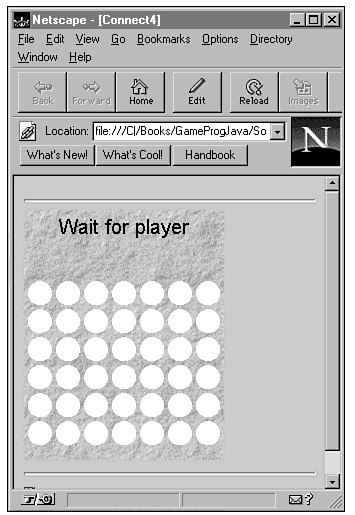
The other half of NetConnect4 is the client, which is an applet that runs from within a browser such as Netscape Navigator. Incidentally, the NetConnect4 client applet is called Connect4, to keep the name consistent with the original single-player game. After you have the server up and running, fire up a Java-compatible browser, and load an HTML document including the NetConnect4 client applet. On the CD-ROM, this HTML document is called Example1.asp, in keeping with the standard JDK demo applets. After running the Connect4 client applet, you should see something similar to what's shown in Figure 19.1.
Figure 19.1 : The NetConnect4 game with a single clients player.
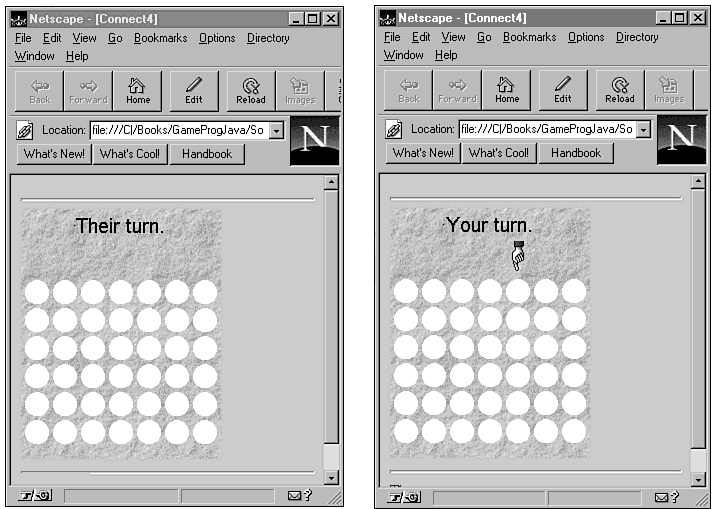
At this point, you have the server up and running with a single client attached to it. Because two players are required to start a game, the client is in a wait state until another player comes along. Now, load a second instance of the Web browser with the same Example1.asp document; this is your second player. When the server detects this player, it pairs the two players and starts the game. Figure 19.2 shows this scenario.
Figure 19.2 : The NetConnect4 game with two client players in a new game.
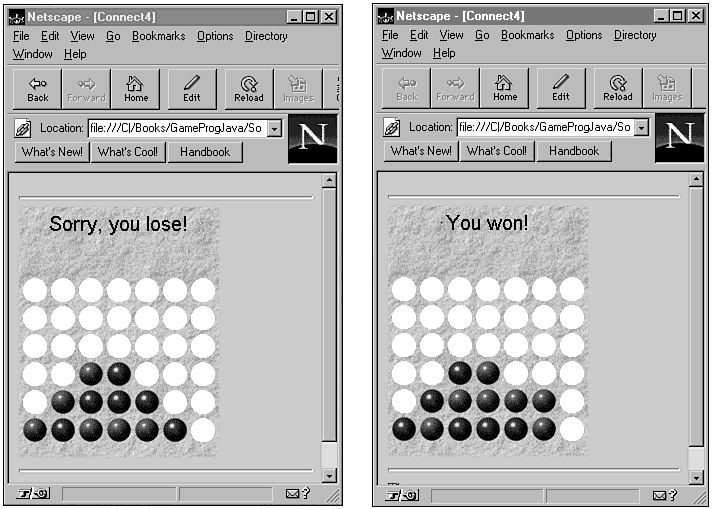
By switching between the Web browsers, you can simulate a network game between the two players. Go ahead and outwit yourself so that you can see what happens when one of the players wins. This situation is shown in Figure 19.3.
Figure 19.3 : The NetConnect4 game with two client players in a finished game.
For another game to start between the same two players, each player just needs to click once in the applet window. You can see now how two players interact together in a game of NetConnect4. Now, if you really want to test the game, try loading two more instances of the Web browser and starting another game between two new players. In this scenario, you have a total of four players involved in two separate games, all running off the same server. The game server supports an unlimited number of players and games, although at some point it might be wise to impose a limit so that performance doesn't start dragging. A couple of hundred players banging away at your game server might tend to slow things down!
You now understand how the game plays, along with the roles of the client and server, so you're ready to actually dig into the source code and really see how things work. You've come to the right place.
Developing NetConnect4
The client/server nature of NetConnect4 doesn't just apply at the conceptual level, it also plays a role in how the code is laid out for the game. Because the client and server components function as separate programs, it makes sense to develop the code for them as two different efforts. With that in mind, let's tackle each part separately.
The Server
The NetConnect4 server is composed of four classes:
- Connect4Server
- Connect4Daemon
- Connect4Player
- Game
- Connect4Daemon
The Connect4Server class serves as a stub program to get the server started. Check out the source code for it:
class Connect4Server {
public static void main(String args[]) {
System.out.println("NetConnect4 server up and running...");
new Connect4Daemon().start();
}
}
As you can see, the Connect4Server class contains only one method, main, which prints a message and creates a Connect4Daemon object. The Connect4Daemon class is where the server is actually created and initialized. The Connect4Daemon class is responsible for creating the server socket and handling client connections. Take a look at the member variables defined in the Connect4Daemon class:
public static final int PORTNUM = 1234;
private ServerSocket port;
private Connect4Player playerWaiting = null;
private Game thisGame = null;
Other than the constant port number, Connect4Daemon defines three member variables consisting of a ServerSocket object, a Connect4Player object, and a Game object. The Connect4Player and Game classes are covered a little later in the lesson. The ServerSocket member object, port, is created using an arbitrary port number above 1024. If you recall from yesterChapter's lesson, all ports below 1024 are reserved for standard system services, so you must use one above 1024. More specifically, I chose 1234 as the port number, which is represented by the PORTNUM constant.
| Warning |
Using a port number greater than 1024 doesn't guarantee that the port will be available. It does guarantee, however, that the port isn't already assigned to a common service. Nevertheless, any other extended services, such as game servers, could potentially conflict with your port number. If your port number conflicts with another server, just try a different one. |
The run method in Connect4Daemon is where the details of connecting clients are handled:
public void run() {
Socket clientSocket;
while (true) {
if (port == null) {
System.out.println("Sorry, the port disappeared.");
System.exit(1);
}
try {
clientSocket = port.accept();
new Connect4Player(this, clientSocket).start();
}
catch (IOException e) {
System.out.println("Couldn't connect player: " + e);
System.exit(1);
}
}
}
The run method first retrieves the socket for a connecting client via a call to the ServerSocket class's accept method. If you recall from yesterChapter's lesson, the accept method waits until a client connects and then returns a socket for the client. After a client connects, a Connect4Player object is created using the client socket.
| Note |
Even though the Connect4Daemon class functions very much like a daemon thread, you don't specify it as a Java daemon thread because you don't want it to be destroyed by the runtime system. You might be wondering why the Java runtime system would go around killing innocent threads. Because daemon threads always run as support for other non-daemon threads or programs, the Java runtime system kills them if there are no non-daemon threads executing. |
The waitForGame method is where players are paired up with each other. Listing 19.1 contains the source code for the waitForGame method.
Listing 19.1. The Connect4Daemon class's waitForGame method.
public synchronized Game waitForGame(Connect4Player p) {
Game retval = null;
if (playerWaiting == null) {
playerWaiting = p;
thisGame = null; // just in case!
p.send("PLSWAIT");
while (playerWaiting != null) {
try {
wait();
}
catch (InterruptedException e) {
System.out.println("Error: " + e);
}
}
return thisGame;
}
else {
thisGame = new Game(playerWaiting, p);
retval = thisGame;
playerWaiting = null;
notify();
return retval;
}
}
The waitForGame method is called from within the Connect4Player class, which you'll learn about in a moment. waitForGame is passed a Connect4Player object as its only parameter. If no player is waiting to play, this player is flagged as a waiting player, and a loop is entered that waits until another player connects. A null Game object is then returned to indicate that only one player is present. When another player connects and waitForGame is called, things happen a little differently. Because a player is now waiting, a Game object is created using the two players. This Game object is then returned to indicate that the game is ready to begin.
The finalize method in Connect4Daemon is simply an added measure to help clean up the server socket when the daemon dies:
protected void finalize() {
if (port != null) {
try {
port.close();
}
catch (IOException e) {
System.out.println("Error closing port: " + e);
}
port = null;
}
}
To clean up the server socket, finalize simply calls the close method on the port.
The Connect4Daemon class made a few references to the Connect4Player class, which logically represents a player in the game. Listing 19.2 contains the source code for the Connect4Player class.
Listing 19.2. The Connect4Player class.
class Connect4Player extends SocketAction {
private Connect4Daemon daemon = null;
public Connect4Player(Connect4Daemon server, Socket sock) {
super(sock);
daemon = server;
}
public void run() {
daemon.waitForGame(this).playGame(this);
}
public void closeConnections() {
super.closeConnections();
if (outStream != null) {
send("GAMEOVER");
}
}
}
The Connect4Player class represents a player from the server's perspective. Connect4Player is derived from SocketAction, which is the generic socket class you developed yesterChapter. I told you it would come in handy. The only member variable defined in Connect4Player is daemon, which holds the Connect4Daemon object associated with the player.
The constructor for Connect4Player takes Connect4Daemon and Socket objects as its two parameters. The Connect4Daemon object is used to initialize the daemon member variable, and the Socket object is passed on to the parent constructor in SocketAction.
The run method for Connect4Player calls back to the daemon's waitForGame method to get a Game object for the player. The playGame method is then called on the Game object to get the game underway. The closeConnections method closes the client connection and is typically used to end the game.
The last class the NetConnect4 server comprises is the Game class, which handles the details associated with managing the game logic and the communication between players. The Game class takes on the bulk of the work involved in maintaining the state of the game, as well as communicating that state between the players. The Game class contains a group of member constants that define the different states in the game:
public static final int ERROR = -1;
public static final int IWON = -2;
public static final int IQUIT = -3;
public static final int ITIED = -4;
public static final int YOURTURN = -5;
public static final int SENTSTRING = -6;
Along with the constants, the Game class has member variables representing each player, along with an event queue for each player and a string used to send messages to the other player:
private Connect4Player player1 = null;
private Connect4Player player2 = null;
private Vector p1Queue = null;
private Vector p2Queue = null;
private String sentString;
An event queue is a list of events that take place within a particular context.
In the case of NetConnect4, an event consists of player moves and related game states. So the event queue is used to keep up with the latest player moves and game states.
The workhorse method in the Game class is playGame, which essentially manages the game flow and logic for each player. Listing 19.3 contains the source code for the playGame method.
Listing 19.3. The Game class's playGame method.
public void playGame(Connect4Player me) {
String instr;
boolean playgame = true;
boolean theirturn = false;
try {
if (me == player2) {
theirturn = true;
}
else if (me != player1) {
System.out.println("Illegal call to playGame!");
return;
}
while (playgame) {
if (!theirturn) {
me.send("YOURTURN");
instr = me.receive();
instr = instr.toUpperCase();
instr = instr.trim();
if (instr.startsWith("IQUIT")) {
sendStatus(me, IQUIT);
playgame = false;
}
else if (instr.startsWith("IWON")) {
sentString = me.receive();
sentString = sentString.toUpperCase();
sentString = sentString.trim();
sendStatus(me, IWON);
sendStatus(me, SENTSTRING);
playgame = false;
}
else if (instr.startsWith("ITIED")) {
sentString = me.receive();
sentString = sentString.toUpperCase();
sentString = sentString.trim();
sendStatus(me, ITIED);
sendStatus(me, SENTSTRING);
}
else {
sentString = instr;
sendStatus(me, SENTSTRING);
}
}
else {
theirturn = false;
}
if (playgame) {
me.send("THEIRTURN");
int stat = getStatus(me);
if (stat == IWON) {
me.send("THEYWON");
if (getStatus(me) != SENTSTRING) {
System.out.println("Received Bad Status");
me.closeConnections();
}
me.send(sentString);
playgame = false;
}
else if (stat == ITIED) {
me.send("THEYTIED");
if (getStatus(me) != SENTSTRING) {
System.out.println("Received Bad Status");
me.closeConnections();
}
me.send(sentString);
playgame = false;
}
else if (stat == IQUIT) {
me.send("THEYQUIT");
playgame = false;
}
else if (stat == SENTSTRING) {
me.send(sentString);
}
else if (stat == ERROR) {
me.send("ERROR");
me.closeConnections();
playgame = false;
}
else {
System.out.println("Received Bad Status");
sendStatus(me,ERROR);
me.closeConnections();
playgame = false;
}
}
}
me.closeConnections();
return;
}
catch (IOException e) {
System.out.println("I/O Error: " + e);
System.exit(1);
}
}
The logic used in playGame is fairly simple in that it models the way a game of Connect4 takes place; basically, each player waits while the other takes her turn. The only potentially confusing aspect of playGame is the mechanism it uses to communicate between the players. Each player has an event queue, which contains game information sent by the other player. The players communicate with each other in an indirect fashion by using the event queue. The state of the game is encoded into event messages using the state constants, along with strings. The playGame method interprets this information for each player.
The getStatus method gets the status of the game for the player passed in the me parameter. Listing 19.4 contains the source code for the getStatus method.
Listing 19.4. The Game class's getStatus method.
private synchronized int getStatus(Connect4Player me) {
Vector ourVector = ((me == player1) ? p1Queue : p2Queue);
while (ourVector.isEmpty()) {
try {
wait();
}
catch (InterruptedException e) {
System.out.println("Error: " + e);
}
}
try {
Integer retval = (Integer)(ourVector.firstElement());
try {
ourVector.removeElementAt(0);
}
catch (ArrayIndexOutOfBoundsException e) {
System.out.println("Array index out of bounds: " + e);
System.exit(1);
}
return retval.intValue();
}
catch (NoSuchElementException e) {
System.out.println("Couldn't get first element: " + e);
System.exit(1);
return 0; // never reached, just there to appease compiler
}
}
The getStatus method waits until the player's event queue contains status information, and then it grabs the information and returns it.
The sendStatus method is the complement of getStatus; it's used to update a player's event queue with status information:
private synchronized void sendStatus(Connect4Player me, int message) {
Vector theirVector = ((me == player1) ? p2Queue : p1Queue);
theirVector.addElement(new Integer(message));
notify();
}
The integer status message passed in as the second parameter to sendStatus is added to the player's event queue. The notify method is then called, which causes the wait call in getStatus to return. This shows the synchronized nature of these two methods: getStatus waits until sendStatus provides the information it needs.
That sums up the code for the server. At this point, you have half a game. Too bad you can't do much with it yet; you still need a client. Knowing that, let's take a look at the code involved in making the client side work.
The Client
The client side of NetConnect4 consists of four classes, three of which you've seen before:
- Connect4State
- Connect4Engine
- Connect4
- Connect4ClientConnection
- Connect4Engine
The first two classes, Connect4State and Connect4Engine, come directly from the original Connect4 game. They provide the core logic for establishing the rules of the game and determining whether the game has been won, lost, or tied. These two classes require no modification for NetConnect4, so refer to Chapter 16 if you need to refresh your memory on how they work.
The Connect4 applet class should also be familiar from the original game. A few modifications have been made to this version of Connect4 to accommodate the fact that the game is running over a network. The primary changes to the Connect4 class are in the run method, which handles establishing a server connection and coordinating the state of the game with the graphics and user interface. Listing 19.5 contains the source code for the run method.
Listing 19.5. The Connect4 class's run method.
public void run() {
// Track the images
int gameState = 0;
newGame();
try {
tracker.waitForID(0);
}
catch (InterruptedException e) {
return;
}
try {
// Create the connection
connection = new Connect4ClientConnection(this);
while (connection.isConnected()) {
int istatus = connection.getTheirMove();
if (istatus == Connect4ClientConnection.GAMEOVER) {
myMove = false;
gameState = 0;
return;
}
// Wait for the other player
else if (istatus == Connect4ClientConnection.PLSWAIT) {
if (gameState == 0) {
gameState = Connect4ClientConnection.PLSWAIT;
status = new String("Wait for player");
repaint();
} else {
System.out.println("Gameflow error!");
return;
}
}
else if (istatus == Connect4ClientConnection.THEIRTURN) {
status = new String("Their turn.");
myMove = false;
gameState = Connect4ClientConnection.THEIRTURN;
repaint();
}
else if (istatus == Connect4ClientConnection.YOURTURN) {
gameState = Connect4ClientConnection.YOURTURN;
status = new String("Your turn.");
repaint();
myMove = true;
}
else if (istatus == Connect4ClientConnection.THEYWON) {
gameState = Connect4ClientConnection.THEYWON;
}
else if (istatus == Connect4ClientConnection.THEYQUIT) {
gameState = Connect4ClientConnection.THEYQUIT;
status = new String("Opponent Quit!");
myMove = false;
repaint();
return;
}
else if (istatus == Connect4ClientConnection.THEYTIED) {
gameState = Connect4ClientConnection.THEYTIED;
}
else if (istatus == Connect4ClientConnection.ERROR) {
System.out.println("error!");
gameState = Connect4ClientConnection.ERROR;
status = new String("Error! Game Over");
myMove = false;
repaint();
return;
}
else {
if (gameState == Connect4ClientConnection.THEIRTURN) {
// Note that we make the move, but wait for the *server*
// to say YOURTURN before we change the status. Otherwise,
// we have a race condition - if the player moves before
// the server says YOURTURN, we go back into that mode,
// allowing the player to make two turns in a row!
Point pos = gameEngine.makeMove(1, istatus);
blueSnd.play();
repaint();
}
else if (gameState == Connect4ClientConnection.THEYWON) {
status = new String("Sorry, you lose!");
myMove = false;
gameOver = true;
repaint();
sadSnd.play();
return;
}
else if (gameState == Connect4ClientConnection.THEYTIED) {
status = new String("Tie game!");
myMove = false;
gameOver = true;
repaint();
sadSnd.play();
return;
}
else {
System.out.println("Gameflow error!");
return;
}
}
}
}
catch (IOException e) {
System.out.println("IOException: "+e);
}
}
The logic used in the run method flows directly from the logic you just learned about in the Game class. This logic revolves around handling whose turn it is, along with communicating whether a game has been won, lost, or tied.
The mouseDown method also has been modified a little to accommodate sending game information to the server. Listing 19.6 shows the source code for the mouseDown method.
Listing 19.6. The Connect4 class's mouseDown method.
public boolean mouseDown(Event evt, int x, int y) {
if (gameOver) {
thread = null;
thread = new Thread(this);
thread.start();
}
else if (myMove) {
// Make sure the move is valid
Point pos = gameEngine.makeMove(0, x / 28);
if (pos.y >= 0) {
if (!gameEngine.isWinner(0))
if (!gameEngine.isTie()) {
redSnd.play();
status = new String("Their turn.");
connection.sendMove(pos.x);
myMove = false;
}
else {
sadSnd.play();
status = new String("It's a tie!");
gameOver = true;
connection.sendITIED();
connection.sendMove(pos.x);
}
else {
applauseSnd.play();
status = new String("You won!");
gameOver = true;
connection.sendIWON();
connection.sendMove(pos.x);
}
repaint();
}
}
else
badMoveSnd.play();
return true;
}
The mouseDown method is actually where each player's physical move is sent to the server. Notice that this information is sent using the client member variable, which is a Connect4ClientConnection object. This brings up a neat aspect of the design of the Connect4 client: The client communication details in the Connect4 class are hidden in the Connect4ClientConnection class.
The Connect4ClientConnection class is in charge of managing the client socket and ensuring that information is sent back and forth to the server correctly. Connect4ClientConnection is derived from SocketAction, which is another good example of code reuse. The constructor for Connect4ClientConnection takes an Applet object as its only parameter:
Connect4ClientConnection(Applet a) throws IOException {
super(new Socket(a.getCodeBase().getHost(), PORTNUM));
}
The Connect4ClientConnection constructor creates a socket connection based on the applet parameter and a port number. Note that this port number must match the port number used by the server.
| Warning |
If the port numbers for the client and server don't match, none of the socket communication will be able to take place. In other words, the game won't run if the port numbers don't match. |
The getTheirMove method in Connect4ClientConnection is used to get the other player's move so that the client game can be updated. Listing 19.7 contains the source code for the getTheirMove method.
Listing 19.7. The Connect4ClientConnection class's getTheirMove method.
public int getTheirMove() {
// Make sure we're still connected
if (!isConnected())
throw new NullPointerException("Attempted to read closed socket!");
try {
String s = receive();
System.out.println("Received: " + s);
if (s == null)
return GAMEOVER;
s = s.trim();
try {
return (new Integer(s)).intValue();
}
catch (NumberFormatException e) {
// It was probably a status report error
return getStatus(s);
}
}
catch (IOException e) {
System.out.println("I/O Error: " + e);
System.exit(1);
return 0;
}
}
The getTheirMove method basically just receives a string from the server and resolves it down to an integer, which is then returned. The integer it receives is a game state constant as defined in Connect4ClientConnection. The following are the game state constants defined in Connect4ClientConnection:
static final int ERROR = -1;
static final int PLSWAIT = -2;
static final int YOURTURN = -3;
static final int THEIRTURN = -4;
static final int THEYWON = -5;
static final int THEYQUIT = -6;
static final int THEYTIED = -7;
static final int GAMEOVER = -8;
Although these game state constants are similar in function to the ones defined on the server side in the Game class, keep in mind that they are client-specific and make sense only in the context of a client. The constants are all negative, which is based on the fact that the integer state constant is also used to convey the location of a player's move; all moves are in the range 0 through 6, which corresponds to the column into which a piece is being dropped.
The getStatus method resolves a string status message into an integer game state constant. Listing 19.8 contains the source code for getStatus.
Listing 19.8. The Connect4ClientConnection class's getStatus method.
private int getStatus(String s) {
s = s.trim();
if (s.startsWith("PLSWAIT"))
return PLSWAIT;
if (s.startsWith("THEIRTURN"))
return THEIRTURN;
if (s.startsWith("YOURTURN"))
return YOURTURN;
if (s.startsWith("THEYWON"))
return THEYWON;
if (s.startsWith("THEYQUIT"))
return THEYQUIT;
if (s.startsWith("THEYTIED"))
return THEYTIED;
if (s.startsWith("GAMEOVER"))
return GAMEOVER;
// Something has gone horribly wrong!
System.out.println("received invalid status from server: " + s);
return ERROR;
}
The getStatus method is used by getTheirMove to convert incoming text messages to their integer equivalent.
The sendMove method is pretty straightforward; it simply sends the player's move to the server:
public void sendMove(int col) {
String s = (new Integer(col)).toString();
send(s);
}
Likewise, the sendIQUIT, sendIWON, and sendITIED methods are used to send the corresponding messages IQUIT, IWON, and ITIED to the server:
public void sendIQUIT() {
send("IQUIT");
}
public void sendIWON() {
send("IWON");
}
public void sendITIED() {
send("ITIED");
}
That wraps up the client side of NetConnect4. If you're still a little dizzy from all the code, feel free to go through it again and study the details until you feel comfortable with everything. Trust me, it's perfectly normal to get confused during your first dealings with network game programming-I sure did!
Summary
ToChapter you wrote your fourth complete Java game. Well, you actually modified one of the games you had already written. However, turning a single-player game into a two-player game that can be played over the Web might as well constitute a whole new game. In learning how the game was implemented, you saw how the client/server architecture and Java socket services are used in a practical scenario. You also reused the generic socket class you developed yesterChapter, thereby reinforcing the values of applying OOP techniques to Java game programming.
With four complete Java games under your belt, you're probably ready to chart some new territory in regard to Java game development. That's a good thing, because tomorrow's lesson focuses on a subject that has long been crucial to successful game programming: optimization. Tomorrow's lesson guides you through some tricks and techniques for speeding up your Java game code.
Q&A
| Q | I still don't follow the whole client/server strategy as it applies to NetConnect4. Can you briefly explain it again? |
| A | Of course. The game server sits around in a never-ending loop waiting for client players to show up. When a player connects to the server, the server spawns a daemon thread to manage the communications necessary to support a single game. This daemon serves as a communication channel between the two clients (players) involved in the game, which is necessary because there is no facility to enable clients to communicate directly with each other. |
| Q | Would this same client/server strategy work for a game with more than two players? |
| A | Absolutely. The code would get a little messier because the daemon would have to manage a group of clients rather than just two, but conceptually there is no problem with adding more client players to the mix. |
| Q | How do I incorporate NetConnect4 into a Web site? |
| A | Beyond simply including the client applet in an HTML document that is served up by your Web server, you must also make sure that the NetConnect4 server (NetConnect4Server) is running on the Web server machine. Without the game server, the clients are worthless. |
Workshop
The Workshop section provides questions and exercises to help you get a better feel for the material you learned toChapter. Try to answer the questions and at least ponder the exercises before moving on to tomorrow's lesson. You'll find the answers to the questions in appendix A, "Quiz Answers."
Quiz
- What is a daemon thread?
- What is the significance of the Game class?
- What is the purpose of the Connect4ClientConnection class?
- What is the significance of the Game class?
Exercises
- Enhance the NetConnect4 game to display the name of each player
as he is making his move. Hint: To get the name of a player, use
the getHostName method after
getting an InetAddress object
for a socket using getInetAddress.
- Modify the NetConnect4 game to enable players to choose who they want to play with. Admittedly, this is a pretty big modification, but I think you can handle it. Hint: This task involves modifying the client/server design so that clients connect and are added to a list of potential players. A player can then choose an opponent from the list, in which case they are paired together normally.




Popular Tutorials
-
 MS Access
1109
MS Access
1109
-
 C++
1222
C++
1222
-
 HTML
584
HTML
584
-
 JavaScript
616
JavaScript
616
-
 Vbscript
873
Vbscript
873
-
 Oracle
473
Oracle
473
-
 VC++
875
VC++
875
-
 SQL
2959
SQL
2959
-
 XML
514
XML
514
-
 Java
814
Java
814
-
 Perl
455
Perl
455
-
 Linux
451
Linux
451