Web based School
Chapter 16
Connect4: Human versus Machine
CONTENTS
YesterChapter you broke away from Java code for a little while and spent some time learning about artificial intelligence (AI) and how it is used in games. I promised you yesterChapter that you would spend toChapter's lesson implementing a game complete with a computer opponent using strategic AI. I've been known to keep most of my promises, and toChapter's lesson is no exception.
ToChapter you develop a complete Connect4 game from scratch. Along the way, you learn about the type of AI strategy used by a game like Connect4, and then you get to work implementing it. By the end of toChapter, you will have created your own worst nightmare: a computer opponent that can consistently beat you in a game of Connect4. You might be thinking that no stupid computer player could ever match wits with you. At this point, I'm not going to making any guarantees, but let me just say that if any money were involved, mine would be on the player with the silicon brain! Still skeptical? Well, read on and find out for yourself.
The following topics are covered in toChapter's lesson:
- Designing Connect4
- Sample applet: Connect4
Designing Connect4
ToChapter's entire focus is on creating a Connect4 game with a computer player that can at least give a human player a good game. After you finish the game, I think you'll agree that the computer player can do a lot more than give you a good game. In fact, I've already mentioned that the computer player will be able to beat most human players pretty consistently. But enough of that for now; you'll have plenty of time to go head-to-head against the computer later.
How to Play the Game
In case you've never played Connect4, let's briefly go over the basic rules. It is a simple game that is similar to tic-tac-toe in that the goal is to complete a continuous row, column, or diagonal series. The game is played on a rectangular "board" that contains a 7¥6 array of positions. You use round pieces, similar to checker pieces, to represent each move. Figure 16.1 shows what a Connect4 board looks like.
Figure 16. : A Connect4 board, complete with pieces.
The main catch to Connect4 is that the board stands upright, with each column being slotted. So a move consists of selecting a column to drop your piece in, and then gravity takes care of the rest. This means that instead of explicitly choosing the vertical position of each move, you can only stack up the pieces vertically. This fact impacts the strategy greatly.
The game is won when one of the players manages to connect a horizontal, vertical, or diagonal series of four pieces. There is the chance for a tie, as in tic-tac-toe, but it is less likely, simply because of the number of ways in which the game can be won.
The Elements of the Game
Before moving into the meat of toChapter's lesson-studying the AI necessary to create an engaging computer opponent-let's take a look at what Connect4 requires in terms of the basic game. First of all, you know that it is a board game, or at least the play is similar to that of a board game. The style of play involves the players dropping pieces into columns of the board on alternating turns. Thus, you apparently don't have much need for the sprite animation code you've relied on so heavily throughout the guide. Well, technically you could animate the pieces falling down the columns, but because that would involve a decent amount of extra work, let's leave it as an exercise for later!
Because you're not going to fool with any animation, the graphics for the game are simplified a little. This is a good thing, because implementing the AI alone will keep you busy enough. The graphics for the game basically consist of drawing the board and pieces. Not bad so far. Because the computer player is likely to take time calculating its next move, it might also be nice to have a status line. The status line simply indicates the current state of the game, with a message something like "Thinking..." or "Your Turn."
Because you're not going to implement animation, there is one neat little extra you can add without too much extra work: a column selector hand. The column selector hand is displayed over the currently selected column so that the human player can tell exactly which column a piece will be dropped in. Each time the player moves the mouse, the hand is updated to reflect the selected column. The selector hand is simple to implement, and it gives the game a nice touch.
So far, the graphics requirements of the game consist of four elements:
- Board
- Pieces
- Status line
- Hand selector
- Pieces
Now, let's take a look at what type of user input the game needs. Because you've already decided to go with a mouse-controlled hand selector to pick the column to drop a piece in, it only makes sense to make the entire user interface for the game mouse-driven. So moving the mouse selects a column, and clicking the mouse button drops a piece in that column.
The AI Strategy
The only other area to cover is the type of AI strategy used by the game and how it connects to the general play of the game. As you might recall from yesterChapter's lesson, the most popular type of AI used in games like Connect4 is strategic AI that makes use of a depth search algorithm linked to a fixed table of rule information. This is exactly the AI strategy you use when developing the Connect4 code, but you'll learn the details of that later in this lesson.
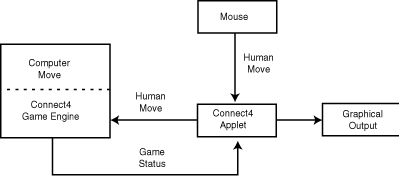
For now, let's think of the AI in terms of the logical components required to make it work. Basically, the AI algorithm should come up with the best possible column for the computer player to drop the next piece into. Keeping that in mind, a good approach would be to break the game into two components: the AI engine that calculates the computer player's next move, and the higher-level applet itself, which uses this move to update the graphics in the game.
In this way, the human and computer players' moves are handled very similarly, which makes things much easier to deal with; each move just results in a piece being placed in a position on the game board. Another important benefit of this arrangement is that the AI engine handles all the details of figuring out whether moves are valid, along with determining whether there is a winner in the game. In this way, the engine is actually more of a general Connect4 game engine, rather than just an AI engine. Figure 16.2 shows the two Connect4 components and what kind of information they transfer to each other.
Figure 16.2 : The logical Connect4 game components.
This approach results in a complete separation of the low-level algorithms necessary to drive the game from the high-level applet issues. But you still haven't learned anything about the details of the AI itself. How can the computer player possibly know what moves to make and be able to actually compete with a human player? To answer this question, you must first be able to assess the state of the game from a particular player's perspective. More specifically, you need to be able to calculate a score for a player that determines how he is faring in the game.
A player's score reflects his status in the game and basically how close he is to victory. So to calculate the score, you first need to be able to know when a game has been won. This might at first seem trivial; just look for a series of four pieces in a row, column, or diagonal, right? That's right for you or me, but teaching the computer how to look at the board and figure this out isn't quite so simple. One approach is to keep up with every possible combination of piece positions that constitutes a victory. These combinations could be stored in a table and then used as a basis to determine how close each player is to winning the game. Although this approach sounds fairly cumbersome, it's actually not too hard to implement.
With the scoring system in place, you can then use a look-ahead depth search to try out different moves for the computer player and determine the best one. The combination of the table of winning moves and the look-ahead search is what gives the computer player its "brains." Although a few more details are involved in implementing the AI for the game, this covers the major points of interest. I don't know about you, but I'm getting tired of talking about the game in general terms; let's start writing it!
| Note |
Incidentally, a look-ahead depth search is a technique that involves looking into the future of a game and trying out every possible move to determine the best one. A look-ahead depth search is a computer AI version of the common human strategy of planning moves in a game based on what the other player might do in each situation; the primary difference being that the computer is much more efficient and can evaluate a lot more possibilities. |
Sample Applet: Connect4
The Connect4 applet is a complete Java Connect4 game including strategic AI for a computer player good enough to give most people fits. Figure 16.3 shows a screen shot of a game of Connect4-and, yes, I'm the one losing! The complete source code, executable, images, and sounds for Connect4 are located on the accompanying CD-ROM.
Figure 16.3 : The Connect4 sample applet.
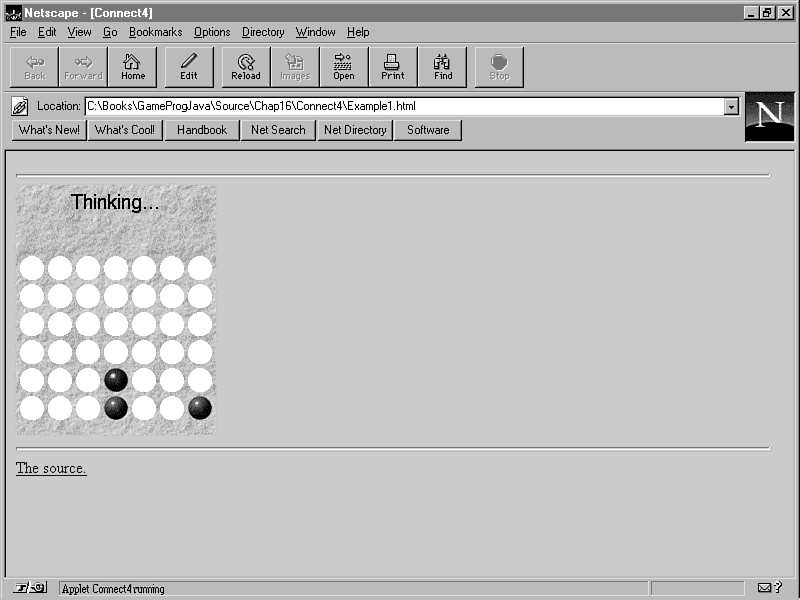
Connect4 starts out by setting up an empty game board and giving the human player the first turn. After the human player makes a move, the status message "Thinking..." is displayed while the AI engine determines the computer player's move. Figure 16.4 shows the game while the computer player is "thinking."
Figure 16.4 : The Connect4 sample applet during the computer player's turn.
| Note |
Study has revealed that it is technically possible to always win at Connect4 if you are the player to make the first move, regardless of the other player's strategy. |
The computer makes its move and the play shifts back to the human player. This exchange of turns continues until there is a win, loss, or tie. When the game ends, you can start a new one by clicking in the applet window. Sound effects are played during the course of the game to indicate who made which move. Sound effects are also played for making an invalid move, starting a new game, winning, and losing.
If you're curious about how well the computer player plays the game, load it up and give it a try. You might be a Connect4 whiz and teach the computer a lesson, or you might end up learning a few things!
The Game Engine Classes
The heart of the AI in Connect4 is the Connect4 game engine. The Connect4 game engine is composed of two classes: Connect4Engine and Connect4State. The Connect4Engine class provides the framework for the game engine itself, while the Connect4State class models the current state of a Connect4 game. Together, these two classes provide the overhead necessary to conduct a two-player game of Connect4 with either player being a human or computer player.
These engine classes implement a computer player using look-ahead depth searching AI. The intelligence of the computer player is determined by the depth of the search. Higher depth searches result in a more intelligent computer player, but at the cost of more processing time. But enough theory, let's go ahead and look into how all this stuff is implemented in the Connect4Engine and Connect4State classes!
The Connect4Engine class models the game engine, including the computer player AI, for the Connect4 game; it is based on implementations originally developed by Keith Pomakis and Sven Wiebus. The following are the member variables defined in Connect4Engine:
private static Random rand = new Random(System.currentTimeMillis());
private Connect4State state;
The Connect4Engine class contains a member variable, state, which is of type Connect4State. It turns out that Connect4Engine delegates much of the dirty work of the AI and game state upkeep to the Connect4State class. Even without knowing the details of the Connect4State class, you'll find that it's not too hard to figure out what the Connect4State class is doing by examining how Connect4Engine uses it. Nevertheless, you'll learn all the messy details of the Connect4State class in a little while.
Connect4Engine implements two methods for handling each player making a move: makeMove and computerMove. The following is the source code for makeMove:
public Point makeMove(int player, int xPos) {
int yPos = state.dropPiece(player, xPos);
return (new Point(xPos, yPos));
}
The makeMove method is called when the human player makes a move. makeMove takes a player number (player), which can be 0 or 1, and a column to drop the piece in (xPos) as parameters. The game state is updated to reflect the move, and the XY position of the move on the board is returned as a Point object. If the move is invalid (for example, the column might already be full), the y member of the Point object is set to -1. Otherwise, it has a value in the range of 0 to 6.
The computerMove method is called for the computer player to make a move. Listing 16.1 shows the source code for the computerMove method.
Listing 16.1. The Connect4Engine class's computerMove method.
public Point computerMove(int player, int level) {
int bestXPos = -1, goodness = 0, bestWorst = -30000;
int numOfEqual = 0;
// Simulate a drop in each of the columns
for (int i = 0; i < 7; i++) {
Connect4State tempState = new Connect4State(state);
// If column is full, move on
if (tempState.dropPiece(player, i) < 0)
continue;
// If this drop wins the game, then cool
if (tempState.isWinner(player)) {
bestWorst = 25000;
bestXPos = i;
}
// Otherwise, look ahead to see how good it is
else
goodness = tempState.evaluate(player, level, 1, -30000,
-bestWorst);
// If this move looks better than previous moves, remember it
if (goodness > bestWorst) {
bestWorst = goodness;
bestXPos = i;
numOfEqual = 1;
}
// If two moves are equally good, make a random choice
if (goodness == bestWorst) {
numOfEqual++;
if (Math.abs(rand.nextInt()) % 10000 <
(10000 / numOfEqual))
bestXPos = i;
}
}
// Drop the piece in the best column
if (bestXPos >= 0) {
int yPos = state.dropPiece(player, bestXPos);
if (yPos >= 0)
return (new Point(bestXPos, yPos));
}
return null;
}
The computerMove method handles all the details of determining the best move for the computer player given the current state of the game. It takes a player number (player) and a level (level) as parameters. The level parameter specifies the depth of the look-ahead search and directly affects both the intelligence of the computer player and the amount of time it takes the computer player to figure out its move. All this is carried out by determining how each possible move affects the computer player's score. Most of the low-level AI work is handled by the evaluate method in Connect4State, which is called by computerMove. Notice that if computerMove isolates the best move down to two equal choices, it randomly chooses one or the other. This gives a little more human feel to the computer player.
The other three methods in Connect4Engine are getBoard, getWinner, and isTie, whose source code follows:
public int[][] getBoard() {
return state.board;
}
public boolean isWinner(int player) {
return state.isWinner(player);
}
public boolean isTie() {
return state.isTie();
}
The getBoard method simply returns a 7¥6 array of integers representing the current state of the game board. getWinner and isTie check with the game state member object, state, to see whether the game has been won or tied.
That pretty much sums up the Connect4Engine class. With the exception of the computerMove method, which was a little tricky, it was pretty painless, don't you think? Well, brace yourself, because Connect4State is a little messier. Here are the member variables defined in the Connect4State class:
public static final int winPlaces = 69, maxPieces = 42, Empty = 2;
public static boolean[][][] map;
public int[][] board = new int[7][6];
public int[][] score = new int[2][winPlaces];
public int numPieces;
The first step in figuring out Connect4State is to understand what the member variables represent. The first three members (winPlaces, maxPieces, and Empty) are static final integers, which simply means that they are all constant. winPlaces, which specifies the number of possible winning combinations on the board, is calculated using the following equation:
winPlaces = 4*w*h - 3*w*n - 3*h*n + 3*w + 3*h - 4*n + 2*n*n;
This is a general equation that can be applied to any ConnectX-type game. In the equation, w and h represent the width and height of the game board, and n represents the number of pieces that must be in a series to constitute a victory. Because Connect4 uses a 7¥6 game board with a four-piece series constituting a win, you can simply calculate winPlaces beforehand, which is exactly what is done in Connect4State.
The maxPieces member specifies the maximum number of pieces that can be placed on the board. It is calculated using the following equation:
maxPieces = w*h;
This calculation is pretty straightforward. The result is used to detect whether there is a tie; a tie occurs when nobody has won and the number of pieces in the game equals maxPieces.
The other constant member, Empty, represents an empty space on the board. Each space on the board can contain a player number (0 or 1) or the Empty constant, which is set to 2.
Moving right along, the map member variable is a three-dimensional array of booleans that holds the lookup table of winning combinations. To better understand how the map is laid out, first think of it as a two-dimensional array with the same dimensions as the board for the game; in other words, think of it as a 7¥6 two-dimensional array. Now, add the third dimension by attaching an array of winning positions onto each two-dimensional array entry. Each different winning combination in the game is given a unique position within this array (the winning position array is winPlaces in length). Each location in this array is set to true or false based on whether the winning series intersects the associated board position.
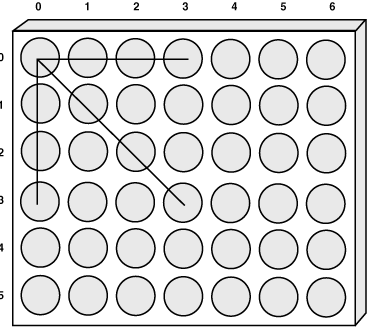
Let's go over a quick example to make sure you understand how the map works. Take a look at the upper-left space on the game board back in Figure 16.1; let's call this position 0,0 on the board. Now, think about which different winning series of pieces would include this position. Give up? Check out Figure 16.5.
Figure 16.5 : Winning series possibilities for position 0,0.
As you can see, position 0,0 on the board is a part of three different winning scenarios. Therefore, the winning position array for position 0,0 would have these three entries set to true, and all the others would be set to false. If the winning moves shown in Figure 16.5 were at positions 11-13 in the winning series array, you would initialize position 0,0 in the map like this:
...
map[0][0][9] = false;
map[0][0][10] = false;
map[0][0][11] = true;
map[0][0][12] = true;
map[0][0][13] = true;
map[0][0][14] = false;
map[0][0][15] = false;
...
After the entire map is constructed, the AI algorithms can use it to look up winning combinations and determine how close each player is to winning.
The board member variable is simply a 7¥6 two-dimensional array of integers that represents the state of the game. Each integer entry can be set to either 0 or 1 (for a player occupying that position on the board) or Empty.
The score member variable contains a two-dimensional array of integers representing the "score" for the players. The main array in score contains a subarray for each player that is winPlaces in length. These subarrays contain information describing how close the player is to completing a winning series. It works like this: Each subarray entry corresponds to a potential winning series and contains a count of how many of the player's pieces occupy the series. If a series is no longer a winning possibility for the player, its entry in the array is set to 0. Otherwise, the entry is set to 2p, where p is the number of the player's pieces occupying the series. So if one of these entries is set to 16 (24), that player has won.
Rounding out the member variables for Connect4State is numPieces, which is just a count of how many pieces have been played in the game. numPieces is really used only in determining whether the game is a tie; in the event of a tie, numPieces is equal to maxPieces.
That covers the member variables for the Connect4State class. You might have realized by now that by understanding the member variables and what they model, you already understand a great deal about how the AI works in the game. Let's move on to the methods in Connect4State, because that's where the fun really begins.
The default constructor for Connect4State takes on the role of initializing the map, board, and score arrays. This constructor is shown in Listing 16.2.
Listing 16.2. The Connect4State class's default constructor.
public Connect4State() {
// Initialize the map
int i, j, k, count = 0;
if (map == null) {
map = new boolean[7][6][winPlaces];
for (i = 0; i < 7; i++)
for (j = 0; j < 6; j++)
for (k = 0; k < winPlaces; k++)
map[i][j][k] = false;
// Set the horizontal win positions
for (i = 0; i < 6; i++)
for (j = 0; j < 4; j++) {
for (k = 0; k < 4; k++)
map[j + k][i][count] = true;
count++;
}
// Set the vertical win positions
for (i = 0; i < 7; i++)
for (j = 0; j < 3; j++) {
for (k = 0; k < 4; k++)
map[i][j + k][count] = true;
count++;
}
// Set the forward diagonal win positions
for (i = 0; i < 3; i++)
for (j = 0; j < 4; j++) {
for (k = 0; k < 4; k++)
map[j + k][i + k][count] = true;
count++;
}
// Set the backward diagonal win positions
for (i = 0; i < 3; i++)
for (j = 6; j >= 3; j--) {
for (k = 0; k < 4; k++)
map[j - k][i + k][count] = true;
count++;
}
}
// Initialize the board
for (i = 0; i < 7; i++)
for (j = 0; j < 6; j++)
board[i][j] = Empty;
// Initialize the scores
for (i = 0; i < 2; i++)
for (j = 0; j < winPlaces; j++)
score[i][j] = 1;
numPieces = 0;
}
The default constructor also sets the number of pieces to zero. There is also a copy constructor for Connect4State, whose source code follows:
public Connect4State(Connect4State state) {
// Copy the board
for (int i = 0; i < 7; i++)
for (int j = 0; j < 6; j++)
board[i][j] = state.board[i][j];
// Copy the scores
for (int i = 0; i < 2; i++)
for (int j = 0; j < winPlaces; j++)
score[i][j] = state.score[i][j];
numPieces = state.numPieces;
}
If you aren't familiar with copy constructors, they enable you to create new objects that are copies of existing objects. It is necessary to have a copy constructor for Connect4State because the AI algorithms use temporary state objects a great deal, as you'll see in a moment. The copy constructor for Connect4State just copies the contents of each member variable.
The isWinner method in Connect4State checks to see whether either player has won the game:
public boolean isWinner(int player) {
for (int i = 0; i < winPlaces; i++)
if (score[player][i] == 16)
return true;
return false;
}
The isWinner method looks for a winner by checking to see whether any member in the score array is equal to 16 (24). This indicates victory because it means that four pieces occupy the series.
The isTie method checks for a tie by simply seeing whether numPieces equals maxPieces, which indicates that the board is full. The source code for isTie follows:
public boolean isTie() {
return (numPieces == maxPieces);
}
The dropPiece method handles dropping a new piece onto the board:
public int dropPiece(int player, int xPos) {
int yPos = 0;
while ((board[xPos][yPos] != Empty) && (++yPos < 6))
;
// The column is full
if (yPos == 6)
return -1;
// The move is OK
board[xPos][yPos] = player;
numPieces++;
updateScore(player, xPos, yPos);
return yPos;
}
The dropPiece method takes a player and an X position (column) as its only parameters. It first checks to make sure there is room in the specified column to drop a new piece. Incidentally, you might have noticed from this code that the board is stored upside down in the board member variable. Having the board inverted simplifies the process of adding a new piece a little. If the move is valid, the entry in the board array is set to player, and numPieces is incremented. Then the score is updated to reflect the move with a call to updateScore. You'll learn about updateScore in a moment.
The evaluate method is where the low-level AI in the game takes place. The source code for the evaluate method is shown in Listing 16.3.
Listing 16.3. The Connect4State class's evaluate method.
public int evaluate(int player, int level, int depth, int alpha,
int beta) {
int goodness, best, maxab = alpha;
if (level != depth) {
best = -30000;
for(int i = 0; i < 7; i++) {
Connect4State tempState = new Connect4State(this);
if (tempState.dropPiece(getOtherPlayer(player), i) < 0)
continue;
if (tempState.isWinner(getOtherPlayer(player)))
goodness = 25000 - depth;
else
goodness = tempState.evaluate(getOtherPlayer(player),
level, depth + 1, -beta, -maxab);
if (goodness > best) {
best = goodness;
if (best > maxab)
maxab = best;
}
if (best > beta)
break;
}
// What's good for the other player is bad for this one
return -best;
}
return (calcScore(player) - calcScore(getOtherPlayer(player)));
}
It is the evaluate method's job to come up with the best move for the computer player given the parameters for the depth search algorithm. The algorithm used by evaluate determines the best move based on the calculated "goodness" of each possible move. The alpha and beta parameters specify cutoffs that enable the algorithm to eliminate some moves entirely, thereby speeding things up. It is a little beyond toChapter's focus to go any further into the low-level theory behind the algorithm. If, however, you want to learn more about how it works, look into the Web sites mentioned at the end of yesterChapter's lesson.
The calcScore method in Connect4State is responsible for calculating the score for a player:
private int calcScore(int player) {
int s = 0;
for (int i = 0; i < winPlaces; i++)
s += score[player][i];
return s;
}
In calcScore, the score of a player is calculated by summing each element in the score array. The updateScore method handles updating the score for a player after a move:
private void updateScore(int player, int x, int y) {
for (int i = 0; i < winPlaces; i++)
if (map[x][y][i]) {
score[player][i] <<= 1;
score[getOtherPlayer(player)][i] = 0;
}
}
The updateScore method sets the appropriate entries in the score array to reflect the move; the move is specified in the x and y parameters. The last method in Connect4State is getOtherPlayer, which simply returns the number of the other player:
private int getOtherPlayer(int player) {
return (1 - player);
}
That wraps up the game engine. You now have a complete Connect4 game engine with AI support for a computer player. Keep in mind that although you've been thinking in terms of a human versus the computer, the game engine is structured so that you could have any combination of human and computer players. Yes, this means you could set up a game so that two computer players duke it out! Pretty neat, huh?
The Connect4 Class
The game engine classes are cool, but they aren't all that useful by themselves; they need an applet class with some graphics and a user interface. The Connect4 class is exactly what they need. The Connect4 class takes care of all the high-level game issues such as drawing the graphics and managing human moves through mouse event handlers. Even though it doesn't rely on the sprite classes, the Connect4 applet class is still similar to other applet classes you've developed. Let's look at its member variables first:
private Image offImage, boardImg, handImg;
private Image[] pieceImg = new Image[2];
private AudioClip newGameSnd, sadSnd, applauseSnd,
badMoveSnd, redSnd, blueSnd;
private Graphics offGrfx;
private Thread thread;
private MediaTracker tracker;
private int delay = 83; // 12 fps
private Connect4Engine gameEngine;
private boolean gameOver = true,
myMove;
private int level = 2, curXPos;
private String status = new String("Your turn.");
private Font statusFont = new Font("Helvetica", Font.PLAIN, 20);
private FontMetrics statusMetrics;
The first member variables you probably noticed are the ones for all the graphics and sound in the game. The most important member variable, however, is gameEngine, which is a Connect4Engine object. There are also two boolean member variables that keep up with whether the game is over (gameOver) and whose move it is (myMove). The level member variable specifies the current level of the game, and the curXPos member keeps up with which column the hand selector is currently over. Finally, there are a few member variables for managing the status line text and its associated font and font metrics. Let's move on to the methods.
The init method in Connect4 is pretty standard; it just loads the images and audio clips:
public void init() {
// Load and track the images
tracker = new MediaTracker(this);
boardImg = getImage(getCodeBase(), "Res/Board.gif");
tracker.addImage(boardImg, 0);
handImg = getImage(getCodeBase(), "Res/Hand.gif");
tracker.addImage(handImg, 0);
pieceImg[0] = getImage(getCodeBase(), "Res/RedPiece.gif");
tracker.addImage(pieceImg[0], 0);
pieceImg[1] = getImage(getCodeBase(), "Res/BluPiece.gif");
tracker.addImage(pieceImg[1], 0);
// Load the audio clips
newGameSnd = getAudioClip(getCodeBase(), "Res/NewGame.au");
sadSnd = getAudioClip(getCodeBase(), "Res/Sad.au");
applauseSnd = getAudioClip(getCodeBase(), "Res/Applause.au");
badMoveSnd = getAudioClip(getCodeBase(), "Res/BadMove.au");
redSnd = getAudioClip(getCodeBase(), "Res/RedMove.au");
blueSnd = getAudioClip(getCodeBase(), "Res/BlueMove.au");
}
Although init is certainly important, the run method is where things get interesting, because the computer player's move is handled in the main update loop inside it. Listing 16.4 contains the source code for the run method.
Listing 16.4. The Connect4 class's run method.
public void run() {
try {
tracker.waitForID(0);
}
catch (InterruptedException e) {
return;
}
// Start a new game
newGame();
// Update everything
long t = System.currentTimeMillis();
while (Thread.currentThread() == thread) {
// Make the computer's move
if (!gameOver && !myMove) {
Point pos = gameEngine.computerMove(1, level);
if (pos.y >= 0) {
if (!gameEngine.isWinner(1))
if (!gameEngine.isTie()) {
blueSnd.play();
status = new String("Your turn.");
myMove = true;
}
else {
sadSnd.play();
status = new String("It's a tie!");
gameOver = true;
}
else {
sadSnd.play();
status = new String("You lost!");
gameOver = true;
}
repaint();
}
}
try {
t += delay;
Thread.sleep(Math.max(0, t - System.currentTimeMillis()));
}
catch (InterruptedException e) {
break;
}
}
}
If it is the computer player's turn, the run method attempts a move using the current level by calling computerMove on the gameEngine object. If the move is successful, run checks for a win or tie, and then it plays the appropriate sound and updates the status text.
| Note |
The level member variable ultimately determines how smart the computer player is by affecting the depth of the look-ahead search. This is carried out by level being passed as the second parameter of computerMove. If you find the game too easy or too difficult, feel free to tinker with the level member variable, or even supply your own calculation as the second parameter to computerMove. |
The update method handles the details of drawing the game graphics. Listing 16.5 shows the source code for the update method.
Listing 16.5. The Connect4 class's update method.
public void update(Graphics g) {
// Create the offscreen graphics context
if (offGrfx == null) {
offImage = createImage(size().width, size().height);
offGrfx = offImage.getGraphics();
statusMetrics = offGrfx.getFontMetrics(statusFont);
}
// Draw the board
offGrfx.drawImage(boardImg, 0, 0, this);
// Draw the pieces
int[][] board = gameEngine.getBoard();
for (int i = 0; i < 7; i++)
for (int j = 0; j < 6; j++)
switch(board[i][j]) {
case 0:
offGrfx.drawImage(pieceImg[0], (i + 1) * 4 + i *
pieceImg[0].getWidth(this), (6 - j) * 4 + (5 - j) *
pieceImg[0].getHeight(this) + 67, this);
break;
case 1:
offGrfx.drawImage(pieceImg[1], (i + 1) * 4 + i *
pieceImg[1].getWidth(this), (6 - j) * 4 + (5 - j) *
pieceImg[1].getHeight(this) + 67, this);
break;
default:
offGrfx.setColor(Color.white);
offGrfx.fillOval((i + 1) * 4 + i *
pieceImg[0].getWidth(this), (6 - j) * 4 + (5 - j) *
pieceImg[0].getHeight(this) + 67,
pieceImg[0].getWidth(this),
pieceImg[0].getHeight(this));
break;
}
// Draw the hand selector
if (!gameOver && myMove)
offGrfx.drawImage(handImg, (curXPos + 1) * 4 + curXPos *
pieceImg[0].getWidth(this) + (pieceImg[0].getWidth(this) -
handImg.getWidth(this)) / 2, 63 - handImg.getHeight(this),
this);
// Draw the game status
offGrfx.setColor(Color.black);
offGrfx.setFont(statusFont);
offGrfx.drawString(status, (size().width -
statusMetrics.stringWidth(status)) / 2,
statusMetrics.getHeight());
// Draw the image onto the screen
g.drawImage(offImage, 0, 0, null);
}
The update method draws the board, the pieces, the hand selector, and the status text. The only tricky part of update is in drawing the pieces in the correct locations, which takes a few calculations. Other than that, update is pretty straightforward.
The mouseMove method is used to update the hand selector via the curXPos member variable:
public boolean mouseMove(Event evt, int x, int y) {
// Update the current X position (for the hand selector)
if (!gameOver && myMove) {
curXPos = x / 28;
repaint();
}
return true;
}
In mouseMove, curXPos is set to the currently selected column (0-6), based on the position of the mouse. The mouseDown method is a little more interesting in that it handles making moves for the human player. Listing 16.6 contains the source code for the mouseDown method.
Listing 16.6. The Connect4 class's mouseDown method.
public boolean mouseDown(Event evt, int x, int y) {
if (gameOver) {
// Start a new game
newGame();
return true;
}
else if (myMove) {
// Make sure the move is valid
Point pos = gameEngine.makeMove(0, x / 28);
if (pos.y >= 0) {
if (!gameEngine.isWinner(0))
if (!gameEngine.isTie()) {
redSnd.play();
status = new String("Thinking...");
myMove = false;
}
else {
sadSnd.play();
status = new String("It's a tie!");
gameOver = true;
}
else {
applauseSnd.play();
status = new String("You won!");
level++;
gameOver = true;
}
repaint();
}
else
badMoveSnd.play();
}
else
badMoveSnd.play();
return true;
}
The mouseDown method first checks to see whether the game is over, in which case a mouse click starts a new game. If the game is not over, mouseDown attempts to make the human player's move in the specified column. If the move is valid, mouseDown checks for a win or tie, and then it plays the appropriate sound and updates the status text. Notice that if the human player has won, the level of the game is increased.
The last method in Connect4 is newGame, which (surprise!) sets up a new game:
public void newGame() {
// Setup a new game
newGameSnd.play();
gameEngine = new Connect4Engine();
gameOver = false;
myMove = true;
status = new String("Your turn.");
repaint();
}
In newGame, the game engine is re-created and all the game status member variables are reinitialized, except for level. This is important, because it results in the level increasing after each win by the human player. The only drawback is that the computer player plays considerably slower (because of the increased depth search) with each increasing level. On the other hand, the computer player gets much smarter after each human player victory, so don't expect to win more than a couple of games.
That concludes the dissection of the Connect4 applet. You now have a complete Java AI strategy game to add to your growing list of Java game accomplishments!
Summary
In toChapter's lesson, you learned how to apply the AI theory from yesterChapter's lesson toward a real game. You began by developing a preliminary design for a Connect4 game and then progressed into implementing the support classes as well as the main applet class. You learned how to use strategic AI to implement a very capable computer player for the Connect4 game. You also used much of the experience acquired during the past two weeks to add creative graphics and sound to the game.
ToChapter's lesson focused primarily on implementing a computer player for a Connect4 game using AI techniques. But what if you want to play against another real person rather than the computer? Well, you could try to connect two mice to your computer and figure out a way to convince Java to recognize the two. After that approach failed, you would probably come to the conclusion that multiplayer games require an entirely different approach to game design. Over the next few Chapters, you'll learn all about multiplayer network game development, culminating in a network version of Connect4 that enables you to play other people over the Internet. Can you feel the suspense building? I sure can!
Q&A
| Q | Could a similar AI approach be used in another board game, such as Checkers? |
| A | Yes, but the technique of calculating a score for each player would differ, because winning Checkers is based on jumping pieces instead of lining them up in a row. |
| Q | Is this the best AI approach to take for implementing the Connect4 computer player? |
| A | Probably not, but it depends on how you define "best." In terms of simplicity, this approach might well be one of the best. I found a few other Connect4 AI strategies on the Web, but I settled on this one because it is relatively easy to implement and understand. No doubt smarter AI strategies exist, but they are almost certainly more difficult to implement. Keep in mind, however, that most other AI strategies in games like Connect4 still use a conceptually similar approach involving look-ahead depth searching. The primary difference usually lies in how the scores are calculated. |
| Q | Will the Connect4 engine work with a larger board or a different number of pieces to connect in a series? |
| A | Absolutely. You just need to alter the sizes of the game state arrays as well as all the loops that work with them, along with recalculating the values of the winPlaces and maxPieces member variables in the Connect4State class. |
Workshop
The Workshop section provides questions and exercises to help you get a better feel for the material you learned toChapter. Try to answer the questions and at least ponder the exercises before moving on to tomorrow's lesson. You'll find the answers to the questions in appendix A, "Quiz Answers."
Quiz
- What is the map used for?
- Why is the game engine broken into two classes?
- Why does the hand selector disappear when the computer player is thinking?
- Why is the game engine broken into two classes?
Exercises
- Integrate the sprite classes to animate dropping the pieces.
- Modify the game engine so that the AI algorithms are executed in a thread.
- Modify the applet so that two computer players battle it out.
- In the computer-versus-computer version you just created, try out different values for the level used by each player, and watch the results.
- Modify the game engine so that the AI algorithms are executed in a thread.




Popular Tutorials
-
 MS Access
1109
MS Access
1109
-
 C++
1222
C++
1222
-
 HTML
584
HTML
584
-
 JavaScript
616
JavaScript
616
-
 Vbscript
873
Vbscript
873
-
 Oracle
473
Oracle
473
-
 VC++
875
VC++
875
-
 SQL
2959
SQL
2959
-
 XML
514
XML
514
-
 Java
814
Java
814
-
 Perl
455
Perl
455
-
 Linux
451
Linux
451