Web based School
Chapter 11
Using Internet Mail with Your Web Page
- Looking At Existing Mail Programs
- Using Existing CGI E-Mail Programs
- Building Your Own E-Mail Tool
- Implementing E-Mail Security
- Defining a Regular Expression
- Summary
- Q&A
E-mail had a major hand in the creation of the Internet. So it makes sense that there would be a great deal of interest from all corners of the Net about e-mail and CGI. In this chapter, you will learn about the tools available to send e-mail on the Net.
In particular, you will learn about the following:
- The UNIX mail program
- The UNIX sendmail program
- Two existing Web e-mail programs
- How an e-mail program works
- E-mail security
- Regular expressions in Perl
Looking At Existing Mail Programs
There are two main mailer programs that most of the CGI e-mail tools use to send e-mail. The mail program is the simpler of the two but is designed primarily as a user interface to e-mail. It is easy to call, however, and is used frequently as a Web fill-out form e-mail interface. The sendmail program accepts several parameters that make it a more secure tool to use for form e-mail. The details of both of these programs are discussed in this section.
The UNIX Mail Program
The mail program usually is used in interactive mode to read and send messages. The following definition of the mail program assumes that you are using it in that manner. When using the mail program as a Web fill-out form e-mail program, however, you still are required to follow the same rules. To send a message to one or more people, you can invoke the mail program with arguments consisting of the names of people to whom the mail will be sent. You then type your message, press Ctrl+D at the beginning of a line, or enter a period (.) on a line by itself to end the mail message body and begin sending the message. When using the tool as an HTML form interface, the interface is essentially the same. You first send the address or addresses of people to whom the mail is directed, followed by the body of the message, as discussed in Chapter 7 "Building an Online Catalog."
You can use the reply command to set up a response to a message, sending it back to the person who sent it. The text that you then type in, up to an end-of-file marker, defines the content of the message. While you are composing a message, mail treats lines beginning with the tilde (~) character in a special way. Typing ~m (alone on a line), for example, places a copy of the current message into the response, right-shifting it by a tab stop. Other escapes set up subject fields, add and delete recipients to the message, and enable you to escape to an editor to revise the message or to a shell to run some commands. This is one of the primary dangers of the mail program; it can interpret escapes inside the body of a message. These special escape codes can be potential security problems.
You also can create a personal distribution list so that you can send mail to "cohorts" and have it go to a group of people. You can define such lists by placing a line like this in the file .mailrc in your home directory: alias cohorts bill ozalp jkf mark kridle@ucbcory
You can display the current list of such aliases with the alias
command in mail. In mail
you send, personal aliases are expanded in mail sent to others
so that they will be able to reply to the recipients.
| Tip |
| The .mailrc file defines the personalized look and feel of the mail program you use. You can modify this program to suit your needs. Most UNIX programs have .rc files. The rc stands for resource configuration. The next time you are at the command line in your home directory, execute this command: ls -lat .*rc You should get a list of all your resource files. These files are there for you to customize your user interface to each program they represent. Take a few moments to look at the contents of these files. With a little study, you can personalize your UNIX environment to your own preferences. |
Each tilde escape command (~command) is typed on a line by itself, and may take arguments following the command word. You do not need to type the tilde escape command in its entirety; the first tilde escape command that matches the typed prefix is used. For tilde escape commands that take message lists as arguments, if no message list is given, the next message forward that satisfies the tilde escape command's requirements is used. If there are no messages forward of the current message, the search proceeds backward, and if there are no good messages at all, mail displays no applicable messages and aborts the command.
Table 11.1 provides a summary of the tilde escapes used when composing
messages to perform special functions. Tilde escapes are recognized
only at the beginning of lines. The term tilde escape is
somewhat of a misnomer because the actual escape character can
be set by the option escape.
| Command | Function |
| ~|command | Pipes the message through the command as a filter. If the command gives no output or terminates abnormally, it retains the original text of the message. The command fmt(1) often is used as a command to align the message. |
| ~:mail-command | Executes the given mail command. Not all commands, however, are allowed. |
| ~~string | Inserts the string of text in the message prefaced by a single ~. If you have changed the escape character, you should double that character in order to send it. |
| ~!command | Executes the indicated shell command and then returns to the message. |
| ~bname | Adds the given names to the list of carbon-copy recipients but does not make the names visible in the Cc: line ("blind" carbon copy). |
| ~cname | Adds the given names to the list of carbon-copy recipients. |
| ~fmessages | Reads the named messages into the message being sent. If no messages are specified, reads in the current message. Message headers currently being ignored (by the ignore or retain command) are not included. |
| ~Fmessages | Identical to ~fmessages, except that all message headers are included. |
| ~mmessages | Reads the named messages into the message being sent, indented by a tab or by the value of the indent prefix. If no messages are specified, reads the current message. Message headers currently being ignored (by the ignore or retain command) are not included. |
| ~Mmessages | Identical to ~mmessages, except that all message headers are included. |
| ~rfilename | Reads the named file into the message. |
| ~sstring | Causes the named string to become the current Subject field. |
| ~tname | Adds the given names to the direct recipient list. |
| ~wfilename | Writes the message to the named file. |
The UNIX sendmail Program
The sendmail program is better suited for use as an HTML form e-mail interface. It accepts several switches that make it a much more secure e-mail tool. It sends a message to one or more recipients, routing the message over whatever networks are necessary. Sendmail does Internet work, forwarding as necessary to deliver the message to the correct place.
Sendmail is not intended as a user-interface routine; it is used only to deliver preformatted messages. Other programs provide user-friendly front ends.
With no flags, sendmail reads its standard input up to an end-of-file marker or a line consisting only of a single dot and sends a copy of the message found there to all the addresses listed. It determines the network(s) to use based on the syntax and contents of the addresses.
Local addresses are looked up in a file and aliased appropriately. Aliasing can be prevented by preceding the address with a backslash (\). Normally, the sender is not included in any alias expansions-for example, if john sends to group, and group includes john in the expansion, the letter is not delivered to john.
Sendmail has several command-line
options. Table 11.2 summarizes the most useful options. Several
of these options enhance security, which is discussed in the section
"Implementing E-Mail Security," later in this chapter.
These switches can all be passed to the sendmail
program from your CGI program just as if you were entering them
from the command line.
| Option | Function |
| -bt | Runs in address test mode. This mode reads addresses and shows the steps in parsing; it is used for debugging configuration tables. |
| -bv | Verifies names only; does not try to collect or deliver a message. Verify mode generally is used for validating users or mailing lists. |
| -Cfile | Uses alternate configuration files. Sendmail refuses to run as the root if an alternative configuration file is specified. |
| -Ffullname | Sets the full name of the sender. |
| -fname | Sets the name of the from person (the sender of the mail). -f can be used only by trusted users (normally, root, daemon, and network) or if the person you are trying to become is the same as the person you are. |
| -n | Doesn't do aliasing. |
| -t | Reads message for recipients. To:, Cc:, and Bcc: lines are scanned for recipient addresses. The Bcc: line is deleted before transmission. Any addresses in the argument list are suppressed-they do not receive copies even if they are listed in the message header. |
Sendmail returns an exit
status describing what it did. The codes are defined in sysexits.h
and are summarized in Table 11.3.
| Message | Meaning |
| EX_NOHOST | Hostname not recognized |
| EX_NOUSER | Username not recognized |
| EX_OK | Successful completion on all addresses |
| EX_OSERR | Temporary operating system error, such as cannot fork |
| EX_SOFTWARE | Internal software error, including bad arguments |
| EX_SYNTAX | Syntax error in address |
| EX_TEMPFAIL | Message could not be sent immediately, but was queued |
| EX_UNAVAILABLE | A general failure message indicating that necessary resources weren ot available |
Using Existing CGI E-Mail Programs
Several nice CGI e-mail programs already are available on the Net. In this section, you will learn about two existing CGI e-mail programs that you can use right now: WWW Mail Gateway and Engine_Mail. If you are in a hurry, you can plug these existing tools directly into your HTML form interface and have a working Web fill-out e-mail form in just a few hours. You also can use these tools as a guide for building your own CGI e-mail tool, or you can customize one of these tools. The code written in Perl for both of these is freely available on the Net.
The WWW Mail Gateway Program
One of the more popular mail gateway programs on the Net is a nice Perl implementation written by Doug Stevenson. This script is a great front end to e-mail in your HTML. Not every browser supports the mailto URLs, so this is the next best thing. This program is available at http://www-bprc.mps.ohio-state.edu/mailto/mailto_info.asp
This package is a totally self-contained Perl script. If you want to have a mail gateway in your HTML but can't run the script for yourself, just make a link that points to the program at http://www-bprc.mps.ohio-state.edu/cgi-bin/mailto.pl
and give it standard Get method variables. However, you usually will find that this script already is installed on your local server, and I recommend that you link to a local copy of the script if you can. Ask your friendly neighborhood Webmaster where the mailto Perl script is located. What makes the WWW Mail Gateway better than mailto URLs is the fact that you can give it default values for nearly every field.
Examining the Get Method Variables
Table 11.4 lists the parameters that have special meaning to the
gateway, which you can pass by using the Get
method. When you use the Get
method, you get the default mail form from the script.
| Parameter | Function |
| body | Specifies the default body text. This is very useful for feedback forms or surveys. You can't include too much here, because the Get method limits the maximum number of characters passed to 1,024. |
| cc | Specifies the carbon-copy mail address. Does not work when restricted mail addresses are enabled. |
| from | Normally comes from the CGI variables REMOTE_IDENT and REMOTE_HOST to form a guess at the mail address. If the remote user is running Netscape, REMOTE_USER is used instead. If the form is passed manually, these methods are overridden. |
| nexturl | Tells the browser what URL to retrieve after mail is sent. If this is undefined, the user gets a short mail sent confirmation message. |
| sub | Gives the default subject for the mail. |
| to | Specifies the default mail address of the user to send mail to. If restricted mail addresses are enabled, this field specifies the address that shows up as the default in the selection list. |
All other CGI variables, whether hidden or part of a fill-out form, are logged after the body portion. This means that questionnaires via mail can be implemented easily.
Using the Get Method Variables
These variables can be supplied in the Get request when linking to the mailto script. If you simply want your mail address to be given in the mail form, make your HTML look something like this: <A HREF="/cgi-bin/mailto.pl?to=your@mail.address">
The URL in the Href tag should be changed to the full URL of the script.
If you're using the URL at Ohio State University, for example, use http://www-bprc.mps.ohio-state.edu/cgi-bin/mailto.pl
If you want your default subject to be Wow! Spiffy!, specify the subvariable separated by an ampersand (each variable/value pair should be separated by one ampersand): <A HREF="/cgi-bin/mailto.pl?to=your@mail.address&sub=Wow!++Spiffy!">
Notice that all spaces were replaced with plus signs; spaces are not allowed in URLs. Also note that pluses then must be specified in hexadecimal form with %2B. As you have learned, all HTML-reserved characters also must be specified in the same way.
Every CGI variable in your mail form that does not have a special meaning to the WWW Mail Gateway is logged at the bottom of the mail in variable/value pairs that look like this: variable -> value
You also can compose a mail form that contains only a fill-out form to be logged, but one of the CGI variables must be named body to fool the gateway into thinking that it has been filled out properly. Creative users will take this opportunity to use the body variable as a hidden variable in their forms to make the output a little more readable or to include useful information. Always be sure to include the to and from variables correctly filled out in some form or another as well. Also be sure to point the Action tag of your form to the correct script URL using the Post method.
Also available is a .forward file and mail filter that handle returned mail from the WWW Mail Gateway. Put the .forward file in the home directory of the user who runs the HTTP daemon (do not put it in an active user's directory!!), and change the path name where mailto.handler.pl exists and is executable; all returned mail then is shipped off to the real sender. My server runs under the user www, whose home directory is /usr/local/www, as is evident from the source code. If your server runs as nobody, and you don't want to change that, you can make a home directory for nobody and enable mail to that user. If your server runs under your name, all returned mail is sent to your account unless you figure out how to redirect only WWW Gateway mail to the handler script. If the real sender's mail address is bad, the mail goes to the bit bucket.
Using a Multilingual E-Mail Tool
Engine_Mail is a WWW/e-mail gateway written in Perl for creating on-the-fly mail forms for users on a system. It can be used in English, Spanish, or French, with future language modules to follow. The script also accepts customized e-mail forms and functions as a searchable query/e-mail gateway. The script can be called as a simple anchored link or with a simple Email button that can be placed anywhere in an HTML document. Customized e-mail forms also are supported by the script.
This program is the only multilingual e-mail tool I could find. That doesn't mean there aren't others; it just means I didn't find any others. You insert the correct language module, and off you go. The current multilingual version of the script is Engine_Mail 2.01b. French and Spanish are available as plug-in libraries for the script.
Aside from its basic e-mail function, the script doubles as a searchable e-mail interface for users on your system. You have full control over which accounts can receive mail through the server. A configuration file called mail_list contains a list of users who can receive mail sent through the script. A second Perl script, do_mail, creates the mail_list file for you from the entries in /etc/passwd. Otherwise, you can generate the file manually, which includes adding users not on your system.
This program has several configuration variables that enable you
to customize the program for your site. Table 11.5 summarizes
these variables.
| Variable | Meaning |
| $default_language | Default language for presenting HTML output in the event that no specific language is requested by the user. Choices are fr for French or es for Spanish. English is the default setting if $default_language is not defined. English also may be specified as eng. |
| $engine_mail | The path to Engine_Mail relative to your WWW server-usually, /cgi-bin/engine_mail. |
| @language | Lists the plug-in language libraries to be included in the script. Languages are based on the country code: fr = French, es = Spanish, and so on. |
| $language_path | Defines the absolute path to the directory holding all language libraries for the script. The directory and files must be world readable. |
| $mail_list | Absolute path to the mail_list file. |
| $mail_log | Absolute path to your mail_log. This file must be writable by anyone. |
| $make_page_links = 1 | Makes anchored links to the same pages in all languages defined in @language. The query form in French, for example, has a link stating This page is available in English. |
| $max_total | If this tool is used as a search engine, specifies the maximum number of hits to be returned. If the total number of matches is greater than $max_total, the user is prompted to enter a more specific query. |
| $no_regexp_allowed = 1 | If uncommented, Perl search/regexp characters (*^?+.\) are escaped with a backslash (\) in any query or user request sent through the script. |
| $site | Name of your WWW server. |
| $www_admin | Name or account of your site's Webmaster. |
| $www_admin_email | E-mail address of the Webmaster. |
The format of the file mail_list is one entry per line, as shown here: Full Name:login_nickname:login@your.particular site Rrose Selavy:rrose:rrose@bachelors.even.net Leo LHOOQ:LHOOQ:LHOOQ@readymade.com
The script do_mail, which also is available with this program, creates your mail_list file for you. The script uses the contents of the /etc/passwd file to create a mail_list file. People not listed in the /etc/passwd account can be added manually to the mail_list file. Just follow the format outlined earlier.
Building Your Own E-Mail Tool
The WWW Mail Gateway program is a very nice script written in Perl. You will use it as an outline to step through building your own script. The code used here is sometimes directly pulled from WWW Mail Gateway, mailto.pl, and sometimes modified slightly for readability purposes. After you step through this detailed explanation of the e-mail code, you should be able to get your own copy off the Net and use it as a guide to building a custom e-mail tool for your own site.
Making Your Own E-Mail Form
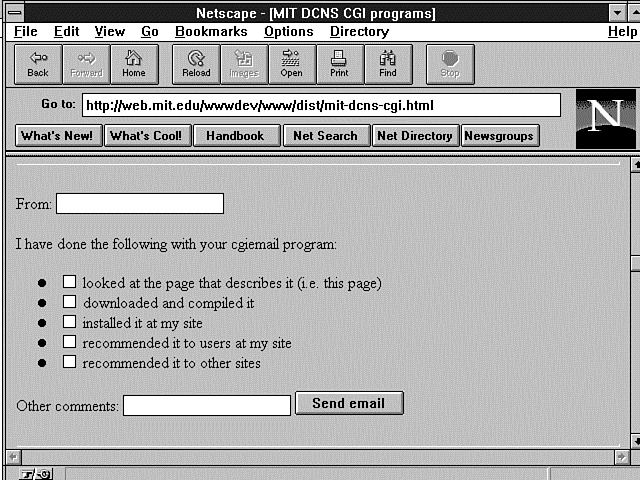
Building your own e-mail form is where you can show off your HTML skills. You can use any format you want here. I like the one presented by MIT shown in Figure 11.1. The MIT form is nice and compact. You get all the information you need in just one simple screen. Listing 11.1 shows the HTML for the MIT e-mailer. The MIT e-mail tool is called cgiemail and is part of a C library available at http://web.mit.edu/wwwdev/cgiemail/
Figure 11.1 : The MIT e-mail form.
Listing 11.1. HTML for the MIT e-mail form.
01: <form METHOD="POST"
02: ACTION="http://web-forms.mit.edu/bin/cgiemail/afs/athena.mit.edu/astaff/
project/wwwdev/www/dist/mit-dcns-cgi.txt">
03:
04: From: <input name="required-from">
05: I have done the following with your cgiemail program:
06:
07: <input type="checkbox" name="donewhat" value="read-about">
08: looked at the page that describes it (i.e. this page)
09: <input type="checkbox" name="donewhat" value="downloaded">
10: downloaded and compiled it
11: <input type="checkbox" name="donewhat" value="installed">
12: installed it at my site
13: <input type="checkbox" name="donewhat" value="recommended-local">
14: recommended it to users at my site
15: <input type="checkbox" name="donewhat" value="recommended-other">
16: recommended it to other sites
17:
18:
19: Other comments:
20: <input type="textarea" name="comments" ROWS=4 COLS=60>
21: <input type="submit" value="Send email">
22: <input type="hidden" name="addendum" value="This is the default success
message. You may also specify a URL as the value of an input named "success"
to cause cgiemail to jump to that URL if email is successfully sent.">
23: </form><hr>
The thing to remember with your e-mail HTML is to present a reasonable amount of data in a compact manner, especially if you're trying to gather information. The e-mail form shown in Figure 11.2 doesn't really gather a lot of information and still manages to take up the entire screen.
Figure 11.2 : A simple e-mail form.
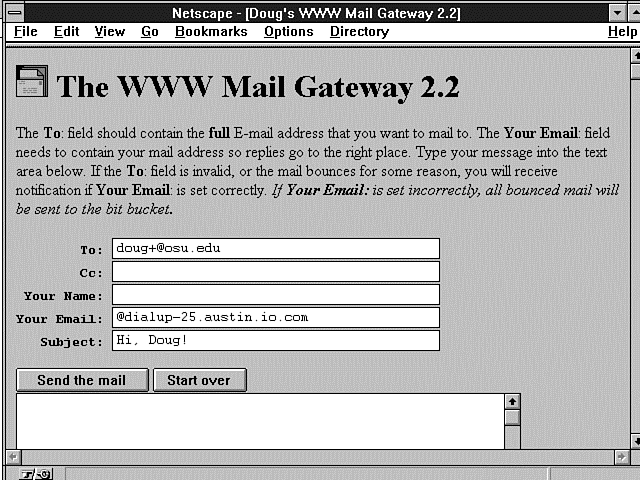
Finally, Doug Stevenson's e-mail form is shown in Figure 11.3. Programmers aren't necessarily the best graphics designers, but Doug does a nice job of presenting the basic data in a nice, readable format. If all you are trying to do is send an e-mail message through your browser, this form works very well. The HTML for this form is shown in Listing 11.2.
Figure 11.3 : Doug Stevenson's mailto form.
Listing 11.2. HTML for Doug Stevenson's mailto
form.
01: print &PrintHeader();
02: print <<EOH;
03: <HTML><HEAD><TITLE>Doug\'s WWW Mail Gateway $version</TITLE></HEAD>
04: <BODY><H1><IMG SRC="http://www-bprc.mps.ohio-state.edu/pics/mail2.gif"
ALT="">
05: The WWW Mail Gateway $version</H1>
06:
07: <P>The <B>To</B>: field should contain the <B>full</B> E-mail address
08: that you want to mail to. The <B>Your Email</B>: field needs to
09: contain your mail address so replies go to the right place. Type your
10: message into the text area below. If the <B>To</B>: field is invalid,
11: or the mail bounces for some reason, you will receive notification
12: if <B>Your Email</B>: is set correctly. <I>If <B>Your Email</B>:
13: is set incorrectly, all bounced mail will be sent to the bit bucket.</I></P>
14:
15: <FORM ACTION="$script_http" METHOD=POST>
16: EOH
17: ;
18: print "<P><PRE> <B>To</B>: ";
19:
20: # give the selections if set, or INPUT if not
21: if ($selections) {
22: print $selections;
23: }
24: else {
25: print "<INPUT VALUE=\"$destaddr\" SIZE=40 NAME=\"to\">\n";
26: print " <B>Cc</B>: <INPUT VALUE=\"$cc\" SIZE=40 NAME=\"cc\">\n";
27: }
28:
29: print <<EOH;
30: <B>Your Name</B>: <INPUT VALUE="$fromname" SIZE=40 NAME="name">
31: <B>Your Email</B>: <INPUT VALUE="$fromaddr" SIZE=40 NAME="from">
32: <B>Subject</B>: <INPUT VALUE="$subject" SIZE=40 NAME="sub"></PRE>
33: <INPUT TYPE="submit" VALUE="Send the mail">
34: <INPUT TYPE="reset" VALUE="Start over"><BR>
35: <TEXTAREA ROWS=20 COLS=60 NAME="body">$body</TEXTAREA><BR>
36: <INPUT TYPE="submit" VALUE="Send the mail">
37: <INPUT TYPE="reset" VALUE="Start over"><BR>
38: <INPUT TYPE="hidden" NAME="nexturl" VALUE="$nexturl"></P>
39: </FORM>
You can do all types of elaborate things with e-mail forms. But that's what makes HTML so much fun. Understanding the HTML and understanding the CGI are two different things, however. Using Doug's mailto program as a model, you will learn the basic steps of creating your own e-mail CGI program. As you have just seen, step one is deciding what the e-mail form will look like and generating the HTML for that form. The next step is sending the empty form on request.
Sending the Blank Form
How do you know whether to send the form as an e-mail, an error message, or a blank form to your Web page client? As you can see from Listing 11.3, one very straightforward method is to look at the HTTP request method of the form. If the request method is Get, this can't be someone sending you e-mail. A completed e-mail form will be sent only via the Post HTTP request header. The Get method request header is sent only after someone clicks on the link to your CGI program.
Listing 11.3. Sending the first e-mail form.
01: if ($ENV{'REQUEST_METHOD'} eq 'GET') {
02: $destaddr = $in{'to'};
03: $cc = $in{'cc'};
04: $subject = $in{'sub'};
05: $body = $in{'body'};
06: $nexturl = $in{'nexturl'};
07:
08: if ($in{'from'}) {
09: $fromaddr = $in{'from'};
10: }
11: # this is for Netscape pre-1.0 beta users - probably obsolete code
12: elsif ($ENV{'REMOTE_USER'}) {
13: $fromaddr = $ENV{'REMOTE_USER'};
14: }
15: # this is for Lynx users, or any HTTP/1.0 client giving From header info
16: elsif ($ENV{'HTTP_FROM'}) {
17: $fromaddr = $ENV{'HTTP_FROM'};
18: }
19: # if all else fails, make a guess
20: else {
21: $fromaddr = "$ENV{'REMOTE_IDENT'}\@$ENV{'REMOTE_HOST'}";
22: }
23: }
This code tries to get as much information as it can loaded into the fields before it sends the form to the requester. As you can see, however, it isn't very successful in finding much information to return with the form. The prebuilt destination address that has the receiver's e-mail address is loaded into the To field. Some e-mail forms don't include this information, but I think it helps present a more complete form. The Your Email field is unfortunately not valid and is hard to come by these days. This program uses the REMOTE_IDENT and the REMOTE_HOST environment variables as the default values for filling in the Your Email field. These variables don't necessarily create a valid e-mail address, but it's a place to start.
Nevertheless, returning some type of information does reinforce the need to fill in the correct information. People have a greater tendency to fix incorrect information than they do to fill in blank information. So you might see this as smart human factors design on Doug's part. As you work through this code, you should notice that it is well commented and handles most error conditions. This is a good example of production code. The comments explain the flow of the code without repeating the syntax of the code. If you're looking for a style to emulate, I recommend this one.
Restricting Who Mail Can Be Sent To
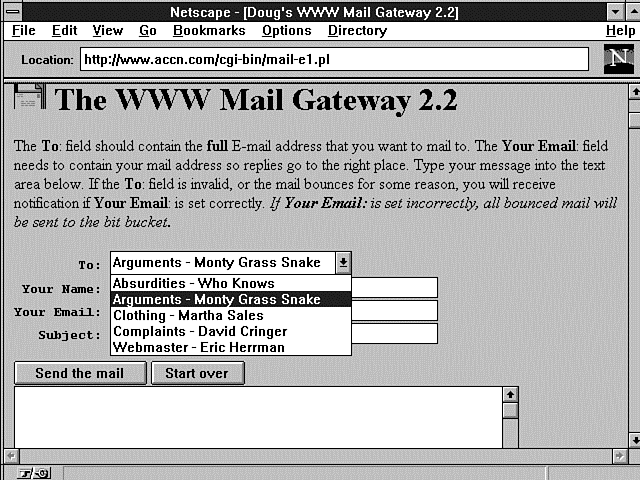
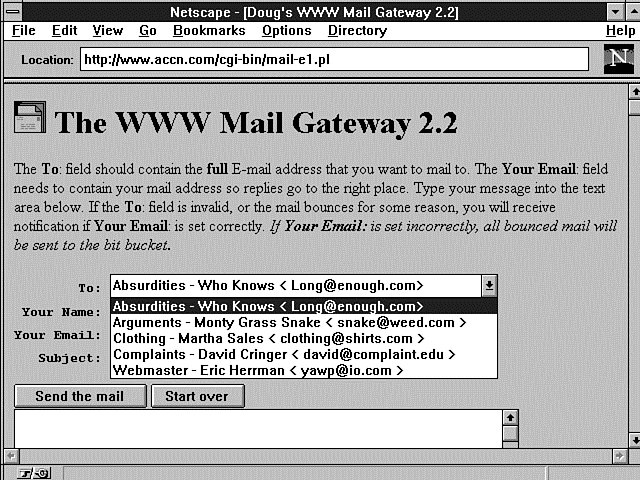
One of the features that is becoming more popular with e-mail HTML forms is limiting who the e-mail form can be sent to. Instead of using the <INPUT TYPE=Text> field for entering the To header, you can present your e-mail patron with a list of valid e-mail addresses. This way, if you maintain a site where a variety of questions might come your way, you can present the Web patron with a list of valid e-mail addresses where you can see the names of the recipients but not their e-mail addresses (see Figure 11.4). Exposing the e-mail addresses to the Web patron, as shown in Figure 11.5, is done by removing the comment character from the $expose_address = 1; line of code. I have modified the original mailto.pl program just a little to read from a local address file and to separate out the Name and Address fields in a simpler manner. Listing 11.4 presents the old and new code for setting up the %addrs associative array. (The line of modified code is in boldface and the old code is left commented out.)
Figure 11.4 : Using a pop-up menu for e-mail destination addresses.
Figure 11.5 : Using a pop-up menu and exposing the e-mail destination addresses.
Listing 11.4. Setting up the addrs
associative array.
# set to 1 if you want the real addresses to be exposed from %addrs
1: $expose_address = 1;
# Uncomment one of the below chunks of code to implement restricted mail
# List of address to allow ONLY - gets put in an HTML SELECT type menu.
#
#%addrs = ("Doug - main address", "doug+@osu.edu",
# "Doug at BPRC", "doug@polarmet1.mps.ohio-state.edu",
# "Doug at CIS", "stevenso@cis.ohio-state.edu",
# "Doug at the calc lab", "dstevens@mathserver.mps.ohio-state.edu",
# "Doug at Magnus", "dmsteven@magnus.acs.ohio-state.edu");
# If you don't want the actual mail addresses to be visible by people
# who view source, or you don't want to mess with the source, read them
# from $mailto_addrs:
#
2: $mailto_addrs = '/usr/local/business/http/accn.com/cgi-bin/address.txt';
3: open(ADDRS,$mailto_addrs);
4: while(<ADDRS>) {
5: ($name, $address) = split(/\,/);
# ($name,$address) = /^(.+)[ \t]+([^ ]+)\n$/;
# $name =~ s/[ \t]*$//;
6: $addrs{$name} = $address;
7: }
I recommend reading from a file instead of using fixed addresses embedded in the code. Leaving your code open to constant modification just to change data is not a very good idea. To make the code read from a file, just modify the address of where your address file resides, as shown on line 2. The address file shouldn't require any complex mechanism to decode. You can use a simple comma (,) to separate the real name from the e-mail address in your e-mail address file, as shown in Listing 11.5. Don't leave any blank lines at the end of the e-mail address file, or the Select list presented as a pop-up menu will end up with an address that looks like <>. In Listing 11.6, the %addrs array is used to present the pop-up menu to the Web patron.
Listing 11.5. The address.txt
file.
1: Webmaster - Eric Herrmann, yawp@io.com
2: Complaints - David Cringer, david@complaint.edu
3: Arguments - Monty Grass Snake, snake@weed.com
4: Clothing - Martha Sales , clothing@shirts.com
5: Absurdities - Who Knows, Long@enough.com
Listing 11.6. Displaying the To
e-mail addresses as a Select list.
01: # Make a list of authorized addresses if %addrs exists.
02: if (%addrs) {
03: $selections = '<SELECT NAME="to">';
04: foreach $name (sort keys %addrs) {
05: if ($in{'to'} eq $addrs{$name}) {
06: $selections .= "<OPTION SELECTED>$name";
07: }
08: else {
09: $selections .= "<OPTION>$name";
10: }
11: if ($expose_address) {
12: $selections .= " <$addrs{$name}>";
13: }
14: }
15: $selections .= "</SELECT>\n";
16: }
If any data at all is in the %addrs associative array, this code builds a $selections variable that is processed later by the program fragment shown in Listing 11.7. This program fragment is part of the HTML of the mailto form shown in Figure 11.3. Each address of the %addrs array is added to the $selections variable by the .= concatenation operator. In addition, if the address is to be exposed, the encoding of the less than sign (<) is required with the use of < on line 12. Remember that the encoding of HTML special characters is required of all data sent through HTML forms.
Listing 11.7. Creating the pop-up menu.
1: # give the selections if set, or INPUT if not
2: if ($selections) {
3: print $selections;
4: }
5: else {
6: print "<INPUT VALUE=\"$destaddr\" SIZE=40 NAME=\"to\">\n";
7: print " <B>Cc</B>: <INPUT VALUE=\"$cc\" SIZE=40 NAME=\"cc\">\n";
8: }
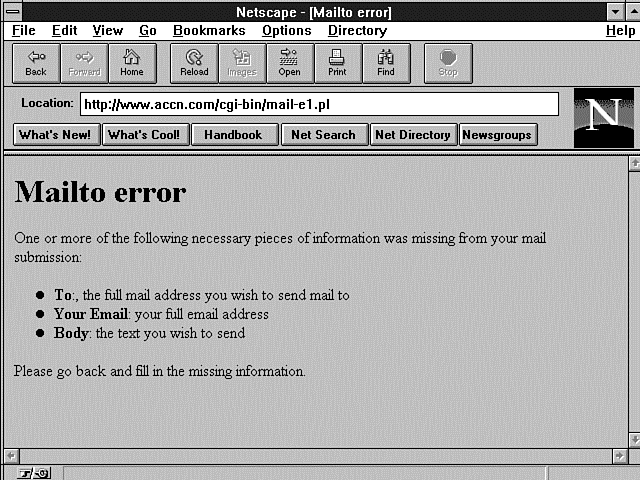
After the blank e-mail form is sent to the Web patron, the next step is to decode the incoming posted e-mail form. The first thing to do with any application program is to check for valid data. Figure 11.6 shows the results of not filling in the correct information. Listing 11.8 illustrates how this data checking is done.
Figure 11.6 : The Mailto error message.
Listing 11.8. Sending the Mailto
error message.
01: elsif ($ENV{'REQUEST_METHOD'} eq 'POST') {
02: # get all the variables in their respective places
03: $destaddr = $in{'to'};
04: $cc = $in{'cc'};
05: $fromaddr = $in{'from'};
06: $fromname = $in{'name'};
07: $replyto = $in{'from'};
08: $sender = $in{'from'};
09: $errorsto = $in{'from'};
10: $subject = $in{'sub'};
11: $body = $in{'body'};
12: $nexturl = $in{'nexturl'};
13: $realfrom = $ENV{'REMOTE_HOST'} ?
$ENV{'REMOTE_HOST'}:$ENV{'REMOTE_ADDR'};
14:
15: # check to see if required inputs were filled - error if not
16: unless ($destaddr && $fromaddr && $body && ($fromaddr =~ /^.+\@.+/)) {
17: print <<EOH;
18: Content-type: text/html
19: Status: 400 Bad Request
20:
21: <HTML><HEAD><TITLE>Mailto error</TITLE></HEAD>
22: <BODY><H1>Mailto error</H1>
23: <P>One or more of the following necessary pieces of information was missing
24: from your mail submission:
25: <UL>
26: <LI><B>To</B>:, the full mail address you want to send mail to</LI>
27: <LI><B>Your Email</B>: your full email address</LI>
28: <LI><B>Body</B>: the text you want to send</LI>
29: </UL>
30: Please go back and fill in the missing information.</P></BODY></HTML>
31: EOH
32: exit(0);
33: }
The first check to see whether this is a Post request might seem a bit redundant, because if it isn't a Get request header, what else could it be? As you learned earlier, however, there are other request methods; also, if you are running from the command line, you will not be using the Post request header. Line 13 shows a syntax you might not be familiar with. It can be interpreted as a simple if then else construct. Add an imaginary if at the beginning of the statement, substitute a then for the question mark, and finally replace the colon (:) with an else statement. Line 13 could be rewritten as the following: if (defined ($ENV{'REMOTE_HOST'})){ $realfrom = $ENV{'REMOTE_HOST'} ; } else{ realfrom = $ENV{'REMOTE_ADDR'}; }
This might be a little slower in execution speed, although I doubt it. The program fragment here and line 13 of Listing 11.8 typically end up with about the same machine code because compilers usually optimize your code. Even if there is no optimization, any difference in program execution speed is going to be in nanoseconds because the clock speed of most machines these days is greater than 60 MHz. Usually, the real reason for using the shorter code is programmer machismo. It looks cooler, and it takes a little less time to type than the syntax in line 13. No offense to Doug intended. There isn't anything wrong with the syntax of line 13; it is certainly part of the language. However, I think it's just a little less readable. Doug might feel that it's more readable and faster, and I'm just all wet. Isn't it amazing what programmers can get all excited about?
One more thing needs to be mentioned about this error-checking code. Line 16 uses a regular expression to determine whether formatted data has been written into the $fromaddr field and makes sure that something is written into each of the $destaddr, $fromaddr, and $body fields. The regular expression can be read as Match any character, but there must be at least one character, followed by an at (@) sign, and then followed by at least one more character.
In his WWW-Security FAQ, Lincoln Stein suggests using the following regular expression to match e-mail addresses: $mail_address=~/([\w-.]+\@[\w-.]+)/;
This could be interpreted as Match at least one of the following: an alphanumeric character, a hyphen, or a period. (Any non-alphanumeric character before the at (@) sign causes the pattern to fail.) Immediately after the period must be an at sign, followed by at least one more alphanumeric character, hyphen, or period. Regular expressions can be confusing and they are rather important as a CGI programming skill. Regular expressions are covered in the section "Defining a Regular Expression," later in this chapter.
After all this up-front work, the actual sending of the mail is almost anticlimactic. In my 10 years of programming experience, that seems to be the norm. It's not the actual kernel of the program that takes so much code and time-it's all the details leading up to the "real" stuff that takes so much time. However, all those details separate robust production code from something just hacked together that breaks every time a new twist is required of the code. The real kernel of the WWW Mail Gateway code is in Listing 11.9.
Listing 11.9. Sending the mail.
01: # if we just received an alias, then convert that to an address
02: $realaddr = $destaddr;
03: if ($addrs{$destaddr}) {
04: $realaddr = "$destaddr <$addrs{$destaddr}>";
05: }
06:
07: open(MAIL,"| $sendmail") ||
08: &InternalError('Could not fork sendmail with -f switch');
09:
10: # only print Cc if we got one
11: print MAIL "Cc: $cc\n" if $cc;
12: print MAIL <<EOM;
13: From: $fromname <$fromaddr>
14: To: $realaddr
15: Reply-To: $replyto
16: Errors-To: $errorsto
17: Sender: $sender
18: Subject: $subject
19: X-Mail-Gateway: Doug\'s WWW Mail Gateway $version
20: X-Real-Host-From: $realfrom
21:
22: $body
23:
24: EOM
25: close(MAIL);
26: }
The data was read earlier in Listing 11.5, so all that needs to be done is a validation of the incoming address. The program checks the type of incoming address. Remember that you might not receive the real address in the To field because addresses might not be $exposed. Because the real address is just the value associated with the key of the %addrs array, it easily is set by using the value in the %addrs associative array. The real address is set on line 4 in e-mail format.
Finally, it's time to send the mail. Earlier in the program, the variable $sendmail is set to sendmail -t -n -oi. This is mainly for security reasons. With this type of formatting of the sendmail command, extraneous characters from user input don't matter because the shell will never be invoked with user input. The user input is passed directly to the sendmail program, and any strange characters are just ignored.
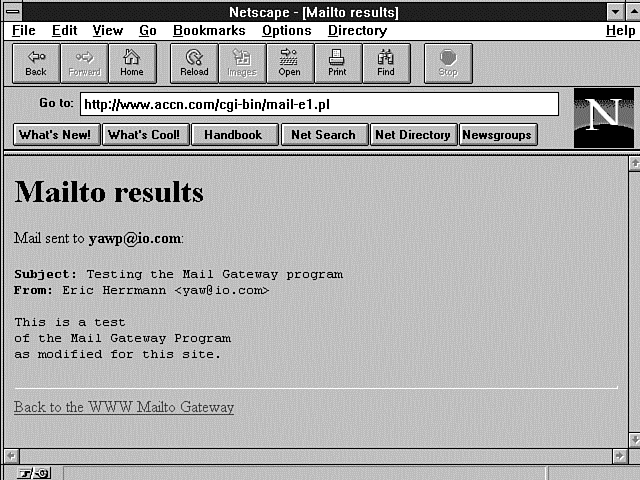
Finally, a confirmation message is sent, as shown in Figure 11.7. Listing 11.10 shows the HTML/CGI for the confirmation message.
Figure 11.7 : The mailto confirmation notice.
Listing 11.10. Sending an e-mail confirmation notice.
01: # give some short confirmation results
02: #
03: # if the cgi var 'nexturl' is given, give out the location, and let
04: # the browser do the work.
05: if ($nexturl) {
06: print "Location: $nexturl\n\n";
07: }
08: # otherwise, give them the standard form.
09: else {
10: print &PrintHeader();
11: print <<EOH;
12: <HTML><HEAD><TITLE>Mailto results</TITLE></HEAD>
13: <BODY><H1>Mailto results</H1>
14: <P>Mail sent to <B>$destaddr</B>:<BR><BR></P>
15: <PRE>
16: <B>Subject</B>: $subject
17: <B>From</B>: $fromname <$fromaddr>
18:
19: $body</PRE>
20: <HR>
21: <A HREF="$script_http">Back to the WWW Mailto Gateway</A>
22: </BODY></HTML>
23: EOH
24: ;
25: }
And that's all there is to sending e-mail using the sendmail program. An example using the mail program is available in Chapter 7. Hopefully, you feel like that wasn't too hard. Usually, that's the case with most programming exercises. Take the time to separate out the problem into reasonably sized chunks and then step through one line of code at a time. When you're all done, you have a working, understandable program. Part of the secret of writing working, understandable programs is separating big programming applications into very small, understandable programming applications.
Implementing E-Mail Security
And now for only a brief note on e-mail security; Chapter 12, "Guarding Your Server Against Unwanted Guests," is devoted entirely to CGI security.
The sendmail program has several options that you are strongly encouraged to include in all your CGI uses of the program. The -t option forces sendmail to read the To, Cc, and Bcc fields separately. Sendmail searches these lines only for addresses, which avoids the effect of adding special metacharacters to address fields. Metacharacters, which are characters that have special meaning to the shell, have an impact on security only if they can be interpreted by the UNIX shell. Because using the -t option prevents any metacharacter from reaching the UNIX shell, you have just plugged a major security hole. Use the -n option to turn off aliasing. This makes sure that the message goes where you expect it. Use the -oi option to prevent early termination of sending the message. Make sure that you include these options every time you call the sendmail program through your CGI code, and you will greatly enhance the security of your site.
Because e-mail can be one of the primary places for user input, you really need to understand how to build intelligent, regular expressions to protect your scripts from malicious user input. Putting weird characters in the input field is a common place for hackers to try to break your CGI program. Doug Stevenson's mailto problem solves this by using the sendmail -t -n -oi parameters, which have the effect described previously. If you understand how to build regular expressions, however, you also can search for malicious user input and further protect your CGI programs, especially if you are using the mail program described at the beginning of this chapter.
Defining a Regular Expression
A regular expression, as used by Perl, is a pattern of symbols generally used to match the contents of a string. A regular expression is not a literal translation of the pattern but an interpreted translation. This is much as if you were using some cliché such as, "A bug in my software." This expression does not mean that some insect is crawling around inside your code. It is interpreted by the reader to match the pattern, "Something is wrong with my program," or "There is an error in my program," or "I'm going to be here all night." A regular expression works in exactly the same manner. A special pattern is used that can be interpreted by the computer to match a different fixed pattern.
It's not possible to come up with all the valid e-mail addresses if you're trying to validate an e-mail address in your program, for example. Not only is it not possible but it's not desirable. Keeping a database of all the valid addresses and then searching that database would be a very time-consuming task. That's where regular expressions come to the rescue. You describe the pattern you are looking for by using a regular expression. The pattern match is much quicker than a one-for-one match required by a database lookup and much more doable. The trick in using regular expressions is two-fold. First, you must understand the pattern you are trying to match. Second, you must understand the possible patterns you can use to create a pattern match.
Don't discount the first step. Understanding the pattern you are trying to match sometimes is harder than finding a regular expression to match it. It is frequently very tempting to skip the first step. Don't skip figuring out what you are trying to match. You will spend hours testing regular expressions trying to find just the right expression for that pattern of symbols you never took the time to write down. And what usually happens when you are all done is that you have a very complex pattern and you didn't match everything you really needed to.
Positioning Your Regular Expression Match
Before you build your regular expression, you need to decide where
you think the pattern will be found in the search string. Will
it be at the front of the string or the end, and will it be separated
on word boundaries (pattern-positioning characters)? Any
pattern match can be matched based on its position in the string.
Table 11.6 lists the characters for matching position in a string.
| Meaning | |
| The caret (^) character makes the pattern match only at the beginning of the string. | |
| The dollar sign ($) character makes the pattern match only at the end of the string. | |
| This position modifier makes the pattern match on word boundaries. A word boundary is considered to be any nonalphanumeric character. Alphanumeric characters are the digits 0 through 9, the upper- and lowercase letters A through Z, and the underscore ( _ ). | |
| This position modifier makes the pattern match on nonword boundaries. |
The \b and \B position modifiers, unlike the ^ and $, can be used as pattern matches by themselves. The \b will match any nonword character, and the \B will match any word character. You should use \w and \W for these types of matches, as described later in this chapter.
Specifying the Number of Times a Pattern Must Occur
Next, you must decide how often you expect the pattern to occur.
Can it happen only once in the string or many times? Is it valid
for it to occur zero times? You can specify how often you expect
the pattern to occur by using the repetition modifiers summarized
in Table 11.7.
| Meaning | |
| A match will occur if the pattern exists an infinite number of times or not at all (zero or more times). | |
| A match will occur if the pattern exists at least once (one or more times). | |
| A match will occur only if the pattern exists only once or not at all (zero or one time). | |
| The pattern will match only if it occurs at least the minimum number of times and no more than the maximum number of times. | |
| The pattern will match only if it occurs at least the minimum number of times. There is no maximum number of times it may occur. | |
| The pattern will match only if it occurs N number of times. |
Using Regular Expression Special Characters
You always can match simple patterns, like abcdef.
It's all those neat, special characters, however, that are so
confusing and necessary that make regular expression patterns
so powerful. Table 11.8 summarizes the special characters of regular
expressions.
| Meaning | |
| Matches any single character except for the newline character (\n). | |
| Matches groups of unordered characters. Any character inside the square brackets will be matched regardless of the order in which it is defined inside the square brackets. | |
| The caret (^), when added to the square brackets ([]) as the first character of the square bracket character list, acts as a negation operator. The regular expression will match any character that is not inside the square brackets. | |
| Defines a range of characters. It generally is used to define a range of numbers or letters. | |
| Matches any digit. You also can use the range specifier [0-9]. | |
| Matches anything that is not a number. | |
| Matches a form-feed character. | |
| Matches a newline character. | |
| The NN represents an octal number. The ASCII equivalent character is matched. | |
| Matches a carriage-return character. | |
| Matches any tab (\t), newline (\n), carriage return (\r), or form feed (\f). These characters also are referred to as whitespace characters. | |
| Matches any character that is not a whitespace character. | |
| Matches a tab character. | |
| Matches any letter, number, or the underscore ( _ ). This set of characters commonly is referred to as alphanumerics. You also can use the specifier [_0-9a-zA-Z]. | |
| Matches anything that is not a letter, number, or underscore. | |
| The NN represents a hexadecimal number. The ASCII equivalent character is matched. |
Regular expressions are best learned by examples. Even the experts have trouble sometimes. I suggest that you create a file with a lot of different strings in it and then read the file into a while loop and play with a lot of different regular expressions. This is a very powerful tool that programmers frequently try to ignore. Be sure to take the time to learn how to use regular expressions in your CGI programs.
Summary
After reading this chapter, you should be able to build your own e-mail tool, customize one of the existing CGI e-mail tools, or install a CGI e-mail engine and start using it immediately. In this chapter, you learned about the UNIX sendmail and mail programs, and how they work on your server. In addition, you learned about the very popular WWW Mail Gateway program and how to install and use it on your server. The WWW Mail Gateway program was used as an outline to teach you the steps required to build your own CGI e-mail tool. You learned that the actual sending of e-mail using sendmail or mail is a task you can accomplish without too much difficulty. You also learned several ways to protect your CGI e-mail program from malicious user input. Finally, this chapter covered the use of regular expressions-powerful tools for screening user input and other pattern-matching operations.
Q&A
| How do I test my regular expressions? | |
| Using the same method I suggested at the end of "Using Regular Expression Special Characters," create a file that has the patterns you want to test. Read in the file and test your regular
expression pattern using the pattern operator (//). You can test your regular expression matches by using this program fragment of Perl code:
#!/usr/local/bin/perl Substitute the pattern you are testing in place of $pattern. | |
| How do I use the positioning modifiers in regular expressions? | |
| Table 11.9 shows some examples of pattern matches. |
| Matches | |
| The number 9 at the beginning of a line. | |
| The number 9 followed by a caret (^). | |
| The number 9 at the end of a line. | |
| A dollar sign followed by a number 9. | |
| A caret (^) followed by a 9. The backslash is used to prevent the caret from being interpreted as a position modifier. The backslash is called an escape character. | |
| a, b, c, d or an _ at the beginning of a line. |
| How do I use the repetition modifiers in regular expressions? | |
| Table 11.10 shows some examples of pattern matches. |
| Matches | |
| Any line with an ab in it. The 9 can occur zero or one time. | |
| ab9ab and abab, but not ab99ab | |
| ab9ab and ab99ab, but not abab | |
| ab9ab, abab, and ab99ab |
| How do I use the special characters in regular expressions? | |
| Table 11.11 shows some examples of pattern matches. |
| Matches | |
| Any digit | |
| Any digit | |
| Any alphanumeric character, but not the following:
~ ' ! @ # $ % ^ & * ( ) - + = < > ? / | \: " ' ; |


Popular Tutorials
-
 MS Access
1109
MS Access
1109
-
 C++
1222
C++
1222
-
 HTML
584
HTML
584
-
 JavaScript
616
JavaScript
616
-
 Vbscript
873
Vbscript
873
-
 Oracle
473
Oracle
473
-
 VC++
875
VC++
875
-
 SQL
2959
SQL
2959
-
 XML
514
XML
514
-
 Java
814
Java
814
-
 Perl
455
Perl
455
-
 Linux
451
Linux
451