Web based School
Chapter 10
Keeping Track of Your Web Page Visitors
- Defining an Access Counter
- Using the Existing Access Log File
- Using page-stats.plto Build Log Statistics
- Getting Access Counts for Your Entire Server from wusage 3.2
- Examining Access Counter Graphics and Textual Basics
- Working with DBM Files
- Excluding Unwanted Domains from Your Counts
- Printing the Counter
-
Turning Your Counter into an Inline Image
- Generating Counters from a Bitmap
- Using the WWW Homepage Access Counter
- Using the gd 1.2 Library to Generate Counter Images On-the-Fly
- Using the gd 1.2 Library to Produce Images On-the-Fly
- Global Types
- Create, Destroy, and File Functions
- Drawing Functions
- Query Functions
- Font and Text-Handling Functions
- Color-Handling Functions
- Copying and Resizing Functions
- Summary
- Q&A
This chapter will put your CGI program skills, graphics skills, Perl skills, and C skills to good use. In this chapter, you will learn how to build your own access counter program. Access counters count the number of hits a Web page has received. Access counters come in all forms and flavors, from a simple Server Side Include command to a call to a CGI program that generates an inline graphics image. In this chapter, you will learn about the simple and complex access counters, and some of the existing tools that access counter programs use.
In particular, you will learn about the following:
- What access counters count
- How to use existing log files
- wusage: A program for generating server statistics
- Access counter basics
- Graphics-based access counters
- The gd graphics library
Defining an Access Counter
Access counters count the number of hits your Web page receives. A hit is any request for your Web page from a client browser. Early uses of access counters counted the download of every single piece of your Web page. Because a Web page is frequently made up of some text, several inline images, and maybe a few SSI files, some Web pages would count 10 hits for every time the Web page was accessed. This was the "norm" in the first half of 1995, but as the year progressed and it leaked out how many Web sites were inflating their access counters, filtering of access counts started to become more frequent. The original hue and cry of, "Well, that's just the way it works," was overruled by a few smarter CGI programmers who understood where hits come from and how to make those hits a little more meaningful.
Using the Existing Access Log File
Several of the programs you will learn about in this chapter generate their own access count by incrementing a number inside a file every time their counter program is called. If you are running any of the major servers, however, a log file already should exist that has detailed information about how your Web page is being accessed. On ncSA servers, this file usually is located on the server root in the log's directory. The name of the log file is access_log. You can see several examples of the log file of the domain where I have been working on this guide in Listing 10.1. You'll probably first notice that there is a large amount of information in this file-including the type of access being made and, for access types of Get, even the data sent with the Get HTTP request header.
Listing 10.1. The access_log
file.
01: dialup-9.austin.io.com - - [02/Oct/1995:20:18:05 -0500] "GET /phoenix/ HTTP/
1.0" 200 2330
02: crossnet.org - - [08/Oct/1995:19:56:45 -0500] "HEAD / HTTP/1.0" 200 0
03: dialup-2.austin.io.com - - [09/Oct/1995:07:54:56 -0500] "GET /leading-rein/
orders HTTP/1.0" 401 -
04: onramp1-9.onr.com - - [10/Oct/1995:11:11:40 -0500] "GET / HTTP/1.0" 200 1529
05: onramp1-9.onr.com - - [10/Oct/1995:11:11:43 -0500] "GET /accn.jpg HTTP/1.0"
200 20342
06: onramp1-9.onr.com - - [10/Oct/1995:11:11:46 -0500] "GET /home.gif HTTP/1.0"
200 1331
07: dialup-3.austin.io.com - - [12/Oct/1995:08:04:27 -0500] "GET /cgi-bin/
env.cgi?
08: SavedName=+&First+Name=Eric&Last+Name=Herrmann&Street=&City=&State=&
09: zip=&Phone+Number=%28999%29+999-9999+&Email+Address=&
10: simple=+Submit+Registration+ HTTP/1.0" 200 1261
11: dialup-20.austin.io.com - - [14/Oct/1995:16:40:04 -0500]
"GET /leading-rein/index.cgi?unique_id=9658-199.170.89.58-813706781 HTTP/1.0"
200 1109
After you take a closer look at what types of pages are being accessed, you will see that your home page can be accessed in a variety of ways. If you name your home page one of the aliased home page names-such as welcome.asp, index.cgi, index.shtml, and so on-in the srm.conf file, hits on your home page are likely to end only with the directory name of where your home page resides and not even include the name of your home page-for example, index.asp. A call to your home page might look like this, for example: http://www.accn.com/
You can use the access_log directly to determine how many hits are made to your home page by understanding the format of the HTTP request header that calls your home page and using the grep command. The grep command is a UNIX command that searches a list of input files for lines containing a match to a given pattern. It has this syntax: grep pattern file-list
grep normally prints every matching line it finds in the file list. But it can be given a switch or input parameter of -c that tells the grep program to suppress normal output and instead print a count of the matching lines. The simple CGI program grep.cgi in Listing 10.2 takes advantage of this and counts the number of home-page accesses in the document root directory using the access_log file and assuming that the home page is named index.asp.
Listing 10.2. A simple access counter program: grep.cgi.
1: #!/usr/local/bin/perl
2: print "content-type: text/html\n\n";
3: $num = `grep -c 'GET / HTTP' /your-server-root/logs/access_log` ;
4: $num += `grep -c 'GET /index.shtml' /your-server-root/logs/access_log` ;
5: $num += `grep -c 'GET /index.asp' /your-server-root /logs/access_log` ;
6: print "$num\n";
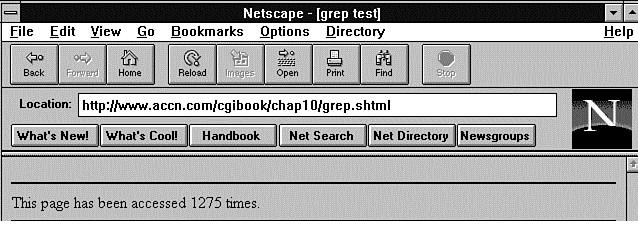
To use this program, you only need to include it in your home page as an SSI file. Listing 10.3 shows a brief example of this HTML, and the result is displayed in Figure 10.1.
Figure 10.1 : A simple text-access counter.
Listing 10.3. An SSI file for using the grep
access counter.
01: <html>
02: <head><title>grep test</title>
03: <body>
04: <hr noshade>
05: This page has been accessed
06: <!--#exec cgi="grep1.cgi" --> times.
07: <hr noshade>
08: </body>
09: </html>
Don't forget to change your Web page extension to .shtml. The program grep.cgi is very simple. If you install this program on your own site, just remember to change the directory path to your own server's log directory. The single quotation marks (') around the pattern string tell the UNIX shell not to change the contents of the string and the grep program to match the pattern exactly. The including Get is required because the match is on the document root; if you let grep match on just '/index.shtml', every home page named index.shtml would return as a match. If I were searching for matches to the Phoenix company's home page, I could grep on '/phoenix/index.asp' and '/phoenix' and get a good match count.
There you have a straightforward and easy-to-use access counter. It has a few problems and isn't very fancy, though, so I will explore several other options before moving on to another topic.
The grep program's biggest negative probably is efficiency. First, it can take a significant amount of time (up to a few seconds) to read through and count all the matches on a long access_log file. Even just a couple of seconds is too much time for a simple text access counter.
Second, you need to change this counter for every page you're interested in, so you're going to have a lot of these little CGI programs on your document root.
Third, but probably least significant, is the fact that this program requires you to make your home page an SSI page. Unless the DirectoryIndexing directive includes the Index.shtml as one of the possible home page values in the srm.conf, a lot of people might not get your home page. Changing the DirectoryIndexing directive is relatively easy, so this isn't really that big of a problem. Here is a sample DirectoryIndexing directive from my srm.conf file: DirectoryIndex blocked.asp index.cgi index.asp home.asp welcome.asp index.asp index.shtml
Using SSI pages is not that much of a problem, but the time required to go "grepping" through a large file really is a negative. However, there is a nice program called page-stats that solves that problem and the related problem of having lots of different counter files.
Using page-stats.pl to Build Log Statistics
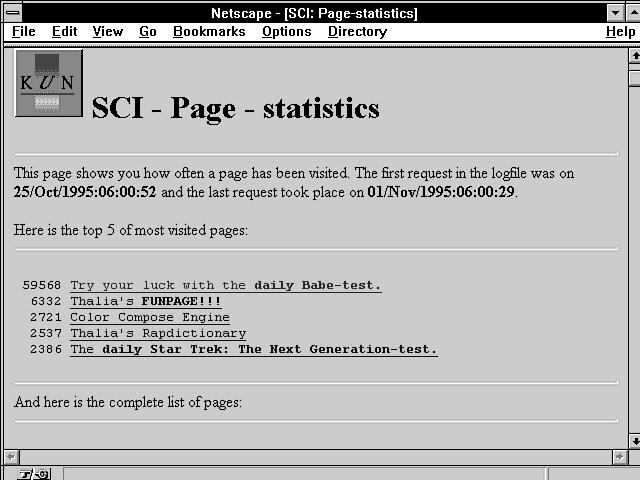
The page-stats.pl program examines the access_log of an HTTP daemon and searches it for occurrences of references to Web pages you identify in an identfile. These references then are counted and put into an HTML file that is ready to be displayed to the outside world as a Page Statistics page. With this type of formatting, you get some detailed statistics on how the pages on your Web site are being accessed and a displayable Web page at the same time. A sample Page Statistics Web page automatically generated by this program is illustrated in Figure 10.2. This program is available at
Figure 10.2 : A sample Page Statistics Web page. http://www.sci.kun.nl/thalia/guide/index.asp
A working example of this program can be found at http://www.sci.kun.nl/thalia/page-stats/page-stats_sci.asp
You don't have to ever display the Page Statistics Web page. It is generated automatically for your use every time the program runs. You can use a grep command on the Page Statistics Web page, however, to be assured that the grep command will return promptly. Because the Page Statistics Web page is small, grep searches this file quickly and returns your access count without delay. So you win both ways with this program. You get a great detailed page of access statistics, with the HTML automatically built for you. You also get a nice, small file that you can use to get an access count easily and quickly.
You shouldn't use this program to build your Web page statistics when your Web page is called. That defeats the purpose of having a program like this that generates a summary file from the access_log file. Add this program to your list of cron jobs and run this program every hour, once a day, or every five minutes. You pick how much CPU time you want to allocate to generating the Page Statistics Web page. Be cautious about running the page-stats program too often, because the more often you run the program, the more likely you are to have conflicts reading the file at the same time a new one is being built. If you're unfamiliar with the term cron job, this is a UNIX utility that enables you to run programs in the background on a periodic basis. Chapter 12, "Guarding Your Server Against Unwanted Guests," includes a brief tutorial on cron jobs and how to run a cron job to clean up files left around from HTTP_COOKIE control files.
The page-stats program uses a file it refers to as the identfile. The identfile contains the references to URIs that should be counted. Each line in this file results in one line being printed in the Page Statistics Web page. A line in this file should be in the following format: URI@title@reference[@reference...]
which could look like this: ~gnu/index.asp@Gnu's pages@/gnu.asp@~gnu*
Comments are allowed and should be preceded by a hash sign (#).
Everything following the hash character (#) is ignored. Each line
of the identfile should contain at least the URI, title, and reference,
as summarized in Table 10.1.
| Parameter | Specifies |
| reference | A reference of how the page might be accessed. If a directory contains a file index.asp, for example, it can be accessed by leaving out the index.asp part, or even the forward slash (/) before it. Each possible way of referencing your Web page should be listed in the reference section. Each method should be separated by an at sign (@). Put all possible references on the same line, separated by the at sign. |
| title | The title of the page, as you want it to appear in the Page Statistics Web page. Note that leading spaces are significant, so it is possible to use indentation for different levels of documents. |
| URI | The URI of the page, as it should be referenced from the Page Statistics page. This represents the most common way you expect the Web page to be referenced. |
You can use a wildcard (*) at the end of a string that will match all URIs beginning with that string.
The order of the reference lines in the identfile matters. Only the first reference match is taken into account. This prevents double counting of Web page hits. Be careful when using wildcards, because they might filter out hits for lines following them. This next example is the wrong way to use wildcards. The second line of this example will never produce any hits: ~gnu/index.asp@Gnu's pages@~gnu* ~gnu/info/index.asp@Gnu's info files@~gnu/info*
The first line will filter out all URIs ending in .asp, which automatically means that URIs that would match /info/*.asp are matched as well. Place the second line above the first, as illustrated in this example, to solve the problem: ~gnu/info/index.asp@Gnu's info files@~gnu/info* ~gnu/index.asp@Gnu's pages@~gnu*
Currently, page-stats.pl will skip lines in the access_log that contain references to .gif, .jpg, or .jpeg files, even if you specify matching URIs. This program assumes that counting images only inflates page counts. If you need the program to be able to handle references to those pictures, you should comment out the lines as indicated in the code.
Only the first matching Web page reference in the identfile will be recognized as a matching reference, and its associated counter in the Page Statistics Web page file will be incremented. Listing 10.4 contains a fragment of the identfile used to create the Page Statistics Web page shown in Figure 10.2.
Listing 10.4. Selected fragments from the page-stats_sci.ident
file.
1: /thalia/kun/look-up_en.asp@KUN: Look up people at the KUN@/thalia/kun/
look-up_en.asp@/thalia/kun/look-up_nl.asp
2: /thalia/kun/kun-pics_en.asp@KUN: Take a look at some pictures of
KUN-buildings@/thalia/kun/kun-pics_en.asp@/thalia/kun/kun-pics_nl.asp
3: /index.asp@SCI: The Science-Homepage@/@/index.asp@/index_nl.asp
4: a/funpage/fun_en.asp@/thalia/funpage/fun_nl.asp
5: /thalia/funpage/movies/@ Let's see some MPEG movies!@/thalia/funpage/
movies/@/thalia/funpage/movies@/thalia/funpage/movies/index.asp@/thalia/
funpage/movies/index_nl.asp
6: /thalia/funpage/dinosaurs/@ The Dinosaurs page!@/thalia/funpage/
dinosaurs/@/thalia/funpage/dinosaurs@/thalia/funpage/dinosaurs/index.asp@/
thalia/funpage/dinosaurs/dinos_en.asp@/thalia/funpage/dinosaurs/dinos_nl.asp
7: test</STRONG>.@/thalia/funpage/babes/@/thalia/funpage/babes@/thalia/funpage/
babes/index.asp@/thalia/funpage/babes/babes_en.asp@/thalia/funpage/babes/
babes_nl.asp
8: /thalia/funpage/startrek/@ The <STRONG>daily Star Trek: The Next
Generation-test</STRONG>.@/thalia/funpage/startrek/@/thalia/funpage/
startrek@/thalia/funpage/startrek/index.asp
9: /thalia/rapdict/@ Thalia's Rapdictionary@/thalia/rapdict@/thalia/rapdict/@/
thalia/rapdict/index.asp@/thalia/rapdict/dict_en.asp@/thalia/rapdict/
dict_nl.asp
Notice that the embedded HTML is okay in the identfile. There are a couple of examples in the earlier identfile of adding the Strong HTML tag to the title displayed on the Page Statistics Web page.
The HTML Page Statistics file is created from two files: the identfile, which contains the references to check, and a source file, which contains the HTML for the Page Statistics Web page. The name of the source file is determined by replacing the mandatory .ident ending of the identfile with .source. The HTML file that is created will be named in the same way, ending in .asp. This means your Statistics Web page is completely configurable by you. Listing 10.5 shows the HTML for generating the SCI Page Statistics Web page.
Listing 10.5. HTML for generating the SCI Page Statistics Web
page.
01: <HTML>
02: <HEAD>
03: <TITLE>SCI: Page-statistics</TITLE>
04: </HEAD>
05: <BODY>
06: <H1><IMG SRC="/gifs/kunicon.gif" ALT="[KUNLOGO]">
07: SCI - Page - statistics</H1>
08:
09: <HR>
10: This page shows you how often a page has been visited. The first request
11: in the logfile was on <STRONG>$firstrequest</STRONG> and the last request
12: took place on <STRONG>$lastrequest</STRONG>.<P>
13:
14: Here is the top 5 of most visited pages:
15: <HR>
16: $top5
17: <HR>
18:
19: And here is the complete list of pages:
20: <HR>
21: $list
22: <HR>
23: <H5>The Perl-script that generated this page can be found on
24: <A HREF="/thalia/guide/index.asp#page-stats">Thalia's guide
25: for WWW-providers</A>.</H5>
26: <A HREF="/"><IMG SRC="/icons/kun-icon.gif" ALT="*"></A>
27: Go to the <A HREF="/">Science Homepage</A>.
28: <P>
29: <EM>This page was generated on $date.</EM>
30: </BODY>
31: </HTML>
The HTML in Listing 10.5 includes several variables that are defined
by the page-stats program.
The variables of the Page Statistics Web page HTML are replaced
when the page-stats program
reads and prints the HTML source file for the Page Statistics
Web page. Table 10.2 summarizes these variables. Table 10.3 lists
the arguments accepted in the page-stats
program.
| Variable | Meaning |
| $date | The current date and time will be inserted for this variable. |
| $firstrequest | The date and time of the first request logged in the access_log will be inserted for this variable. |
| $lastrequest | This variable is replaced by the last request logged in the access_log. |
| $list | This variable is replaced by the complete list of references in the identfile and the number of hits for each reference. |
| $topN | This variable inserts a sorted list of the N most visited pages, where N can be any number. There cannot be any spaces between $top and N. |
| Meaning | |
| A benchmark; prints user and system times when ready. | |
| Displays the manual page. | |
| Specifies the identfile file that determines which references to look for in the logfile. This defaults to page-stats.ident. | |
| A logfile; specifies the access_log of the HTTP daemon. The default location is /usr/local/httpd/logs/access_log. |
This is a really handy little program that you can install and configure for your own use with very little effort. Another server statistics program is in wide use; it was written by Thomas Boutell (boutell@boutell.com), and designed to be installed for an entire server. It produces lots of details about how, when, why, and where your server is being accessed. This tool is only meant to be run once a week and produces volumes of output that you can see as charts, diagrams, circles and arrows, and 8¥10 glossy photographs. Okay, you can't get glossy photographs from it, but it's a pretty neat program.
Getting Access Counts for Your Entire Server from wusage 3.2
An even more robust tool for generating server statistics currently is available as freeware, and a commercial version soon will be available. Wusage 3.2 maintains usage statistics for WWW servers and is available at http://www.boutell.com. Specifically, it generates weekly usage statistics of the following information as long as you run the tool on a periodic basis:
- Total server usage
- "Index" usage (responses to Isindex pages)
- Top 10 sites by frequency of access
- Top 10 documents accessed
- A graph of server usage over many weeks
- An icon version of the graph for your home page
- Pie charts showing the usage of your server by domain
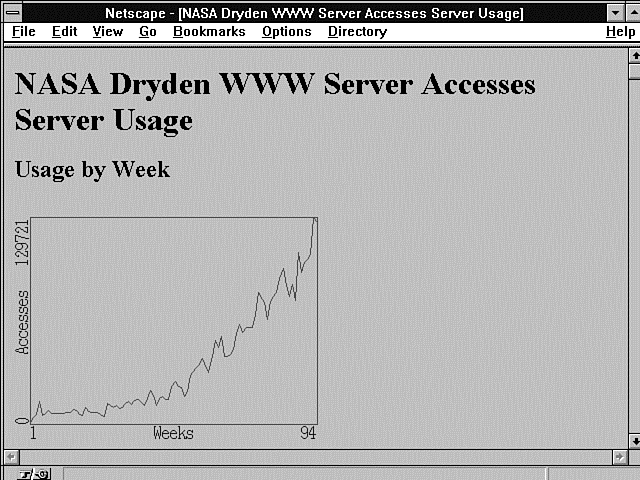
The developers of wusage recommend that you run this tool once a week. Wusage produces graphs of server usage, like the one shown in Figure 10.3.
Figure 10.3 : WWW server access usage.
To use wusage, you need to be using the ncSA or CERN httpd World Wide Web server or any common logfile format server. And you will need a C compiler.
Several parameters must be set in order for wusage to properly interact with your server. These are set in the file wusage.conf. A sample wusage.conf file is included in the tar file, and you can use this file as a starting point.
Configuring wusage
The configuration file is completely dependent on the order and number of lines in the file. You can add comments, but you cannot modify the order or delete any lines that are not comment lines. The server configuration file enables you to define the following:
- Type of server log
- Name of your server
- File system path to an HTML file that is copied in at the beginning of each page generated by wusage
- File system path to an HTML file that is copied in at the end of each page generated by wusage
- Directory where the HTML pages generated by wusage should be stored
- Base URI for HTML pages generated by wusage
- Location of the ncSA server access_log file
- Default domain name
In addition to the basic configuration parameters described earlier, wusage enables you to exclude unwanted accesses from the server statistics reports. You can tell wusage to ignore three items. In the configuration file, each of these items is defined as a list within paired curly braces ({}). Just add the item to the correct paired curly braces. Remember that the configuration file must remain in the correct order. The first curly brace pair ({}) is a list of items that should be hidden. This means that the items still will register in the total number of accesses, but they will never be in the Top 10 for any week. The second curly brace pair ({}) is a list of items that should be ignored. These items never appear in the total number of accesses or in the Top 10; they are ignored completely. The third curly brace pair ({}) is a list of sites to be ignored. This is useful if many of the accesses to your server are made by you personally, and you are more interested in counting accesses made by other sites.
Charting Access by Domain
Wusage also generates pie charts showing the usage of your server by domain, telling you from where in the world people are connecting to your server, as shown in Figure 10.4. These pie charts appear on the weekly Usage Statistics page.
Figure 10.4 : A wusage weekly usage pie chart.
To make pie charts more useful, you can combine countries into continent domains. The last section of the wusage.conf file is made up of continent aliases. Or, you can turn off domain charts altogether by uncommenting the none line just before the continent aliases.
The continent aliases that are provided work well, but if you want to alter them (to add new countries or break up continents-if your server is located in Europe, for example), here are the rules:
- The entire set of aliases is enclosed in the last curly brace pair ({}).
- Each individual country alias is enclosed in a curly brace pair (see the example set in wusage.conf). The first domain in each alias is the name to which the rest will be aliased. This adds them together to make the result show up better in the pie chart and the list of the Top 10 domains. The first domain itself can be a real domain (such as the little-used us domain, to which you could additionally alias gov, edu, org, mil, and com, although this is not always correct), or it can be a made-up domain such as Asia.
- The pie chart only shows domains that take up a sufficient percentage to be legible in the chart, but the Top 10 list always shows the top 10 domains.
- The ? domain is assigned to accesses from sites whose names are unknown. The default domain (line 7 of wusage.conf) is assigned to sites that have no periods in their names (they are assumed to be local sites in your own domain, for example).
- The Other category in the pie chart is assigned to all accesses from domains too small to show up in the chart.
Running wusage
There are three common ways to run wusage:
- As an automatic weekly job, using cron
- Manually-by hand
- Through a CGI script (which enables you to have a button on one of your Web pages to update the information)
An automatic weekly job is the best approach, because this is the frequency with which wusage generates reports. If you are using a UNIX system, it is easy to do this using the program cron.
Wusage must be run on a weekly basis in order to keep useful statistics. Specifically, it should be run as soon after midnight on Sunday as possible. For the purposes of creating an HTML report, wusage always should be run with the -c option, which specifies the location of the configuration file.
In order to install wusage as a regularly scheduled, automatically run program, you need to add it to your crontab file and submit it to the program crontab.
An example crontab file looks like this: 1 0 * * 0 /home/www/wusage -c /home/www/wusage.conf
This can be interpreted as saying Run this program on the first minute after midnight on Sunday of each week. The crontab file is submitted to the UNIX system with the following command, assuming that the crontab file is called crontab.txt: crontab crontab.txt
You also can run wusage by hand with the -c option (wusage -c wusage.conf). You should do this at the same time each week.
To run wusage from a CGI script, create a CGI script that executes this command and echoes back a reasonable Web page to the user indicating success. Because reports are weekly no matter how often the program is run, it is recommended that such a button be placed on a private page, because it has no dramatic effect and does not need to be run incessantly by users.
Run wusage for the first time by hand to make sure that the various HTML and .gif files actually exist and link the usage report to your home page.
You run wusage by hand using the following command, which substitutes the directory where wusage.conf resides on your system for /home/www: wusage -c /home/www/wusage.conf
If all goes well, edit your home page to include a link to the usage report. Here is the relevant excerpt from the developer's home page: <p>Usage of the Quest WWW server is kept track of through <A HREF="/usage/index.asp"> <IMG ALIGN=TOP SRC="/usage/usage.graph.small.gif"> <A HREF="/usage/index.asp">usage statistics</a>.
In addition to obvious name changes, you might need to change the directory linked to if you did not use /usage in your configuration file.
Note that, in addition to a normal text link, a small usage graph is provided as an icon. This graph is genuine; it is updated at the same time as the larger graph on the main usage page!
Purging the access_log File (How and Why)
Your access_log file will grow tremendously over time, particularly if your server is used heavily. You should purge this file periodically, being careful to follow these directions.
Take note of the most recent week for which wusage has generated a complete report. Determine the date on which this week ended (the usage report displays the date the week began). Now edit your access_log file and find the first entry that falls after the completion of that week. It is safe to delete all entries before that line in the access_log file.
When you purge your access_log file, be sure to back up the directory in which wusage keeps its HTML pages. This directory contains important summary information for previous weeks, which wusage must have in order to graph information regarding past weeks no longer in the access_log file.
Examining Access Counter Graphics and Textual Basics
The major alternative to using the access_log file, or using statistics-generating programs like page-stats or wusage, is to create your own page counts. You can do this in lots of ways, but the most popular seems to be by creating a database management (DBM) file in Perl. Regardless of the method you use to generate your counter, there are several basic steps every program goes through to generate graphical or textual counters. In this section, you will learn the basic steps required to generate a counter and how to turn that counter into a graphics image.
The two alternatives for generating counters are to use the existing access_logs in some manner to generate your access counts or to generate your own counter. If you decide to generate your own counter, you must decide what type of file you are going to store the counter in: a DBM file or a plain text file. Next, you must decide whether you are going to protect simultaneous changes to the file from being overwritten. You do this by using a file-locking algorithm. Finally, you must decide on the format you will use for storing the data in the file.
Working with DBM Files
If you chose a DBM file format, the data format is managed for you by Perl's dbmopen(), dbmclose(), reset(), each(), values(), and keys() functions. For the purposes of counters, you are interested primarily in the dbmopen() and dbmclose() commands.
Perl uses the dbmopen() command to bind a DBM file to an associative array. DBM files are managed by a set of C library routines that allow random access to records via an efficient hashing algorithm. The syntax of the dbmopen() command is dbmopen(%array-name,DB_filename, Read-write-mode)
If the database file does not exist prior to the use of the dbmopen() command, two files called db_filename.dir and db_filename.pag are created. If you don't want the DBM files to be created, set the Read-Write mode to the value undef (undefined).
The values of the DBM file are read into cache memory. By default, only 64 values from DBM file are read into memory. This default value can be changed by allocating a size to %Array_Name before opening the file. If you are building counters just for your own Web pages, this probably isn't a concern. If you are building counters for an entire server, however, you probably have more than 64 counters you have to deal with. If you have memory to spare on your server, reading in a larger array makes sense.
Table 10.4 lists the parameters of the dbmopen()
command.
| Parameter | Meaning |
| %Array_Name | This must be an associative array, so you must precede the array name with a percent sign (%). Any values in the array before the dbmopen() command are lost. The keys and values of the DBM file are read into
%Array_Name during the open command. New values can be added to the %Array_Name associative array with simple associative array syntax:
$Array_Name{'key'}=value; any changes to %Array_Name, including new key/value pairs, are saved to the DBM file on a dbmclose (%Array_Name); call. |
| DB_filename | This parameter defines the database management files to open without their .dir and .page extensions. If the DBM files do not exist, they are created, unless the Read-Write mode is set to undef. DB_Filename should include the full path and filename to the DBM file. |
| Read-Write-Mode | This parameter should define standard Read-Write file permissions to ºDBM file. Refer to Chapter 1 "An Introduction to CGI and Its Environment," for a discussion of file permissions. If you do not want a new database (you know one should exist), specify a Read-Write mode as undef. |
DBM files have a reputation for growing overly large. If you're using DBM files for counters, which typically will be short names and small values, you shouldn't have a problem.
As discussed earlier, the values of %Array_Name are saved in cache memory and written to the DBM file as necessary and always on a dbmclose(%Array_Name) call.
The dbmclose(%Array_Name) function breaks the binding between the DBM file and the %Array_Name associative array. The values in the associative array reflect the contents of cache memory when the dbmclose() command is called. You should not use the values in %Array_Name for any other purpose.
You can force a write of cache memory, called flushing memory, to the DBM file by calling the reset(%Array_Name) function. The use of reset on DBM associative arrays does not reset the DBM file itself; it just flushes any entries cached by Perl.
The each(), value(), and keys() functions can be used to traverse the %Array_Name just as for any other associative array. (The keys() function was explained earlier.) The value() function returns an @array of all the values of an associative array. The each() command normally is used when you have very large arrays and you don't want to load the entire array into memory. The each() command loads one value into memory at a time. If you use DBM files to manage your counters, your code should look something like Listing 10.6.
Listing 10.6. A code fragment using DBM files.
1: dbmopen(%COUNTERS, $DOCUMENT_ROOT/DBM_FILES/counters,0666);
2: if(!(defined($counters{'my_counter'})){
3: $counters{'my_counter'}=0;}
4: $counters{'my_counter'})++;
5: $count=$counters{'my_counter'};
6: dbmclose (counters);
You need to confirm that your counter is defined; otherwise, when you use the ++ increment function, you will be incrementing undefined memory, which can cause the program to crash. So set the counter to 0 (zero) once when the counter is undefined and then always increment it. Save the current value of the counter in a local variable for later use and close the DBM file. Whenever you are using a file that can be written to by other processes, you should keep it open only as long as necessary. Later, you'll learn how to lock a file to keep two processes from writing to the same file.
If you don't use a DBM file to manage your counters, you must deal with reading and writing the data to the file in addition to opening and closing the file. You also must decide on an appropriate format for storing the data in the file. These are not difficult tasks and, because you already have seen several examples of reading and writing to a file, I'll leave them to you as an exercise. The basics steps are the same:
- Open the file.
- Read the counter from the file.
- Increment the counter.
- Save the counter in a local variable.
- Write the new value to the file.
- Close the file.
Locking a File
Left out of the previous discussion was how to lock a file containing data that is being updated. Any time you update data in any file and that file has the potential to be modified by another process, you should lock every other process out from modifying the file while your process is modifying the file.
File locking is required for maintaining counters because of the following situation:
Two or more people access your Web page at or near the same time.
This means that there are two or more processes running on your
server that will read and write to your counter file. For simplicity,
assume that only two people are looking at your Web page at the
same time. Those two people start your counter CGI program. Each
CGI program opens the counter file for reading.
| Program 1 increments the counter from the current value of 42,241 to 42,242 and then writes the value to the file. | |
| At the same time, Program 2 opens the file and reads in the counter value of 42,241, increments it, and also writes out the value of 42,242. |
The count from Program 1 is lost.
This isn't a big tragedy; you only lost one count. Your counter is not accurate, however, and the busier your site is, the less accurate it will be. This is a problem with both regular files and DBM files.
You can deal with this problem by creating a message that tells the second program that tries to open the file while the file already is open that it must wait until the other process is done using the file. You can do this by creating your own locking mechanism or by using the system-locking mechanism called flock().
Creating Your Own File Lock
You can create your own file-locking mechanism just by creating and destroying a uniquely named file that tells you when the counter file is locked. This often is referred to as a semaphore because it signals something to you. It defines whether a system resource is available. The code in Listing 10.7 implements this file-locking mechanism.
Listing 10.7. Using your own lock file.
01: While(-f counter.lock){
02: select(undef,undef,undef,0.1);}
03: open(LOCKFILE,">counter.lock);
04: dbmopen(%COUNTERS, $DOCUMENT_ROOT/DBM_FILES/counters,0666);
05: if(!(defined($counters{'my_counter'})){
06: $counters{'my_counter'}=0;}
07: $counters{'my_counter'})++;
08: $count=$counters{'my_counter'};
09: dbmclose (counters);
10: close(LOCKFILE);
11: unlink(counter.lock);
The file-locking program in Listing 10.7 checks to see whether a lock file exists. If it does exist, another process is using the file. This process will wait forever until the lock file, counter.lock, no longer exists. It waits by using a special case of the select() statement. The select() statement, when used this way, causes the program to go into a sleep state for the period defined in the last parameter. The regular sleep() program only accepts full seconds as a unit of sleep. That's much too long to wait for a lock. The actual lock should take only microseconds.
When the lock file no longer exists, this program knows that it is okay to create its own lock file and begin modifying the counter. So it creates a lock file with the open() command on line 3. With this command, the program tells all other programs that it is going to modify the counter file. When it is done modifying the counter file, it closes the lock file (counter.lock) and then uses the unlink command to delete the lock file. When the lock file is deleted, any program that was waiting on the lock file can begin the process again. The lock file isn't a special file; it is just a filename used by every process that wants to modify the counter file. The lock file is created by the open() command and deleted by the unlink() command. When a lock file exists, every process knows to wait to modify the counter file.
Using the flock() Command
Needing to lock files is a very common programmer requirement.
You would think that a system function would exist to perform
this task, and one does. However, as I stated earlier, a lot of
people seem to be commenting out this system call, so if you have
problems using flock() to
implement file locking, use the process defined in Listing 10.7.
| Warning |
| The flock() function in Perl calls the UNIX system flock(2) command. If your system does not implement flock(2), your program crashes. If this happens, use the locking process described earlier. |
The flock() command has this syntax: flock(filehandle, lock-type)
The filehandle is the variable
returned from the open()
command when you open the counter file. The lock-type
can be one of four values:
1: Defines a shared lock. You do not want to use this for
the counter lock.
2: Defines an exclusive lock.
4: Defines a non-blocking lock. You don't want to use this
for the counter lock.
8: Unlocks the file.
If you define an exclusive lock, flock causes your program to wait at the flock() command until the lock is available for your program. The code for flock looks similar to the home-grown locking mechanism, except that it is easier, as shown in Listing 10.8.
Listing 10.8. Code for the flock()
command.
1a: dbmopen(%counters,"filename", 0666);
or
1b: OPEN(counters,"<filename")'
2: flock(counters,2);
3: if(!(defined($counters{'my_counter'})){
4: $counters{'my_counter'}=0;}
5: $counters{'my_counter'})++;
6: $count=$counters{'my_counter'};
7: dbmclose (counters);
8: flock(counters,8);
Open the file however you choose. Pass the filehandle to flock(), as on line 2. If another process is using the file, the second process should hang at the flock() command until the first process is done. That is all there is to it.
Excluding Unwanted Domains from Your Counts
Your counter is working wonderfully, your access counts are going up at a nice, steady pace, and then one dark and stormy night, your access counter goes BUMP in the night! Your count went from a daily change of 100 hits a day to 2,000 hits. What happened? Somebody decided to play with your CGI counter and called it 2,000 times just to mess up your counts or just for the fun of it.
You can stop these unwanted counts rather easily. First, you must figure out how your script is being called. You can find the domain from which the counter terrorist is attacking without any problem by looking in the access_log file. The easiest thing to do is to not count any hits from that domain. You do this by creating an array inside your CGI counter program that contains a list of all the domains and IP addresses that you don't want to count. Then you compare the array against the REMOTE_HOST and REMOTE_ADDR environment variables. For starters, I'll exclude access from my server to my Web pages. Listing 10.9 shows the array and code for excluding parts of the array.
Listing 10.9. Excluding unwanted counts.
1: @BAD-ADDRESSES="199.170.89","austin.io.com";
2: $increment-counter="true";
3: foreach $address (@BAD-ADDRESSES){
4: if( ($ENV{'REMOTE_ADDR'}=~ $address)||
5: ($ENV{'REMOTE_HOST'}=~ $address)){
6: $increment-counter="false";
7: }
8: }
The Perl pattern binding operator (=~)returns true if it finds the IP address or hostname and sets the increment-counter variable to false. In your code where you increment your counter, add this statement: if (increment-counter eg "true"){ counter++; }
Just add IP addresses and remote hosts as necessary to the @BAD-ADDRESSES array. You even can store the bad address in a file and then just read the file into the @BAD-ADDRESSES array at the start of your program. However you choose to do it, the basic steps are outlined in Listing 10.9.
Printing the Counter
Opening and closing files and understanding DBM files is a primary portion of creating your own counter. The next major portion is printing out the counter. You really have three choices:
- Simply print the value just like the SSI command in Listing 10.3.
- Create a fancy text format for your counter, as shown in Figure
10.5. This counter program is available at
http://www.webguides.org/counter
The code that generated the output in Figure 10.5 is written in Perl and is available at this site also. The code is well commented, and you can look at it at your leisure. - Generate one of those nifty graphics image counters, such as the one in Figure 10.6. There are several ways to do this. You will learn how to generate your own graphics images in the next section.
Figure 10.5 : A fancy text access counter.
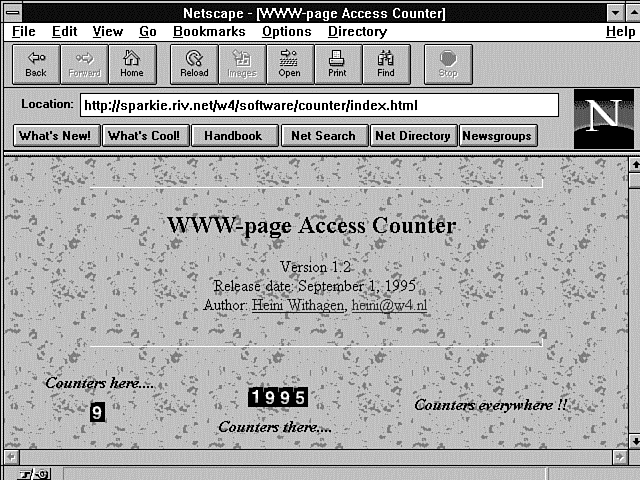
Figure 10.6 : The W4 access counter.
Turning Your Counter into an Inline Image
Getting your counter to appear as an inline image is very simple; just add this HTML: <img src=/cgi-bin/counter.cgi>
This makes your counter program run each time the Web page that contains it is called. All your CGI program has to do now is return a valid image.
Returning the image is what this section is all about. You can use three basic methods to return graphics images. In the first method, you use a bitmap to return the counter as a graphics image. The second method takes several prebuilt GIF images and strings them together to make one image. The third method uses an existing library for generating graphics images like the one called gd, which is written by Thomas Boutell.
Generating Counters from a Bitmap
You will start with where the Internet started. Most of the counters seem to use a design written by Frans Van Hoesel, whose e-mail address is hoesel@rug.nl. The original code was written in C but has been ported many times into Perl and other languages.
The code is based on two bitmaps that contain the hexadecimal values required to generate a GIF image. Usually, the code includes two bitmaps: one for inverse video images and one for regular video images. These bitmaps produce odometer-like images, as shown in Figure 10.6. This shows an image of the W4 consultancy's counter implemented by Heine Withagen. This site has a nice introduction to access counter basics at http://sparkie.riv.net/w4/software/counter/index.asp
The nice thing about understanding bitmaps is their versatility. After you learn how to use bitmaps to build odometer-like counters, you can use bitmaps to build any type of inline image.
Listing 10.10 shows the two arrays used to draw odometer-like counter images. You can find these two bitmaps at http://picard.dartmouth.edu/HomePageCounters.asp
This code was written by John Erickson and can be retrieved from the preceding Web page.
Listing 10.10. Odometer bitmaps.
01: # bitmap for each digit
02: # Each digit is 8 pixels wide, 10 high
03: # @invdigits are white on black, @digits black on white
04: @invdigits = ("c3 99 99 99 99 99 99 99 99 c3", # 0
05: "cf c7 cf cf cf cf cf cf cf c7", # 1
06: "c3 99 9f 9f cf e7 f3 f9 f9 81", # 2
07: "c3 99 9f 9f c7 9f 9f 9f 99 c3", # 3
08: "cf cf c7 c7 cb cb cd 81 cf 87", # 4
09: "81 f9 f9 f9 c1 9f 9f 9f 99 c3", # 5
10: "c7 f3 f9 f9 c1 99 99 99 99 c3", # 6
11: "81 99 9f 9f cf cf e7 e7 f3 f3", # 7
12: "c3 99 99 99 c3 99 99 99 99 c3", # 8
13: "c3 99 99 99 99 83 9f 9f cf e3"); # 9
14:
15:
16: @digits = ("3c 66 66 66 66 66 66 66 66 3c", # 0
17: "30 38 30 30 30 30 30 30 30 30", # 1
18: "3c 66 60 60 30 18 0c 06 06 7e", # 2
19: "3c 66 60 60 38 60 60 60 66 3c", # 3
20: "30 30 38 38 34 34 32 7e 30 78", # 4
21: "7e 06 06 06 3e 60 60 60 66 3c", # 5
22: "38 0c 06 06 3e 66 66 66 66 3c", # 6
23: "7e 66 60 60 30 30 18 18 0c 0c", # 7
24: "3c 66 66 66 3c 66 66 66 66 3c", # 8
25: "3c 66 66 66 66 7c 60 60 30 1c"); # 9
You can create any image you want by sending out this HTTP response header: print ("Content-type: image/x-xbitmap\n\n");
and then defining the width and height of the bitmap with this statement: print("#define count_width $x-width\n#define count_height $y-height\n");
The variables $x-width and $y-height are the pixel width and height of the image you are going to display. The algorithms for printing the bitmap to the screen print the entire bitmap one row at a time. Listing 10.11 shows the program segment that builds the bitmap to be printed.
Listing 10.11. Building a displayable bitmap.
1: $formatted-count=sprintf("%0${NUMBER-OF-DIGITS}d",$count);
2: for($Y-POSITION=0; $Y-POSITION < $MAX-Y-HEIGHT; $Y-HEIGHT++){
3: for($X-POSITION=0; $X-POSITION < $NUMBER-OF-DIGITS; $X-WIDTH++){
4: $DIGIT=substr($formatted-count,$X-POSITION,1);
5: $BYTE=substr(@NORMAL-BITMAP[$DIGIT],$Y-POSITION*3,2);
6: push(@DISPLAY-BITMAP,$BYTE);
7: }
8: }
This program listing and the following one are drawn liberally with John Erickson's permission from the code described previously. As stated earlier, you need to draw one horizontal line at a time. In order to do this, you must traverse the bitmap in Listing 10.10 one horizontal piece of each digit at a time. And that is what Listing 10.11 does. You can use this basic algorithm to build any bitmap array you want.
In this case, you must figure out a way to pull from the bitmaps of digits in Listing 10.10 each piece of the digits that make up your counter. In order to do this, you need some reasonable way to access each digit a number of times. This is accomplished on line 1 of Listing 10.11.
The sprintf() function, when used in this manner, takes a number and returns a string that is the size of the variable $NUMBER-OF-DIGITS: sprintf("%0${NUMBER-OF-DIGITS}d",$count);
If the formatted number is not as large as defined by the variable $NUMBER-OF-DIGITS, the returned string, $formatted-count, will be left filled with leading zeroes. This happens because of the zero (0) that follows the percent sign (%) in the sprintf statement.
The first for loop on line 2 loops one time for each pixel of height of the bitmap. The next for loop loops once for each digit in the bitmap. Line 4 gets the digit for this byte of the bitmap. Line 5 removes a single byte of information about what this digit looks like at a particular $Y-POSITION. The $Y-POSITION is multiplied by 3 to move through the @NORMAL-BITMAP array three characters at a time. Notice in Listing 10.10 that a single value is made up of two numbers and a space. The numbers are hexadecimal values; the space helps make the bitmap readable by humans. The substr() command takes the two numbers it needs, leaving the space character behind. The next time through the $Y-POSITION for loop, the space is skipped and the next number pair is fetched. Each $BYTE retrieved this way then is pushed onto an array of bytes for the @DISPLAY-BITMAP.
The @DISPLAY-BITMAP is processed in the next program fragment. Each digit adds its byte to the @DISPLAY-BITMAP on lines 3-7, and then the $Y-POSITION is incremented and the next row of bytes is added to the @DISPLAY-BITMAP until all the horizontal rows that make up the bitmap have been added to the @DISPLAY-BITMAP.
Next, the @DISPLAY-BITMAP is processed and sent to STDOUT for display as a GIF image. Some formatting of the @DISPLAY-BITMAP array is required before sending to STDOUT. This formatting is required because you used a bitmap that is easy to read by humans. Most of the formatting information added could be replaced by a bitmap that looks like the one in Listing 10.12.
Listing 10.12. A bitmap table formatted for output.
01: # bitmap for each digit
02: @invdigits = (0xff,0xff,0xff,0xc3,0x99,0x99,0x99,0x99,
03: 0x99,0x99,0x99,0x99,0xc3,0xff,0xff,0xff,
04: 0xff,0xff,0xff,0xcf,0xc7,0xcf,0xcf,0xcf,
05: 0xcf,0xcf,0xcf,0xcf,0xcf,0xff,0xff,0xff,
06: 0xff,0xff,0xff,0xc3,0x99,0x9f,0x9f,0xcf,
07: 0xe7,0xf3,0xf9,0xf9,0x81,0xff,0xff,0xff,
08: 0xff,0xff,0xff,0xc3,0x99,0x9f,0x9f,0xc7,
09: 0x9f,0x9f,0x9f,0x99,0xc3,0xff,0xff,0xff,
10: 0xff,0xff,0xff,0xcf,0xcf,0xc7,0xc7,0xcb,
11: 0xcb,0xcd,0x81,0xcf,0x87,0xff,0xff,0xff,
12: 0xff,0xff,0xff,0x81,0xf9,0xf9,0xf9,0xc1,
13: 0x9f,0x9f,0x9f,0x99,0xc3,0xff,0xff,0xff,
14: 0xff,0xff,0xff,0xc7,0xf3,0xf9,0xf9,0xc1,
15: 0x99,0x99,0x99,0x99,0xc3,0xff,0xff,0xff,
16: 0xff,0xff,0xff,0x81,0x99,0x9f,0x9f,0xcf,
17: 0xcf,0xe7,0xe7,0xf3,0xf3,0xff,0xff,0xff,
18: 0xff,0xff,0xff,0xc3,0x99,0x99,0x99,0xc3,
19: 0x99,0x99,0x99,0x99,0xc3,0xff,0xff,0xff,
20: 0xff,0xff,0xff,0xc3,0x99,0x99,0x99,0x99,
21: 0x83,0x9f,0x9f,0xcf,0xe3,0xff,0xff,0xff
22: );
23:
24: @digits = (0x00,0x00,0x00,0x3c,0x66,0x66,0x66,0x66,
25: 0x66,0x66,0x66,0x66,0x3c,0x00,0x00,0x00,
26: 0x00,0x00,0x00,0x30,0x38,0x30,0x30,0x30,
27: 0x30,0x30,0x30,0x30,0x30,0x00,0x00,0x00,
28: 0x00,0x00,0x00,0x3c,0x66,0x60,0x60,0x30,
29: 0x18,0x0c,0x06,0x06,0x7e,0x00,0x00,0x00,
30: 0x00,0x00,0x00,0x3c,0x66,0x60,0x60,0x38,
31: 0x60,0x60,0x60,0x66,0x3c,0x00,0x00,0x00,
32: 0x00,0x00,0x00,0x30,0x30,0x38,0x38,0x34,
33: 0x34,0x32,0x7e,0x30,0x78,0x00,0x00,0x00,
34: 0x00,0x00,0x00,0x7e,0x06,0x06,0x06,0x3e,
35: 0x60,0x60,0x60,0x66,0x3c,0x00,0x00,0x00,
36: 0x00,0x00,0x00,0x38,0x0c,0x06,0x06,0x3e,
37: 0x66,0x66,0x66,0x66,0x3c,0x00,0x00,0x00,
38: 0x00,0x00,0x00,0x7e,0x66,0x60,0x60,0x30,
39: 0x30,0x18,0x18,0x0c,0x0c,0x00,0x00,0x00,
40: 0x00,0x00,0x00,0x3c,0x66,0x66,0x66,0x3c,
41: 0x66,0x66,0x66,0x66,0x3c,0x00,0x00,0x00,
42: 0x00,0x00,0x00,0x3c,0x66,0x66,0x66,0x66,
43: 0x7c,0x60,0x60,0x30,0x1c,0x00,0x00,0x00
44: );
I think the extra work required to process the bitmap is worth the extra readability of the bitmap array in Listing 10.10, but this is really no more than a personal preference. You might prefer the lesser code required to process the bitmap in Listing 10.12. It can be processed simply by replacing line 5 of Listing 10.11 with this line: $BYTE=substr(@NORMAL-BITMAP,[$DIGIT],$Y-POSITION*5,5);
$BYTE now contains 0xNN, where NN is some hexadecimal number. The @DISPLAY-BITMAP array generated from Listing 10.11 is turned into a GIF image printed on your screen by the program fragment in Listing 10.13.
Listing 10.13. Printing the bitmap.
01: printf("Content-type:image/x-xbitmap\n\n");
02: printf("#define count_width%d\n#define count_height10\n",
03: $NUMBER-OF-DIGITS*8);
04: printf("static char count_bits[]={\n");
05: $SIZE-OF-DISPLAY-BITMAP=#DISPLAY-BITMAP; ;
06: for($NUMBER-OF-BYTE=0;
07: $NUMBER-OF-BYTE<$SIZE-OF-DISPLAY-BITMAP;
08: $NUMBER-OF-BYTE++){
09: print("0X$DISPLAY-BITMAP[$NUMBER-OF-BYTE],");
10: if((NUMBER-OF-BYTE+1)%7==0){
11: print("\n");
12: }
13: }
14: print("0X$DISPLAY-BITMAP[$NUMBER-OF-BYTE]\n};\n");
This program fragment can be used to print any GIF image bitmap, as long as you define the width and height correctly. As always, you've got to print the Content-type response header. Don't forget the two newlines (\n\n) required after any ending response header. Then you actually print C code to STDOUT, defining the width and height of the GIF bitmap in pixels. Next, line 4 begins the definition of a C character array that will be loaded with the hexadecimal values that will generate your bitmap. Lines 6-13 load the bitmap one byte at a time into the character array started on line 4. Line 9 converts the two-digit string into the correct hexadecimal format by adding 0X before the two-digit number and a comma (,) after the number; this is the proper syntax for building a C character array made up of hexadecimal values (0XNN, for example).
The for loop on lines 6-13
prints out every byte of the @DISPLAY-BITMAP
array except the last byte. The last byte requires special formatting,
and line 14 provides that special formatting by taking advantage
of the post increment of the for
loop index $NUMBER-OF-BYTE.
You always should use a for
loop index with caution, because some languages don't guarantee
the contents of for loop
index variables after the loop executes. In this case, Perl maintains
the value of $NUMBER-OF-BYTE
for you. $NUMBER-OF-BYTE
is not incremented after the loop fails and equals the value of
the last byte in the @DISPLAY-BITMAP
array. The byte does not require a trailing comma.
| Tip |
| Most C compilers do not complain if the last element of an array has a comma in it. This is handy if you are building statically defined arrays in your .h files. A frequent compilation bug is caused by adding a new element to an array and forgetting to add a comma before the new element. You can prevent the compilation bug from occurring by always including a comma after every element in your arrays-even the last one. |
After the last element in the array, line 14 prints the last byte of the bitmap and then closes the array with the curly brace (}), prints a semicolon (;) to close the definition of the static character array, and finally prints a newline (\n) to close the definition of the GIF image.
And that's all there is to printing inline images made from bitmaps. Listing 10.14 shows a complete listing of all the concepts discussed so far, just so you can see everything put together. The program segment in Listing 10.14 works but is not really complete; error checking and options like increasing the size of the image aren't included in this example.
Listing 10.14. Printing an inline counter as an odometer, using
a bitmap.
01: #chECK FOR ADDRESSES TO EXCLUDE FROM THE AccESS COUNT
02: @BAD-ADDRESSES="199.170.89","austin.io.com";
03: $increment-counter="true";
04: foreach $address (@BAD-ADDRESSES){
05: if( ($ENV{'REMOTE_ADDR'}=~ $address)||
06: ($ENV{'REMOTE_HOST'}=~ $address)){
07: $increment-counter="false";
08: }
09: }
10:
11: #OPEN THE AccESS COUNTER FILE AND IncREMENT THE COUNTER
12: dbmopen(%COUNTERS, $DOCUMENT-ROOT/DBM_FILES/counters,0666);
13: flock(COUNTERS,1);
14: if(!(defined($COUNTERS{'my_counter'})){
15: $COUNTERS{'my_counter'}=0;
16: }
17:
18: if (increment-counter eg "true"){
19: $COUNTERS{'my_counter'})++;
20: }
21:
22: $count=$COUNTERS{'my_counter'};
23: dbmclose (COUNTERS);
24: flock(COUNTERS,8);
25:
26: #BUILD THE BITMAP DISPLAY ARRAY
27: $formatted-count=sprintf("%0${NUMBER-OF-DIGITS}d",$count);
28: for($Y-POSITION=0; $Y-POSITION < $MAX-Y-HEIGHT; $Y-POSITION++){
29: for($X-POSITION=0; $X-POSITION < $NUMBER-OF-DIGITS; $X-POSITION++){
30: $DIGIT=substr($formatted-count, $X-POSITION, 1);
31: $BYTE=substr(@NORMAL-BITMAP[$DIGIT], $Y-POSITION*3, 2);
32: push(@DISPLAY-BITMAP, $BYTE);
33: }
34: }
35:
36: #PRINT THE BITMAP DISPLAY ARRAY
37: printf("Content-type:image/x-xbitmap\n\n");
38: printf("#define count_width%d\n#define count_height10\n",
39: $NUMBER-OF-DIGITS*8);
40: printf("static char count_bits[]={\n");
41: $SIZE-OF-DISPLAY-BITMAP=#DISPLAY-BITMAP;
42: for($NUMBER-OF-BYTE=0;
43: $NUMBER-OF-BYTE<$SIZE-OF-DISPLAY-BITMAP;
44: $NUMBER-OF-BYTE++){
45: print("0X$DISPLAY-BITMAP[$NUMBER-OF-BYTE],");
46: if((NUMBER-OF-BYTE+1)%7==0){
47: print("\n");
48: }
49: }
50: print("0X$DISPLAY-BITMAP[$NUMBER-OF-BYTE]\n};\n");
Using the WWW Homepage Access Counter
If you don't want to go to the trouble of generating images from your own bitmaps, several nice counters are available on the Net that you can use. The WWW Homepage Access Counter available at http://www.fccc.edu/users/muquit/
is a nice implementation of the second method of including counters as inline images. WWW Homepage Access Counter uses prebuilt GIF images and concatenates them to generate a single GIF image, as shown in Figure 10.7. The program is written in C, and the code is available for you to look at on the Net. The original program was designed to run on a UNIX operating system, but it has been ported to most other platforms, including the Windows NT platform.
Figure 10.7 : The WWW Homepage Access Counter.
The WWW Homepage Access Counter keeps a record of the raw hits to a Web page. It generates a GIF image of the number of hits and returns to the browser an inline image of the number of hits. The program also has a runtime option to not show the digital images; this way, the hits can be recorded without displaying them. This program has a nice set of features that makes it different from most of the other inline counters.
The features of the WWW Homepage Access Counter 1.5 follow:
- SSI commands are not required.
- An ornamental 3D frame can be wrapped around the counter image with user-defined thickness and color.
- This program can be used for any number of Web pages.
- Any color of the counter image can be made transparent.
- The style of digits can be specified.
- Authorized hostnames can be placed in the configuration file.
- IP filtering is available through the configuration file.
- Advisory data file locking is available.
- A maximum number of digits can be set, or the counter can be displayed with an exact number of digits.
- A start-up counter value can be specified through the configuration file.
- The display of the counter can be turned off, while still maintaining a valid count of hits.
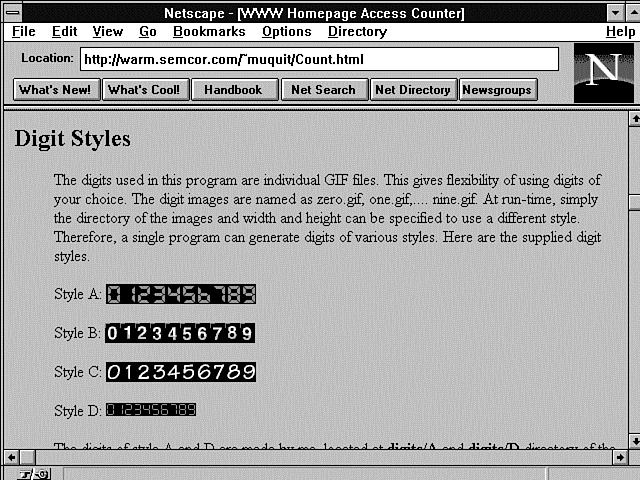
The WWW Homepage Access Counter uses a set of GIF images and enables you to choose the style you want to use as your Web page counter. This program has four installed digit styles, as shown in Figure 10.8, but you can use any image you want by adding your own digit style. A huge collection of GIF digits is available at the Digit Mania page at
Figure 10.8 : The digit styles of the WWW Homepage Access Counter. http://cervantes.comptons.com/digits/digits.asp
This counter is great for its versatility but unfortunately is rather brittle. It uses a large set of parameters that must be passed via the QUERY_STRING. All the parameters must be included in the correct order, and they must be in lowercase. This produces the relatively complex link illustrated here: <img src="/cgi-bin/ Count.cgi?ft=9|frgb=69;139;50|tr=0|trgb=0;0;0|wxh=15;20|md=6|dd=A|st=5|sh=1|df=count.dat" align=absmiddle>;
Table 10.5 shows the parameters required in the QUERY_STRING.
| Stands For | Definition | |
| Digit directory | dd=A indicates that it will use the LED digits located at the directory A. The base of the directory A is defined with the configuration variable DigitDir. | |
| Data file | The file that will contain the counter number. The base directory of this file is defined with DataDir in the configure.h file. If you did not compile with the
flag-DALLOW_FILE_CREATION, this file must exist. To create this file, enter the following at the shell prompt:
echo 1 > count.dat Or use an editor to create it. If you compiled with the flag DALLOW_FILE_CREATION, the file is created and the value defined by st is written to it. Make sure that the directory has Write permission to httpd. | |
| Frame (red, green, | Defines the color of the frame. In blue)the QUERY_STRING, 69 is the red component, 139 is the green component, and 50 is the blue component of the color. The valid range of each component is >=0 and <= 255. The components must be separated by a semicolon (;). Note: Even if you define ft=0, these component must be present;just use 0;0;0 in that case. | |
| Frame thickness | If you want to wrap the counter with an ornamental frame, define a frame thickness greater than 1. For a nice 3D effect, use a number greater than 5. If you do not want a frame, just use ft=0. | |
| Maximum digits | Defines the maximum number of digits to display. It can be >= 5 and <= 10. If the value of your counter is less than md, the left digits will be padded with zeros. In the QUERY_STRING, md=6 means to display the counter with a maximum of six digits. If you do not want to pad to the left with zeros, use pad=0 instead of md=6. Note that you can use md=some_number or pad=0 in this field; you cannot use both. | |
| Show | If sh=0, no digit images are displayed; however, a 1¥1 transparent GIF image is returned, which gives the illusion of nothing being displayed. The counter still is incremented. | |
| Start | The starting counter value if none is defined. st is significant only if you compiled the program with -DALLOW_FILE_CREATION. If you compiled with this option, the data file is saved to the directory defined by DataDir in the configure.h file, and the starting value is written to it. | |
| Transparency | Defines the transparency that you want in the counter image. If tr=0, you do not want a transparent image. If you want a transparent image, define tr=1. Note that Count.cgi does not care whether your digits are transparent GIFs. You must tell explicitly which color you want to make transparent. | |
| Transparency red, | If transparency is turned on, the black color green, blueof the image is transparent if trgb = 0;0;0. Each of these numbers defines the red, green, and blue component of the color you want to make transparent. | |
| Width and height | Defines the width and height of an indi-vidual digit image. Each digit must have the same width and height. If you want to use digits not supplied with this distribution, find out the width and height of the digits and specify them here. |
If you take the time to look at the code available with this counter, there is a nice little program called StringImage, available in a separate file called strimage.c, that creates an image from a string. This handy little subroutine is worth your investigation for its versatility in generating any type of image.
Using the gd 1.2 Library to Generate Counter Images On-the-Fly
The WWW Homepage Access Counter is a hybrid set of code that starts to take use of a graphics library specifically built for generating any type of graphics images on-the-fly. The WWW Homepage Access Counter performs part of the work itself by having a prebuilt set of GIF images. But it is possible to use the gd 1.2 graphics library, which is outlined in the next section, to take care of all aspects of the graphics display of counters.
Listing 10.15 shows the program count.c in its entirety because of its compactness and how well it illustrates using existing libraries to simplify complex tasks.
Listing 10.15. count.c-Using
the gd 1.2 graphics library.
01: #include <stdio.h>
02: #include <stdlib.h>
03: #include <string.h>
04: #include "gd.h"
05: #include "gdfontl.h"
06: #include "gdfonts.h"
07: #include <time.h>
08: #include <sys/types.h>
09: #include <sys/stat.h>
10: /* Look for the file in this directory: */
11: #define HTML_DIR "/sparky.a/masters/reme7117/public_html/count/"
12:
13: /* This is what I use to test locally - ignore */
14: /* #define HTML_DIR "D:\\cgi-bin\\count\\WinDebug\\" */
15:
16: int main(
17: int argc, char *argv[])
18: {
19: char html_dir[180] = HTML_DIR;
20: char *full_path;
21:
22: /* Output image */
23: gdImagePtr im_out;
24:
25: /* Color indexes */
26: int bg_color;
27: int fore_color;
28:
29: FILE *fp = NULL;
30: int access_count;
31: char count_string[8];
32: char template[9]= "00000000";
33: int i, k;
34:
35: full_path = strcat(html_dir, argv[1]);
36: if(argc!=2)
37: {
38: printf("Content-type: text/plain%c%c",10,10);
39: printf("Problem getting information: No file name specified");
40: return(1);
41: }
42:
43: /* Create output image, 67 by 18 pixels. */
44: im_out = gdImageCreate(67, 18);
45:
46: /* Allocate the colors */
47: bg_color = gdImageColorAllocate(im_out, 0, 0, 0);
48: fore_color = gdImageColorAllocate(im_out, 255, 255, 255);
49:
50: /* Set transparent color. */
51: /* gdImageColorTransparent(im_out, bg_color); */
52: /* Get the current count */
53:
54: fp = fopen(full_path,"r");
55: fgets(count_string, 8, fp);
56: fclose(fp);
57:
58: /* Increment the count and write it back to the file */
59: sscanf(count_string,"%d",&access_count);
60: access_count++;
61: fp = fopen(full_path,"w");
62: fprintf(fp,"%d",access_count);
63: fclose(fp);
64:
65: /* Put formated string in output buffer */
66: for (i=8-strlen(count_string), k=0; i<8; i++, k++)
67: template[i] = count_string[k];
68:
69: /* Write the count string */
70: gdImageString(im_out, gdFontLarge, 2, 1, template, fore_color);
71:
72: /* Make output image interlaced
73: (allows "fade in" in some viewers, and in the latest Web
browsers) */
74: gdImageInterlace(im_out, 1);
75:
76: /* Write MIME header */
77: printf ("Content-type: image/gif%c%c",10,10);
78:
79: /* Write GIF */
80: gdImageGif(im_out, stdout);
81:
82: /* Clean up */
83: gdImageDestroy(im_out);
84:
85: return 0;
86: }
This program and a similar one called count2.c are available at http://sparky.cs.nyu.edu:8086/cgi.asp
Unfortunately, this program provides very minimal support for the features you would like to find in access counters. File locking is not available, and neither is domain filtering. If you use this code, I recommend that you add both these features to your own version of count.c. Nevertheless, this is an excellent starting place for a straightforward and easy-to-understand image-producing access counter. The gd 1.2 library that this program makes such heavy and excellent use of is explained in the following section.
Using the gd 1.2 Library to Produce Images On-the-Fly
gd is a graphics library written in C by Thomas Boutell and available at http://www.boutell.com/gd/
It enables your code to quickly draw images, complete with lines, arcs, text, and multiple colors; to cut and paste from other images; to flood fills; and to write the result as a GIF file. Use this section as a handy reference guide to Tom's gd 1.2 library.
gd is not a paint program, however. If you are looking for a paint program, try xpaint by David Koblas, available at ftp://ftp.netcom.com/pub/ko/koblas
This package is for the X Window System; paint programs for the Mac and the pc are considerably easier to find.
To use gd, you need an ANSI C compiler. Any full-ANSI-standard C compiler should be adequate, although those with pcs will need to replace the makefile with one of their own. The cc compiler released with SunOS 4.1.3 is not an ANSI C compiler. Get gcc, which is freely available on the Net. See the Sun-related newsgroups for more information.
You also will want a GIF viewer for your system, because you will need a good way to check the results of your work. lview is a good package for Windows pcs; xv is a good package for X11. GIF viewers are available for every graphics-capable computer out there, so consult newsgroups relevant to your particular system.
The gd library enables you to create GIF images on-the-fly. To use gd in your program, include the file gd.h and link with the libgd.a library produced by make libgd.a under UNIX. You need to adapt the makefile for your needs if you are using a non-UNIX operating system, but this is very straightforward.
If you want to use the provided fonts, include gdfontt.h, gdfonts.h, gdfontmb.h, gdfontl.h, and/or gdfontg.h. If you are not using the provided makefile and/or a library-based approach, be sure to include the source modules as well in your project. Listing 10.16 shows a short example of how to use the gd libraries. A more advanced example, gddemo.c, is included in the distribution.
Listing 10.16. Using the gd library.
01: /* Bring in gd library functions */
02: #include "gd.h"
03:
04: /* Bring in standard I/O so we can output the GIF to a file */
05: #include <;stdio.h>;
06:
07: int main() {
08: /* Declare the image */
09: <A HREF="#gdImagePtr">gdImagePtr im;
10: /* Declare an output file */
11: FILE *out;
12: /* Declare color indexes */
13: int black;
14: int white;
15:
16: /* Allocate the image: 64 pixels across by 64 pixels tall */
17: im = <A HREF="#gdImageCreate">gdImageCreate(64, 64);
18:
19: /* Allocate the color black (red, green and blue all minimum).
20: Since this is the first color in a new image, it will
21: be the background color. */
22: black = <A HREF="#gdImageColorAllocate">gdImageColorAllocate(im,
0, 0, 0);
23:
24: /* Allocate the color white (red, green and blue all maximum). */
25: white = <A HREF="#gdImageColorAllocate">gdImageColorAllocate(im, 255,
255, 255);
26:
27: /* Draw a line from the upper left to the lower right,
28: using white color index. */
29: <A HREF="#gdImageLine">gdImageLine(im, 0, 0, 63, 63, white);
30:
31: /* Open a file for writing. "wb" means "write binary", important
32: under MSDOS, harmless under UNIX. */
33: out = fopen("test.gif", "wb");
34:
35: /* Output the image to the disk file. */
36: <A HREF="#gdImageGif">gdImageGif(im, out);
37:
38: /* Close the file. */
39: fclose(out);
40:
41: /* Destroy the image in memory. */
42: <A HREF="#gdImageDestroy">gdImageDestroy(im);
43: }
When executed, this program creates an image, allocates two colors (the first color allocated becomes the background color), draws a diagonal line (note that 0,0 is the upper left corner), writes the image to a GIF file, and destroys the image.
Global Types
The gd library uses several global types for communication between its functions. These types are used to communicate the structure of fonts and images and to point to those structures.
gdFont
gdFont is a font structure used to declare the characteristics of a font. See the files gdfontl.c and gdfontl.h for examples of the proper declaration of this structure. You can provide your own font data by providing such a structure and the associated pixel array. You can determine the width and height of a single character in a font by examining the w and h members of the structure.
gdFontPtr
gdFontPtr is a pointer to a font structure. Text-output functions expect this as their second argument, following the gdImagePtr argument. Two such pointers are declared in the provided include files gdfonts.h and gdfontl.h.
gdImage
gdImage is the data structure in which gd stores images. gdImageCreate returns a pointer to this type, and the other functions expect to receive a pointer to this type as their first argument. You may read the members sx (size on x-axis), sy (size on y-axis), colorsTotal (total colors), red (red component of colors; an array of 256 integers between 0 and 255), green (green component of colors), blue (blue component of colors), and transparent (index of transparent color; -1 if none).
gdImagePtr
gdImagePtr is a pointer to an image structure. gdImageCreate returns this type, and the other functions expect it as the first argument.
gdPoint
gdPoint represents a point in the coordinate space of the image. It is used by gdImagePolygon and gdImageFilledPolygon.
gdPointPtr
gdPointPtr is a pointer to a gdPoint structure. It is passed as an argument to gdImagePolygon and gdImageFilledPolygon.
Create, Destroy, and File Functions
The functions for creating, loading, and saving files, unless otherwise noted, return a gdImagePtr to the image being created, loaded, or saved. On failure, a NULL pointer is returned. Failure with these functions most often occurs because the file is corrupt or does not contain a GIF image. The file associated with the image is not closed. All images used by these functions eventually must be destroyed using gdImageDestroy().
gdImageCreate
gdImageCreate is called to create images. You invoke this function with the x and y dimensions of the desired image. Use the following code: gdImageCreate(sx, sy)
gdImageCreateFromGd
gdImageCreateFromGd is called to load images from gd format files. Invoke this function with an already opened pointer to a file containing the desired image in the gd file format, which is specific to gd and intended for very fast loading. (It is not intended for compression; for compression, use GIF.) You can inspect the sx and sy members of the image to determine its size. Use this code: gdImageCreateFromGd(FILE *in)
gdImageCreateFromGif
gdImageCreateFromGif is called to load images from GIF format files. You invoke this function with an already opened pointer to a file containing the desired image. You can inspect the sx and sy members of the image to determine its size. Use this code: gdImageCreateFromGif(FILE *in)
gdImageCreateFromXbm
gdImageCreateFromXbm is called to load images from X bitmap format files. Invoke this function with an already opened pointer to a file containing the desired image. You can inspect the sx and sy members of the image to determine its size. Use this code: gdImageCreateFromXbm(FILE *in)
gdImageDestroy
gdImageDestroy is used to free the memory associated with an image. It is important to invoke this function before exiting your program or assigning a new image to a gdImagePtr variable. Use this code: gdImageDestroy(gdImagePtr im)
gdImageGd
gdImageGd outputs the specified image to the specified file in the <A HREF="#gdformat">gd image format. The file must be open for writing. Under MS-DOS, it is important to use "wb" (write binary) as opposed to simply "w" (write) as the mode when opening the file, and under UNIX there is no penalty for doing so. Use this code: void gdImageGd(gdImagePtr im, FILE *out)
The gdImage format is intended for fast reads and writes of images your program will need frequently to build other images. It is not a compressed format and is not intended for general use.
gdImageGif
gdImageGif outputs the specified image to the specified file in GIF format. The file must be open for writing. Under MS-DOS, it is important to use "wb" (write binary) as opposed to simply "w" (write) as the mode when opening the file, and under UNIX there is no penalty for doing so. Use this code: void gdImageGif(gdImagePtr im, FILE *out)
gdImageInterlace
gdImageInterlace is used to determine whether an image should be stored in a linear fashion (where lines will appear on the display from first to last) or in an interlaced fashion (where the image will "fade in" over several passes). By default, images are not interlaced. Use this code: gdImageInterlace(gdImagePtr im, int interlace) (FUncTION)
A nonzero value for the interlace argument turns on interlace; a zero value turns it off. Note that interlace has no effect on other functions and has no meaning unless you save the image in GIF format; the gd and xbm formats do not support interlace.
When a GIF is loaded with gdImageCreateFromGif, interlace is set according to the setting in the GIF file.
Note that many GIF viewers and Web browsers do not support interlace. However, the interlaced GIF still should display; it simply appears all at once, just as other images do.
Drawing Functions
The gdImageFillToBorder and gdImageFill functions are recursive. It is not the most naive implementation possible, and the implementation is expected to improve, but there always will be degenerate cases in which the stack can become very deep. This can be a problem in MS-DOS and Microsoft Windows environments. (Of course, in a UNIX or Windows NT environment with a proper stack, this is not a problem at all.)
gdImageArc
gdImageArc is used to draw a partial ellipse centered at the given point, with the specified width and height in pixels. The arc begins at the position in degrees specified by s and ends at the position specified by e. The arc is drawn in the color specified by the last argument. A circle can be drawn by beginning at 0 degrees and ending at 360 degrees, with width and height being equal. e must be greater than s. Values greater than 360 are interpreted modulo 360. Use this code: void gdImageArc(gdImagePtr im, int cx, int cy, int w, int h, int s, int e, int color)
gdImageDashedLine
gdImageDashedLine is provided solely for backward compatibility with gd 1.0. New programs should draw dashed lines using the normal gdImageLine function and the new gdImageSetStyle function.
gdImageDashedLine is used to draw a dashed line between two endpoints (x1,y1 and x2,y2). The line is drawn using the color index specified. The portions of the line that are not drawn are left transparent so that the background is visible. Use this code: void gdImageDashedLine(gdImagePtr im, int x1, int y1, int x2, int y2, int color)
gdImageFill
gdImageFill floods a portion of the image with the specified color, beginning at the specified point and flooding the surrounding region of the same color as the starting point. For a way of flooding a region defined by a specific border color rather than by its interior color, see "gdImageFillToBorder."
The fill color can be gdTiled, resulting in a tile fill using another image as the tile. The tile image cannot be transparent, however. If the image you want to fill with has a transparent color index, call gdImageTransparent on the tile image and set the transparent color index to -1 to turn off its transparency. Use this code: void gdImageFill(gdImagePtr im, int x, int y, int color)
gdImageFilledPolygon
gdImageFilledPolygon is used to fill a polygon with the vertices (at least three) specified, using the color index specified. See also "gdImagePolygon." Use this code: void gdImageFilledPolygon(gdImagePtr im, gdPointPtr points, int pointsTotal, int color)
gdImageFilledRectangle
gdImageFilledRectangle is used to draw a solid rectangle with the two corners (upper left first, then lower right) specified, using the color index specified. Use this code: void gdImageFilledRectangle(gdImagePtr im, int x1, int y1, int x2, int y2, int color)
gdImageFillToBorder
gdImageFillToBorder floods a portion of the image with the specified color, beginning at the specified point and stopping at the specified border color. For a way of flooding an area defined by the color of the starting point, see "gdImageFill."
The border color cannot be a special color such as gdTiled; it must be a proper solid color. The fill color can be gdTiled, however. Use this code: void gdImageFillToBorder(gdImagePtr im, int x, int y, int border, int color)
gdImageLine
gdImageLine is used to draw a line between two endpoints (x1,y1 and x2,y2).
The line is drawn using the color index specified. Note that the color index can be an actual color returned by gdImageColorAllocate or one of gdStyled, gdBrushed, or gdStyledBrushed. Use this code: void gdImageLine(gdImagePtr im, int x1, int y1, int x2, int y2, int color)
gdImagePolygon
gdImagePolygon is used to draw a polygon with the vertices (at least three) specified, using the color index specified. See also "gdImageFilledPolygon." Use this code: void gdImagePolygon(gdImagePtr im, gdPointPtr points, int pointsTotal, int color)
gdImageRectangle
gdImageRectangle is used to draw a rectangle with the two corners (upper left first, then lower right) specified, using the color index specified. Use this code: void gdImageRectangle(gdImagePtr im, int x1, int y1, int x2, int y2, int color)
gdImageSetBrush
A brush is an image used to draw wide, shaped strokes in another image. Just as a paintbrush is not a single point, a brush image does not need to be a single pixel. Any gd image can be used as a brush, and by setting the transparent color index of the brush image with gdImageColorTransparent, a brush of any shape can be created. All line-drawing functions, such as gdImageLine and gdImagePolygon, will use the current brush if the special "color" gdBrushed or gdStyledBrushed is used when calling them.
gdImageSetBrush is used to specify the brush to be used in a particular image. You can set any image to be the brush. If the brush image does not have the same color map as the first image, any colors missing from the first image are allocated. If not enough colors can be allocated, the closest colors already available are used. This allows arbitrary GIFs to be used as brush images. It also means, however, that you should not set a brush unless you actually will use it; if you set a rapid succession of different brush images, you quickly can fill your color map and the results will not be optimal. Use this code: void gdImageSetBrush(gdImagePtr im, gdImagePtr brush)
You do not need to take any special action when you are finished with a brush. As for any other image, if you will not be using the brush image for any further purpose, you should call gdImageDestroy. You must not use the color gdBrushed if the current brush has been destroyed; you can, of course, set a new brush to replace it.
gdImageSetPixel
gdImageSetPixel sets a pixel to a particular color index. Always use this function or one of the other drawing functions to access pixels; do not access the pixels of the gdImage structure directly. Use this code: void gdImageSetPixel(gdImagePtr im, int x, int y, int color)
gdImageSetStyle
It is often desirable to draw dashed lines, dotted lines, and other variations on a broken line. gdImageSetStyle can be used to set any desired series of colors, including a special color that leaves the background intact, to be repeated during the drawing of a line.
To use gdImageSetStyle, create an array of integers and assign them the desired series of color values to be repeated. You can assign the special color value gdTransparent to indicate that the existing color should be left unchanged for that particular pixel (allowing a dashed line to be attractively drawn over an existing image). Use this code: void gdImageSetStyle(gdImagePtr im, int *style, int styleLength)
Then, to draw a line using the style, use the normal gdImageLine function with the special color value gdStyled.
As of version 1.1.1, the style array is copied when you set the style, so you do not need to be concerned with keeping the array around indefinitely. This should not break existing code that assumes that styles are not copied.
You also can combine styles and brushes to draw the brush image at intervals instead of in a continuous stroke. When creating a style for use with a brush, the style values are interpreted differently; 0 indicates pixels at which the brush should not be drawn, whereas 1 indicates pixels at which the brush should be drawn. To draw a styled, brushed line, you must use the special color value gdStyledBrushed. For an example of this feature in use, see gddemo.c (provided in the gd library distribution).
gdImageSetTile
A tile is an image used to fill an area with a repeated pattern. Any gd image can be used as a tile, and by setting the transparent color index of the tile image with gdImageColorTransparent, a tile that allows certain parts of the underlying area to shine through can be created. All region-filling functions, such as gdImageFill and gdImageFilledPolygon, will use the current tile if the special "color" gdTiled is used when calling them.
gdImageSetTile is used to specify the tile to be used in a particular image. You can set any image to be the tile. If the tile image does not have the same color map as the first image, any colors missing from the first image will be allocated. If not enough colors can be allocated, the closest colors already available will be used. This allows arbitrary GIFs to be used as tile images. It also means, however, that you should not set a tile unless you actually will use it; if you set a rapid succession of different tile images, you quickly can fill your color map and the results will not be optimal. Use this code: void gdImageSetTile(gdImagePtr im, gdImagePtr tile)
You do not need to take any special action when you are finished with a tile. As for any other image, if you will not be using the tile image for any further purpose, you should call gdImageDestroy. You must not use the color gdTiled if the current tile has been destroyed; you can, of course, set a new tile to replace it.
Query Functions
The query functions set includes a set of macros to use to access the gdImage color structure. Use these macros instead of accessing the color structure members directly. Each macro follows this syntax: int gdImageColor(gdImagePtr im, int color)
Replace the Color in gdImageColor with Blue, Red, or Green to return the respective color component of the specified color index. Always use the supplied macros to access structures instead of accessing the structures directly.
gdImageBoundsSafe
gdImageBoundsSafe returns true (1) if the specified point is within the bounds of the image and false (0) if it is not. This function is intended primarily for use by those who want to add functions to gd. All the gd drawing functions already clip safely to the edges of the image. Use this code: int gdImageBoundsSafe(gdImagePtr im, int x, int y)
gdImageGetPixel
gdImageGetPixel retrieves the color index of a particular pixel. Always use this function to query pixels; do not access the pixels of gdImage structure directly. Use this code: int gdImageGetPixel(gdImagePtr im, int x, int y)
gdImageSX
gdImageSX is a macro that returns the width of the image in pixels. Use this code: int gdImageSX(gdImagePtr im)
gdImageSY
gdImageSY is a macro that returns the height of the image in pixels. Use this code: int gdImageSY(gdImagePtr im)
Font and Text-Handling Functions
The following font and text-handling functions have a common parameter list. The fifth argument provides function-specific information. The second argument is a pointer to a font definition structure. Five fonts are provided with gd: gdFontTiny, gdFontSmall, gdFontMediumBold, gdFontLarge, and gdFontGiant. You must include the files gdfontt.h, gdfonts.h, gdfontmb.h, gdfontl.h, and gdfontg.h, respectively, and (if you are not using a library-based approach) you must link with the corresponding .c files to use the provided fonts. Pixels not set by a particular character retain their previous color.
gdImageChar
gdImageChar is used to draw single characters on the image. The character specified by the fifth argument is drawn from left to right in the specified color. Use this code: void gdImageChar(gdImagePtr im, gdFontPtr font, int x, int y, int c, int color)
gdImageCharUp
gdImageCharUp is used to draw single characters on the image, rotated 90 degrees. The character specified by the fifth argument is drawn from bottom to top, rotated at a 90-degree angle, in the specified color. Use this code: void gdImageCharUp(gdImagePtr im, gdFontPtr font, int x, int y, int c, int color)
gdImageString
gdImageString is used to draw multiple characters on the image. The null-terminated C string specified by the fifth argument is drawn from left to right in the specified color. Use this code: void gdImageString(gdImagePtr im, gdFontPtr font, int x, int y, char *s, int color)
gdImageStringUp
gdImageStringUp is used to draw multiple characters on the image, rotated 90 degrees. The null-terminated C string specified by the fifth argument is drawn from bottom to top (rotated 90 degrees) in the specified color. Use this code: void gdImageStringUp(gdImagePtr im, gdFontPtr font, int x, int y, char *s, int color)
Color-Handling Functions
The macros of the color-handling functions should be used to obtain structure information; do not access the structure directly.
gdImageColorAllocate
gdImageColorAllocate finds the first available color index in the image specified, sets its RGB values to those requested (255 is the maximum for each), and returns the index of the new color table entry. When creating a new image, the first time you invoke this function, you are setting the background color for that image. Use this code: int gdImageColorAllocate(gdImagePtr im, int r, int g, int b)
In the event that all gdMaxColors colors (256) already have been allocated, gdImageColorAllocate returns -1 to indicate failure. (This is not uncommon when working with existing GIF files that already use 256 colors.)
gdImageColorClosest
gdImageColorClosest searches the colors that have been defined so far in the image specified and returns the index of the color with RGB values closest to those of the request. (Closeness is determined by Euclidean distance, which is used to determine the distance in three-dimensional color space between colors.) Use this code: int gdImageColorClosest(gdImagePtr im, int r, int g, int b)
If no colors have yet been allocated in the image, gdImageColorClosest returns -1.
This function is most useful as a backup method for choosing a drawing color when an image already contains gdMaxColors (256) colors and no more can be allocated.
gdImageColorDeallocate
gdImageColorDeallocate marks the specified color as being available for reuse. It does not attempt to determine whether the color index is still in use in the image. After a call to this function, the next call to gdImageColorAllocate for the same image sets new RGB values for that color index, changing the color of any pixels that have that index as a result. If multiple calls to gdImageColorDeallocate are made consecutively, the lowest-numbered index among them will be reused by the next gdImageColorAllocate call. Use this code: void gdImageColorDeallocate(gdImagePtr im, int color)
gdImageColorExact
gdImageColorExact searches the colors that have been defined so far in the image specified and returns the index of the first color with RGB values that exactly match those of the request. If no allocated color matches the request precisely, gdImageColorExact returns -1. Use this code: int gdImageColorExact(gdImagePtr im, int r, int g, int b)
gdImageColorPortion
gdImageColorPortion is a set of macros to return the Portion of the specified color in the image. Replace Portion with Red, Green, or Blue. Use this code: int gdImageColorPortion(gdImagePtr im, int c)
gdImageColorsTotal
gdImageColorsTotal is a macro that returns the number of colors currently allocated in the image. Use this code: int gdImageColorsTotal(gdImagePtr im)
gdImageColorTransparent
gdImageColorTransparent sets the transparent color index for the specified image to the specified index. To indicate that there should be no transparent color, invoke gdImageColorTransparent with a color index of -1.
The color index used should be an index allocated by gdImageColorAllocate, whether explicitly invoked by your code or implicitly invoked by loading an image. In order to ensure that your image has a reasonable appearance when viewed by users who do not have transparent background capabilities, be sure to give reasonable RGB values to the color you allocate for use as a transparent color, even though it will be transparent on systems that support transparency. Use this code: void gdImageColorTransparent(gdImagePtr im, int color)
gdImageGetInterlaced
gdImageGetInterlaced is a macro that returns true (1) if the image is interlaced and false (0) if it is not. Use this code: int gdImageGetInterlaced(gdImagePtr im)
gdImageGetTransparent
gdImageGetTransparent is a macro that returns the current transparent color index in the image. If there is no transparent color, gdImageGetTransparent returns -1. Use this code: int gdImageGetTransparent(gdImagePtr im)
Copying and Resizing Functions
The two copy functions presented in this section have a similar parameter format.
The dst argument is the destination image to which the region will be copied. The src argument is the source image from which the region is copied. The dstX and dstY arguments specify the point in the destination image to which the region will be copied. The srcX and srcY arguments specify the upper left corner of the region in the source image.
When you copy a region from one location in an image to another
location in the same image, gdImageCopy
performs as expected unless the regions overlap, in which case
the result is unpredictable. If this presents a problem, create
a scratch image in which to keep intermediate results.
| Note |
| Important note on copying between images: Because images do not necessarily have the same color tables, pixels are not simply set to the same color index values to copy them. gdImageCopy attempts to find an identical RGB value in the destination image for each pixel in the copied portion of the source image by invoking gdImageColorExact. If such a value is not found, gdImageCopy attempts to allocate colors as needed by using gdImageColorAllocate. If both these methods fail, gdImageCopy invokes gdImageColorClosest to find the color in the destination image that most closely approximates the color of the pixel being copied. |
gdImageCopy
gdImageCopy is used to copy a rectangular portion of one image to another image. Use this code: void gdImageCopy(gdImagePtr dst, gdImagePtr src, int dstX, int dstY, int srcX, int srcY, int w, int h)
gdImageCopyResized
gdImageCopyResized is used to copy a rectangular portion of one image to another image. The x and y dimensions of the original region and the destination region can vary, resulting in stretching or shrinking of the region, as appropriate. Use this code: void gdImageCopyResized(gdImagePtr dst, gdImagePtr src, int dstX, int dstY, int srcX, int srcY, int destW, int destH, int srcW, int srcH)
The dstW and dstH arguments specify the width and height of the destination region. The srcW and srcH arguments specify the width and height of the source region and can differ from the destination size, allowing a region to be scaled during the copying process.
Summary
In this chapter, you learned how to add access counters to your home page. Along the way, you learned about DBM files, which will help you with all kinds of practical applications. You learned about several access counter summary programs that can make your page-counting tasks much easier. Also in this chapter, you learned how to build bitmaps and how to use them. With this knowledge, you can create your own images any time you want. Besides learning about several nice existing counter programs, you also learned about the gd 1.2 library for generating graphics images on-the-fly. I hope you find the section on gd 1.2 an excellent reference tool that you can return to over and over again.
Q&A
| How do I build a bitmap? | |
| Bitmaps are easy to build even if you don't understand hexadecimal numbers. The bitmaps for the odometers in Listing 10.10 are 8 pixels wide by 10 pixels high. To figure out how to draw a bitmap of the number zero, just draw yourself an 8¥10 grid and then color in the pixels you want to turn on. Because you're drawing a black background, you want the outside pixels off and the inside pixels on, as shown in Listing 10.17. |
Listing 10.17. An 8¥10 bitmap
of 0.
Translate each row into a number by replacing each empty row with a 0 and each checked row with a 1 so the rows in Listing 10.17 convert as shown in Table 10.6.
Each hexadecimal number is made up of 4 bits, so the easiest maps to draw are multiples of 4 wide. The height can be any number that looks good. You can almost see the pattern just in the 1s and 0s themselves. If you don't understand hexadecimal numbering, just get a binary-to-hexadecimal calculator and draw your bitmaps in multiples of 4 wide. Put 1s in the rows you want on and 0s in the rows you want off. Put your calculator in binary mode, put the 1s and 0s on your grid, and then convert them to hexadecimal numbers. You are ready to go. The grid in Listing 10.18 produces the letter E for an 8¥10 bitmapped letter E.
Listing 10.18. An 8¥10 bitmap
of the letter E.
Table 10.7 shows the translation for the bitmap.
| Row | Bit Value | Hexadecimal Value |


Popular Tutorials
-
 MS Access
1109
MS Access
1109
-
 C++
1222
C++
1222
-
 HTML
584
HTML
584
-
 JavaScript
616
JavaScript
616
-
 Vbscript
873
Vbscript
873
-
 Oracle
473
Oracle
473
-
 VC++
875
VC++
875
-
 SQL
2959
SQL
2959
-
 XML
514
XML
514
-
 Java
814
Java
814
-
 Perl
455
Perl
455
-
 Linux
451
Linux
451