Web based School
Chapter 20
Porting Between Visual Basic and VBScript
CONTENTS
- How Do Visual Basic and VBScript Compare?
- Finding Differences When You Port Code
- Syntax Elements in Visual Basic 4.0 but Not in VBScript
- Other Visual Basic and VBScript Differences
- Summary
- Q&A
- Workshop
- Quiz
If you're a Visual Basic programmer, you likely were pretty excited when you heard about VBScript, which is derived from Visual Basic. The ability to write active Web pages in a language already near and dear to your heart is an appealing one. By some claims, Visual Basic is close to being the world's most widely used programming language, if it's not there already. So many programmers welcome the familiarity of VBScript. Even more, a lot of programmers have likely thought of how great it would be to move much of their existing Visual Basic code into their VBScript Web pages. This is a great way to achieve code reusability, enhance the power of your Web pages, save your company money, and show the boss that all the Visual Basic products you've been working on in the past are even more valuable then she suspected.
Today's lesson addresses the issues of moving code between Visual Basic and VBScript. The languages are indeed blood relatives-closely enough related that code portability is a feasible option. In fact, VBScript is said to be a strict subset of Visual Basic for Applications (the core Visual Basic technology behind Visual Basic 4.0, Office, Excel, and other products) and 100% upward compatible to VBA. When you hear these claims you might start to think that moving code between Visual Basic environments is hitch free. However, this is not entirely true.
There are many differences to be aware of between the languages. The nature of the port makes a big difference, too. It is much easier to take a VBScript application to Visual Basic then to take a Visual Basic application to VBScript. In the first case you're taking code from a language subset and moving to an environment where there are even more language choices. In the second case, you're taking code from a full implementation of the language and moving it to an environment where language choices are much more limited. Unfortunately, the more difficult port direction is the more likely one because there is already a large body of Visual Basic code available that could be exploited in VBScript.
Differences in various host environments can complicate matters as well. Currently, the Internet Explorer 3.0 browser makes available a wide variety of intrinsic objects such as document and location objects that your VBScript code can manipulate. Someday, they will likely become a standard part of Windows, but for now you'll find that the available environmental objects vary between your standard Visual Basic application interface and your VBScript browser hosted interface.
It's a fair expectation that translation-tool products may emerge to aid in porting code. Short of that, however, porting code between the two will take a mixture of both experience and plain old elbow grease. An understanding of many of the differences between the language set and subset is provided here to help you in your future porting work. Just as importantly, understanding what's not in VBScript but is in its parent language will give you a better overall perspective on the focus and capabilities of this language. For that reason, it is still well worth your while to read this chapter even if you don't have background in Visual Basic or don't plan to port any code. You'll come away with a better understanding of what VBScript is all about.
How Do Visual Basic and VBScript Compare?
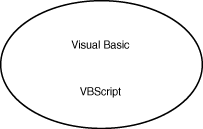
VBScript is derived from Visual Basic or, to be more technically accurate, VBA, the Visual Basic engine. The language syntax and behavior are taken directly from VBA. When you consider how the syntax and capabilities of these two languages relate, it helps to picture a domain graph. Visualize a circle that represents all the language elements and functions in Visual Basic. Then picture another circle that represents all language elements and functions in VBScript. Where these circles intersect is the commonality between the languages. The best case for portability would be if the languages were identical and the circles directly overlapped, as in Figure 20.1.
Figure 20.1 : The ideal overlap of Visual Basic and VBScipt.
| Note |
When Visual Basic is used in the discussions that follow, it refers to the common Visual Basic language supported in the Visual Basic development product and Visual Basic for Applications, the engine behind it. VBA is also used to provide Visual Basic support in products such as Word, Excel, and others. By contrast, VBScript refers specifically to the language syntax that is supported by the VBScript language interpreter and environments such as Internet Explorer, which host it. |
This best-case compatibility is far from what actually exists, and there are good reasons why it couldn't exist. It can be assumed that many goals shaped the development of VBScript and the decisions about what would go into it. Some of these goals have been stated at past Microsoft developers' conferences, and the impact on the language is clear. One goal was to have a secure script language. This meant that there could be no way for a script to directly carry out interaction with the user's system beyond the relatively narrow confines of the Web page it controlled. Therefore, the traditional file input/output (I/O) of Visual Basic was removed and so were the data access and the clipboard objects. Another goal was to have a light-footprint language. A language that took significant space in memory or had overhead that slowed it wouldn't do. VBScript is a slimmed-down version of Visual Basic, with many functions not provided. It is a safe bet that the goal of sleekness of solution accounts for some of what wasn't provided.
A further goal might have been to create a script language that is easy to use and appropriate for scripting tasks. The broad and extensive language of Visual Basic is great for sophisticated corporate applications that must share database information and business rules in a client/server fashion, and it provides many features that facilitate creation of such enterprise solutions. It also provides a considerable level of compatibility with older versions of BASIC, all the way back to pre-Visual Basic versions of BASIC. However, a broad range of language constructs and backward compatibility to older BASIC programs are not important for a script language. A script language can best fulfill its purposes if it is very easy to use and understand. Web page authors will be most likely to apply it to enhance their pages. So it is a fair guess that the desire to keep it simple and straightforward also played a part in shaping VBScript, and it accounts for the fact that only key functions of Visual Basic are included rather than a lot of fluff.
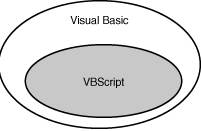
So you can picture VBScript as a proper subset of Visual Basic. You might expect VBScript to include just some of what's in Visual Basic with no other changes or additions. The figure for this scenario is shown in Figure 20.2.
Figure 20.2 : The relationship of VSBscript to Visual Basic is much like this figure.
This is still not quite the full picture, however. There are some approaches you can take in VBScript code that are not directly supported by today's Visual Basic. In a couple isolated areas there are slight differences in the way statements work. The following statement, for example, dimensions an array of 10 elements addressable by indexes 0 through 9 in Visual Basic and an array of 11 elements, addressable by indexes 0 through 10 in VBScript:
dim MyArray(10)
The minor language-specific differences that exist today between the beta VBScript and Visual Basic 4.0 are few and likely will be resolved by subsequent product releases. VBScript is derived from the newest version of VBA, Visual Basic for Applications 5.0, on which the next version of Visual Basic itself is expected to be based. Then the relationship of the released products in the Visual Basic family line will be truly subset-to-set.
In most cases, however, the differences encountered in a port are not due to the language syntax itself. The differences are because certain elements you can reference make sense only in the context of a Web page. A document object or location object makes sense to reference when dealing with a Web page, but they have no equivalent in the 4.0 version of Visual Basic, for example.
However, the differences can't be ignored if you're sharing a lot of code between environments. Another perception of how the languages relate, when you consider that some objects you are likely to use in VBScript are specific to the browser environment, is reflected in Figure 20.3. The languages have a subset relationship, but the intrinsic object model offered by the host environment keeps it from being a true subset. There is a lot you can do in Visual Basic that can be done directly in VBScript, and there are some intrinsic objects you can use in VBScript that you will not find directly available in Visual Basic.
| Note |
The differences between object models and host environments will quickly fade as some of Microsoft's future vision unfolds. Eventually, the independent browser concept will disappear as any document, whether local or remote or an ActiveX application written to document specs, is simply hosted by the Windows operating system shell. |
Finding Differences When You Port Code
You might need to move Visual Basic code to your VBScript Web pages to take advantage of your existing code. On the other hand, once you write some scripts, you may need to go in the other direction. A procedure you have defined in VBScript might be of use in a non-Web-targeted Visual Basic program, so you may be moving code to Visual Basic. In either case, you want a way to detect differences between the environments. You can find many differences by looking for the program incompatibilities documented in this lesson. This can be a tedious process, and it's always possible you won't catch them all when initially modifying source code for a conversion. If any slip by during a conversion, you'll likely discover them as you make the conversion, try your test code, and receive grumbling error messages from the language processor!
If you're moving from VBScript to Visual Basic, the task is relatively easy. First of all, you're moving from a smaller domain of the language to a larger one. For the most part, you're adding potential syntax you can use rather than taking away syntax as you move the code into Visual Basic. Many of the scripts will port with no problems at all, and for those that do introduce problems, the Visual Basic development environment will be a tremendous help in your porting activity. It can flag syntax errors effectively even before the program runs. If porting issues have introduced run-time errors, Visual Basic offers a rich set of debugging capabilities, including a built-in trace facility, to help you hunt down those errors.
If, on the other hand, you are moving from Visual Basic to VBScript,
your task will be considerably more difficult because you are
moving from a larger language domain to a smaller one. Many aspects
of the language supported in Visual Basic are not supported in
VBScript, so you may have a lot of code to remove or syntax to
modify. You cannot make dynamic link library calls, including
Windows API calls, from VBScript, and these often are heavily
used in Visual Basic. There is no easy way to automatically highlight
the differences, although it can be expected that future tools
may come along to partially automate the task. If problems are
introduced by the port or if you miss converting a nonsupported
keyword, the debugging task can be daunting. You may simply be
rewarded with a script that provides a cryptic run-time error,
or worse yet, gives no run-time error and just doesn't work. You
have little at your disposal to help you track down these problems.
As you learned on Day 17, "Exterminating
Bugs from Your Script," no standard VBScript debug environment
is available. Some of the techniques described on Day 17
can help you build your own debugging capabilities into the script,
but this takes time and effort.
| Note |
At the time of this writing, few tools are available to aid in such tasks. It is likely that over time, a richer set of tools will develop to make porting easier. Information at www.doubleblaze.com may describe availability of some such tools in the future. |
It is important to have a good understanding of what is supported in VBScript and what is not before attempting to port. The guidelines here serve as a good starting point, and Appendix A, "VBScript Syntax Quick Reference," can supplement the guidelines. Your ultimate authority of what constitutes legal VBScript syntax is currently available right over the Web. Microsoft's VBScript language reference can be reached at http://www.microsoft.com/vbscript. In addition, whenever you do any code porting to VBScript, you should allow time for lots of painstaking adjustments and testing. Lots and lots of testing! Finally, you should keep in mind that in many cases, there will be no way to do a direct port. If your Visual Basic program makes extensive use of file I/O and the clipboard, you have no easy VBScript alternative. Instead, you have to reset your porting expectations or redefine your script goals. Visual Basic to VBScript porting can work well in many cases, as long as you can avoid the gotchas, which are covered next in detail.
Syntax Elements in Visual Basic 4.0 but Not in VBScript
Because so much of Visual Basic is not in VBScript, it is rather difficult to succinctly summarize it all in one table. The summary here is not intended to be a complete guide, but it does highlight some of the differences. The discussion that follows starts by looking at some major areas that are not supported. This is followed by a table that briefly presents some of the specific keywords that are not a part of VBScript.
Constants
VBScript does not support constants. An easy (although somewhat time-consuming) workaround does exist. Simply declare the constants as variables and assign them a value initially. VBScript also does not support the intrinsic constants of Visual Basic. These are constants starting with a vb prefix that are automatically defined and refer to values expected by Visual Basic functions. These intrinsic constants must likewise be explicitly declared as variables and assigned a value. A file on the CD-ROM, under subdirectory \shared\tools\constants.txt, contains a text file that you can use to copy and paste sample declarations for many frequently used intrinsic constants. The good news is that the constant values expected by most functions are the same between Visual Basic and VBScript. For example, the same value you use to request a Yes/No message box in Visual Basic is also used in VBScript.
File I/O
File I/O is not supported under VBScript. This is an area for which no direct easy workaround exists. Information that persists from one session to another would be saved on the server with the normal Web page model. One possible solution to consider is whether it makes sense to have the information that would normally be saved to the file submitted through CGI to be saved on the server. You could resort to a control to handle storage needs if you can find one commercially available or create your own. It is likely that eventually third-party ActiveX controls may evolve to address more of these needs, for those willing to sacrifice the nonwritable security by incorporating such controls into their programs.
Database Support/Data Access Objects
The situation here is much like that of file I/O. This support is not present in VBScript. You should consider whether the database activity can be replaced by CGI interaction with a server-controlled database.
Classes and Property let/get/set Procedures
Classes and the properties and methods that go with them, including the ability to define let/get/set procedures, are not supported in VBScript. Painful though it may be, the necessary workaround is to restructure code into a standard procedure/variable model when moving it to scripts.
Financial Functions
The advanced financial functions are not available in VBScript. If you need a certain function, you can program it yourself as a function call in your script. It may take quite a few lines of script, however.
String Functions
Most string functions in Visual Basic are provided in an old-style syntax that uses a string ($) designator on the end of the function, as well as the new style without it. For example, you can use Left or Left$ to extract the left portion of a string, and Mid or Mid$ to extract a substring from a string. The functions work the same regardless of the method used. VBScript only supports the standard method (such as Left) and not the syntax that ends with $, such as Left$. The porting workaround is quite easy for this one-just make some global changes to get rid of the $ string designator.
Variable Types
VBScript supports only variant variables, as you learned on Day 4, "Creating Variables in VBScript." This means that all nonvariant declarations in your Visual Basic code must be changed to variant declarations. Visual Basic code by experienced programmers rarely makes use of variant declarations. In Visual Basic, it is generally considered poor programming to rely too heavily on variants. Since the values of variant variables are not explicitly typed, programs based on variant variables are more likely to contain bugs by taking on a data representation the programmer didn't intend. For the same reason, changing variables from explicit types to variants as you move them to code can introduce changes in the behavior of programs. Therefore, any such changes should be examined carefully. Unfortunately, since most programs are variable-centric, a lot of changes and checking are usually necessary.
One example of the type of change to be aware of is shown in the Visual Basic Calculation program in Listing 20.1.
Listing 20.1. The Visual Basic Calculation program with standard nonvariant declarations.
Dim a As Single
Dim b As Integer
Dim c As Integer
a = 0.045
b = 10
c = a * b
MsgBox c
When the code is run, the value 0 is displayed in the message box. Assume that you port this code to VBScript, converting the declarations to variants, as in Listing 20.2.
Listing 20.2. The VBScript Calculation program with variant declarations.
Dim a
Dim b
Dim c
a = 0.045
b = 10
c = a * b
MsgBox c
When this seemingly identical code is run in the script, the value 0.45 is displayed because a Variant variable makes some assumptions for you. Since the result variable c is a variant, it can take on any data subtype form. When the calculation is carried out and the interpreter sees that a single-precision (decimal-point-based) number is used, it assumes that it is the type of data representation it should use for the result variable c as well. The variable c is not forced to use an integer representation as it was in the first example.
To successfully port the code to VBScript, you would need to carry out an additional piece of code modification, shown in Listing 20.3.
Listing 20.3. The VBScript Calculation program with variant declarations and Cint.
Dim a
Dim b
Dim c
a = 0.045
b = 10
c = Cint(a * b)
MsgBox c
The use of the Cint function explicitly forces the result to be represented as an integer in the variant variable. In the example shown here, this doesn't seem too critical. After all, it was just displaying a message box. It doesn't matter much if it shows a 0 or a 0.45. Assume that the software is calculating some financial data or some medical analysis for you; in this case, the difference in such data type representation could be significant indeed.
As you can see from this example, the only way to make sure your variables work as intended, once you port them over, will be to check all statements that use those variables, line by line, or exhaustively check a truly representative range of all program outcomes. Either way, the conversion of your data types to variants can mean a lot of work for you when you carry out a code port.
Intrinsic Objects-Print, Clipboard, and Debug
In Visual Basic you can use the print object to print, the clipboard
object to move data to and from the clipboard, and the debug object
to provide a trace of your programs to the debug window. No equivalents
exist in VBScript for these techniques. If you are using the clipboard
just to move data back and forth within your own program, you
could use global variables instead. Similarly, you can build your
own debug window through a text box or list box control and write
to it in a manner similar to that of the debug object. You learned
about this technique on Day 17. No documented
intrinsic way to print a page from VBScript is available at this
time. However, keep in mind that the user can always manually
trigger a print of a page from the browser menu.
| Note |
Any application in Windows can be written so that it exposes its objects. In other words, it can make certain interfaces to control its behavior publicly available for other applications to use. It is possible that some browser environments of the future might expose objects that allow a page to be printed, or it could be possible to write an advanced ActiveX control that could be included in a page to capture a bitmap of the browser and deliver it to the printer. So keep in mind that with most of the "can't do in VBScript" restrictions highlighted here, there is almost always a way to make it happen with enough programming. However, the capabilities mentioned here are neither native to VBScript nor easily achievable with the currently exposed browser objects. And if you do resort to outside help from a control in your script page, the browser will alert users with a security notification if they have their browser set to the secure option. |
Error Handling, Gotos, and Labels
Visual Basic provides rich error-handling capabilities. You can direct code to go to a specific area of error-handling code when an error occurs through the use of On error Goto <LabelName> statements. VBScript doesn't provide this flexibility. Gotos and labels are not supported at all. You can specify On error Resume Next to tell the VBScript interpreter to continue processing after an error occurs. You can't automatically route the flow of the code for error conditions. If you wish to do this, you must explicitly check an error code immediately after a call, as described on Day 17. The bottom line is that if you've used good, robust error handling in Visual Basic, you are going to have to reassess and restructure it in VBScript.
Program Control
Many ways to control the execution of your program and interact with other programs are available in Visual Basic. These include the use of DoEvents. Under Windows 95, you can use this statement to tell the system to give your app a turn at responding to events other than the currently executing area of your code. Under Windows 3.1, which doesn't inherently support multitasking, this statement causes the operating system to give other apps a turn at responding to events rather than responding to your currently executing code. VBScript provides no such control. With VBScript, as long as your code is running, no other interaction can occur with the page. The Microsoft Internet Explorer browser notices if code executes for an unduly long time and gives you a chance to interrupt it.
Similarly, Visual Basic statements that let you control other apps are not supported in VBScript. Shell, appactivate, and Sendkeys can be used to drive another application in Visual Basic. DDE functions, a means of dynamic data exchange communication, can be used in Visual Basic to communicate with another application. Visual Basic lets you make dynamic link library calls, including Windows Applications Program Interface calls that can control the behavior of virtually every aspect of the Windows environment. No equivalent functions exist for any of these in VBScript, very likely due to the secure scripting philosophy with which VBScript was designed. You cannot use a script for these purposes using the standard VBScript language.
Other Syntax Not Supported
Many broad areas that are not supported in VBScript have been
covered in this lesson; however, some other syntax features that
are not supported are summarized in Table 20.1. Refer to the Visual
Basic language reference help file that comes with Visual Basic
for more details on these statements and functions. Keep in mind
that this table does not represent everything that is not supported
in VBScript; it simply adds to the list of what has been covered
so far. It would be difficult to cover every single nuance of
all the differences, but this list is fairly comprehensive and
will give you a good starting point. At the time of this printing,
a more comprehensive list was also available at Microsoft's Web
site under www.microsoft.com/vbscript.
| Add |
| AddItem |
| appactivate |
| Arrange |
| Arrays (setting low bounds so indexing starts at other than 0) |
| Beep |
| Boolean (must use variant) |
| Byte (must use variant) |
| ccur |
| Chr$ (note that Chr is supported) |
| Circle |
| clipboard object |
| Cls |
| Command |
| Command$ |
| Conditional compiler directives |
| Const (must use variables to simulate constants) |
| Count |
| Currency (use variant to represent decimal-based money amounts) |
| Cvar |
| CVDate |
| Currency data type (use variant to represent decimal-based money amounts) |
| Date statement (allows program to set current date) |
| Date$ (date function to display date is supported) |
| Debug.Print |
| Declare (can't use dynamic link libraries [DLLs]) |
| DefType |
| Dim x As New TypeName |
| DoEvents |
| Double (use variant) |
| Drag |
| End |
| EndDoc |
| Environ |
| Environ$ |
| Erl |
| Error (the err object is supported) |
| Error$ (the err object is supported) |
| Fixed-length strings (use variant variable length string) |
| Format |
| Format$ |
| GetObject |
| Global |
| GoSub...Return |
| Goto |
| Hide |
| IfTypeOf x Is TypeName |
| InputBox$ (Inputbox is supported) |
| Integer (use variant type) |
| IsMissing |
| Item |
| Lcase$ (Lcase is supported) |
| Left$ (Left is supported) |
| Like |
| Line numbers and labels |
| LinkExecute |
| LinkPoke |
| LinkRequest |
| LinkSend |
| Literals: |
Real numbers with scientific exponentiation, such as 1.746E+100 |
Date-specific formats such as #7/6/62# (assign 7/6/62 to a variant) |
Type characters, such as VarI% |
| Load |
| LoadPicture and SavePicture |
| Long (use variant) |
| Lset statements |
| Me |
| Mid$ (Mid is supported) |
| Mid statements (Mid as a function is supported) |
| Move |
| NewPage |
| Object (use variant to represent objects such as Hypertext Markup Language [HTML] forms) |
| On Error...Goto (On Error Resume Next is supported) |
| On Error...Resume (On Error Resume Next is supported) |
| Option Base |
| Option Compare |
| Option Private Module |
| ParamArray |
| Optional |
| Point |
| PrintForm |
| Private (module level) |
| Pset |
| Public (module level) |
| OBColor |
| RGB |
| Refresh |
| Remove |
| RemoveItem |
| Resume (only support is for On Error Resume Next) |
| Right$ (Right is supported) |
| Rset statements |
| Rset (strings) |
| Rset (structs) |
| Scale |
| SendKeys |
| Set x = New TypeName (Set x = ObjName is supported) |
| Set/Let/Get (property procedures not supported, but Set x = ObjName is) |
| SetFocus |
| Shell |
| Show |
| Single (use variant) |
| Space$ (Space is supported) |
| Spc |
| Stop |
| Str$ |
| StrConv |
| Str, Val |
| String$ |
| Tab |
| TextHeight and TextWidth (for printing, graphics) |
| Time$ (Time is supported) |
| Trim$, Ltrim$, and Rtrim$ |
| Type...End Type |
| TypeOf |
| TypeName |
| Type suffixes (%,$,!, and so on) |
| Ucase$ (Ucase is supported) |
| Unload |
| Use of explicitly named arguments such as KeithTest (argument1:=4) |
| With...End With |
| Zorder |
Other Visual Basic and VBScript Differences
You have seen that many Visual Basic keywords and constructs are not supported in VBScript. VBScript has a few other differences from Visual Basic as well. These are discussed in the following sections.
Arrays
Arrays always start at an index of 0 in VBScript. In Visual Basic, you have the option to define the lower bound. In addition, you get a different number of array elements with the same declaration in Visual Basic and VBScript. This Visual Basic declaration gives you 10 elements that can be referenced from code by index numbers 0...9:
Dim CountArray(10)
This VBScript declaration gives you 11 elements that can be referenced from code by index numbers 0...10:
Dim CountArray(10)
You may have noticed that both lines are the same. That's not a typo! The declaration just works differently under Visual Basic 4.0 and VBScript. (As discussed earlier today, this difference is likely to disappear with future product releases that are based on the new VBA 5.0 engine.) Fortunately, in this case the porting impact going to VBScript is relatively small. The VBScript declaration will give you an extra array element, but your code can work as before without change. The extra element can simply go unused without interfering with existing code unless you use the Ubound function to determine the upper bound of an array when looping, assigning values, and so on. If so, you could have trouble with your code. The recurring porting theme is that you need to check everything carefully.
Intrinsic Browser Objects
As mentioned earlier in today's lesson, Visual Basic supports many objects that VBScript does not. These include the clipboard object, debug object, and data object. However, VBScript can also take advantage of objects not directly available to Visual Basic. The Internet Explorer environment provides VBScript with access to location, document, navigator, and other objects discussed on Day 18, "Advanced User Interface and Browser Object Techniques." Typically, major design assessment will be required if you discover that code to be ported has relied on such objects. The browser does support intrinsic objects such as a command button, a text box, and others covered on Day 8, "Intrinsic HTML Form Controls," and Day 9, "More Intrinsic HTML Form Controls," that are very similar to the standard controls in Visual Basic. Property lists will be similar for these controls, but not identical in every respect. However, if you stick to relatively simple standard uses of these controls, porting difficulty should be minimal.
Multiple Form Architecture
Perhaps one of the most challenging porting problems is moving Visual Basic programs that make heavy use of underlying forms. VBScript under Internet Explorer now offers a somewhat equivalent model with its Layout Control forms interface. This, coupled with Internet Explorer's incorporation of 2-D layout for HTML, makes it possible to position elements and controls anywhere on a page in a formlike fashion. This approach is discussed in more detail on Day 18. If you have a Multiple Document Interface application under Visual Basic, you won't have a direct equivalent under VBScript, although you can use Internet Explorer's frames, also discussed on Day 18, to build a slightly different kind of multiple windows. The best bet is to reassess the entire user interface and determine whether you can best represent a series of Visual Basic forms with the Layout Control approach, through a progression of Web frames or pages, the display of input and message boxes from a script, or the display of varying labels. In any event, some user interface redesign may be in order if you are porting code that includes a nontrivial user interface to VBScript. Over the long run, it is possible that the form model between Visual Basic and VBScript may merge with subsequent releases of the product and the operating system.
Summary
Today's lesson addresses issues that are likely to be of concern when moving code between Visual Basic and VBScript. VBScript provides a powerful Web page programming capability, and it is also closely related to what is one of the world's most widely used languages-its parent language Visual Basic for Applications. A natural result is that programmers will look to porting code between the environments for maximum payback of coding efforts. Considering the differences between Visual Basic and VBScript can be valuable even for programmers who have never used Visual Basic and who just program in the script environment. Knowledge of what's not in VBScript but is in the parent language helps provide a broader view of the language and a greater overall understanding of what it can best accomplish.
Differences between the languages are described throughout today's lesson. VBScript is largely a subset of Visual Basic. There are some intrinsic Internet Explorer objects available to VBScript that are not directly available to Visual Basic. Likewise, Visual Basic supports some objects and many language aspects that are not present in VBScript. This means that special care must be taken in moving code between the environments. Therefore, the easiest ports are those where Visual Basic code is converted to VBScript. But these are not always pain-free. Incompatibilities are very likely to arise, and they can range from the very obvious to the very subtle. Because VBScript has no dedicated development environment, debugging scripts that have been converted is often a challenge. Tracking down porting problems and language differences can be especially time consuming. A good understanding of the language differences smoothes the process.
Many specific language differences are addressed. VBScript provides access to some elements that Visual Basic does not. For example, you can use the document and location objects in VBScript but not in Visual Basic. In some cases, Visual Basic and VBScript support the same elements, but they work slightly differently. A Dim ArrayName(n) statement allocates 0 to n elements in VBScript but just 0 to n-1 elements in Visual Basic 4.0.
Today's lesson addresses many areas of Visual Basic that are not supported in VBScript, including the clipboard object, print object, application control statements such as shell, appactivate, SendKeys, data access objects, and file I/O. Guidelines are presented to smooth the porting process. The best tool to aid in porting code, however, is simply a strong understanding of both languages and experience with both. It is important to keep the code compatibility in perspective. Even though there are some pitfalls to moving code between these environments, the two languages are still so closely related that improved programs and great productivity savings can result for those willing to tackle such ports.
Q&A
| Q | Which of the following are available in VBScript?
clipboard object Err object Shell statement printer object |
| A | Only the Err object is available in VBScript. The rest of the items are specific to Visual Basic and not supported in VBScript. |
| Q | Because VBScript is a subset of Visual Basic, does that mean that any VBScript program will work as-is when recompiled as a Visual Basic program? |
| A | No. Many scripts may be upward compatible from VBScript to Visual Basic. However, some will be affected by slight differences in the languages. These include areas such as different indexing for array declarations and the presence of script- specific objects such as the document object, for example. VBScript syntax is a subset of Visual Basic, but host environment objects are not. |
| Q | Can VBScript write to a temporary file, since regular file I/O is not supported? |
| A | No. The current version offers no direct file I/O capabilities of any type. |
Workshop
- If you are a Visual Basic 4.0 programmer, pick a sample program to study in the Visual Basic samples directory that is under the Visual Basic 4.0 main directory. Run the program and inspect its source code. Assess how much of the sample is portable and how much is not, based on the guidelines in this chapter. Then try to make the code work in VBScript. Was the porting more effort than you had estimated? This is often the case with such porting projects.
- This workshop can be carried out even if you do not have prior experience with Visual Basic. Review the areas described in this lesson that are highlighted as those that Visual Basic supports and VBScript does not. Assess whether any of these are traits that would be useful in your Web pages and scripts if the support had been provided. Then think about why the support is not there for a feature. Was it likely omitted to make VBScript more secure, to keep VBScript more lightweight, or just to make implementation of VBScript happen sooner? If you consider these angles, you'll come away with a broader appreciation of VBScript.
Quiz
| Note |
Refer to Appendix C, "Answers to Quiz Questions," for the answers to these Quiz questions. |
- Suppose you're porting a Visual Basic program over to VBScript. The original Visual Basic program makes frequent calls to DLLs you wrote that carry out company-specific calculations. What strategies can you use to get your VBScript code to provide the same functionality as that of the original BASIC code, considering that this DLL dependency exists?
- Refer to the following Visual Basic code:
Const TAX_RATE = 0.04
Const ITEM_PRICE = 25
Dim intUnits as Integer
Dim intCost as Integer
' Calculate the total cost
intUnits = InputBox("How many units do you wish to purchase?")
intCost = (ITEM_PRICE * intUnits) * TAX_RATE
Several of the statements in this code will not work when ported to VBScript. Can you identify them? - Rewrite the code from question 2 so that it is VBScript compatible.


Popular Tutorials
-
 MS Access
1109
MS Access
1109
-
 C++
1222
C++
1222
-
 HTML
584
HTML
584
-
 JavaScript
616
JavaScript
616
-
 Vbscript
873
Vbscript
873
-
 Oracle
473
Oracle
473
-
 VC++
875
VC++
875
-
 SQL
2959
SQL
2959
-
 XML
514
XML
514
-
 Java
814
Java
814
-
 Perl
455
Perl
455
-
 Linux
451
Linux
451