Web based School
Communicating with the World: Using Mailing Lists |
 |
 |
Chapter EightCommunicating with the World: Using Mailing ListsBy now, you know just about everything you need to know about what e-mail is and how to use it. But before you're done with e-mail, you need to know about one more powerful e-mail tool: mailing lists. Mailing lists, often called listservs, have been around for a long time. Using mailing lists, many people from all over can effectively communicate with each other. By the end of this lesson, you should be able to answer the following questions about mailing lists:
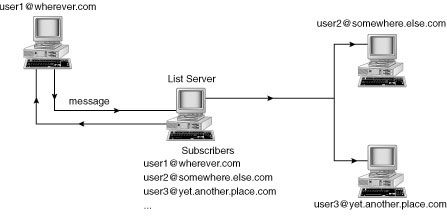
Using listservs is a great way to talk to other people in a "group" setting. Before you start looking for the right listserv, however, you need to find out more about listservs in general. Mailing Lists ExplainedAfter the advent of e-mail, users soon realized that being able to send e-mail to groups of people for collaboration and discussion would be very helpful. Thus, the first listserv was originally devised by the BITNET Information Center (BITNIC). This e-mail list "server" managed a large number of mailing lists, each one addressing a specific area of interest for network users and each having an independent set of list members. This service made the exchange of ideas and information among the members very convenient. How Listservs WorkThe functionality of a listserv is generally easy to understand. Remember that, by defining one word or phrase, you can create a nickname with your e-mail client to distribute e-mail to an individual or a group. Listservs work much the same way, only on a larger scale. A mailing list program runs on a computer and defines a unique e-mail address to distribute all e-mail sent to it. This listserv software automates the process of enabling people to add and remove their names from this giant "nickname" (called subscribing and unsubscribing), as well as a host of other functions. After this listserv is set up, anyone who subscribes to the listserv can send e-mail to it; that e-mail is, in most cases, automatically distributed to everyone on the mailing list, as the diagram shows in Figure 8.1. A list server acts as the distribution point for messages to be sent to multiple subscribers. Listserv PersonalitySo who maintains these listservs? How can one person keep track of hundreds or thousands of subscribers on one listserv? In fact, a person usually doesn't maintain the listserv. Many people don't realize that, for the most part, listservs are automated. After a listserv administrator sets up a listserv, he or she usually leaves it alone and lets it take care of itself. Two exceptions to this rule are the private and moderated listserv. A private listserv is simply one which requires an administrator's approval to join the list. With a moderated listserv, a human being usually approves subscription additions and removals also, but in addition approves message submissions before they are finalized. Usually, listservs that deal with highly volatile issues are moderated. New Term: Moderated listserv: Just as a debate has a moderator to make sure that both sides stick to the rules, so too do some listservs have a human moderator who makes sure that the rules of the listserv are being followed. Finding the Right ListservBefore using a listserv, you first need to actually find one that is of interest to you. You can find a listserv of interest in basically three ways:
The list tells you about hundreds of listservs from A to Z.
Looking for a listserv about dogs? CataList is the place to go. You cannot get an exhaustive list of every mailing list available with any of these three methods. Using them in combination, however, you are sure to find some listservs you can subscribe to. Signing On and Signing OffThe most important procedures to know when using listservs is how to get onto them and then how to get off. If you know what you're doing, getting on and off is easy. You definitely need to know a few points, however, to make your access of listservs easier. Easy OnAfter you find a listserv, you can subscribe to it. Most listservs are similar in how you can subscribe and unsubscribe. Depending on where you located the listserv you want to subscribe to, you should have specific instructions on where to subscribe. In general, though, you need to complete the same basic steps. To Do: Signing On a Listserv1. Send a new e-mail message to the address of the listserv or listserv administrator.2. Leave the Subject: field blank. 3. In the body of the message, you usually type subscribe Your Name. Some lists require you to type subscribe ListName Your Name. 4. If you have a signature attached to your messages, you should turn it off when sending this message.
Here's one last note: If you subscribe to a moderated listserv, getting a message confirming that you're on may take a day or so. You may even get a message from the moderator to confirm that you really want on the list. Waiting at least three days for a response before resubmitting a request to subscribe to a moderated listserv is usually a good idea. Easy OffYou may have many reasons for signing off a listserv. Maybe it isn't exactly what you thought, maybe you're tired of it, or maybe it has too much traffic for you to handle. Whatever the reason, you follow almost exactly the same steps to get off a listserv as you do to get on. To Do: Signing Off a Listserv1. Send a new e-mail message to the address of the listserv or listserv administrator.2. Leave the Subject: field blank. 3. In the body of the message, you usually type unsubscribe Your Name. Some lists require you to type unsubscribe ListName Your Name. 4. If you have a signature attached to your messages, you should turn it off when sending this message.
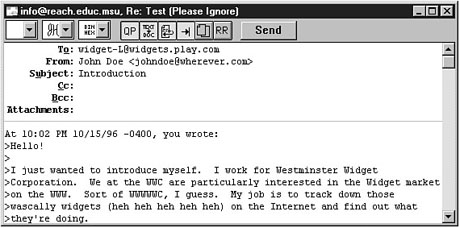
Sending and Responding to MessagesReading, sending, and replying to listserv messages involve the same basic steps as working with any other e-mail. You should know about a few differences, though. I describe these slight differences, along with a few handy rules, in the following sections. Sending Messages to a ListSending a message to an individual is really no different than sending one to a listserv. The only difference is in who receives your message. You can still fill in the To: and Subject: fields, as well as the body of the message. You should keep in mind a few points, however, when sending those messages. To begin, after reading the listserv mail for a couple of days, start by sending a message of introduction to the listserv. Make this message brief, but include information about yourself that might be of interest to other subscribers. Remember, you are hopefully subscribing to the listserv to contribute information as well as get it. The only time you might not want to do this is if you have subscribed to a particularly large listserv with lots of traffic.
You may receive a copy of your message shortly after sending it. When you subscribe to a listserv, you receive a copy of all mail sent to the list, including your own. Conversely, don't be alarmed if you don't receive a copy of your mail right away, especially if you belong to a moderated list. For your e-mail to show up back in your mailbox can take anywhere from a few minutes to a few days. Responding to Listserv MessagesAs with sending messages, responding to listserv messages is similar to replying to personal e-mail. You may need to pay special attention to one major difference, however. When you reply to an e-mail message, you generally know that it is going to be returned to the person who sent it to you. With a listserv, however, this is not necessarily the case. Listservs are set up one of two ways:
So how do you tell which way the listserv you've subscribed to is set up? Easy. Simply compose a reply to a listserv message. When you do, look at the information your e-mail client puts in the To: field. If a reply goes to the listserv address, as in Figure 8.4, the listserv is set up in the standard way. If the reply goes to the individual, the second type of listserv setup is used. Most listservs are set up to have replies automatically sent to the entire listserv. Listservs Helping ListsurfersOne of the best places to go for help in finding out what user options your listserv offers is the listserv itself. To get help, try the following steps with a listserv to which you are currently subscribed. To Do: Finding Help1. Send a new e-mail message to the address of the listserv or listserv administrator. This address is the same one you sent your subscription message to.2. Leave the Subject: field blank. 3. In the body of the message, type help. 4. If you have a signature attached to your messages, you should turn it off when sending this message. 5. You should get a message after a few seconds; it should look something like Figure 8.5. Again, the amount of time it takes you to get this message back could vary. Table 8.1 lists the most common listserv commands. You use these commands in the body of a message you send to the listserv administrator address. Table 8.1. Common listserv commands.
Most listservs offer help online. Depending on the listserv you use, other or different listserv commands may be available as well. The SET commands can be particularly useful, as can the GET command. Another important setting is the Digest option. When you first subscribe to a listserv, read the introductory message to learn whether you can get a digest of listserv postings once a day (as opposed to receiving each individual message in your mailbox). Getting a digest of a listserv--especially lists with high traffic--can save you a lot of time. Feel free to experiment with the different settings to see what style of listserv participation best fits your needs. SummaryIn this lesson, I gave you a lot of information about listservs. You should now understand that listservs are basically mass mailing lists that enable you to communicate with other people who are interested in the same things you are. You also learned many ways to find the right listserv for you. In addition, you learned some of the ins and outs of sending and replying to listserv messages, including how to watch particular headers to see to whom replies to the listserv go. Finally, I gave you some pointers about how to actually get some help from the listservs themselves. WorkshopThe following workshop helps solidify the skills that you learned in this lesson. Q&AQ It seems that listservs are everywhere, and I could easily start getting hundreds of messages a day. Is this true? A The simple answer is yes. You can easily get "oversubscribed," just as many people subscribe to too many magazines to read. Q How do I avoid "oversubscribing"? A You can avoid this situation in a couple of ways. First, make sure that you stay subscribed only to listservs that you really read. If you find yourself automatically deleting most listserv messages without reading them, you should unsubscribe. Second, go to Lessons 9, "Basic Journalism: Introduction to Newsgroups," and 10, "Getting the Scoop: Using Newsgroups," to find another alternative to listservs available on the Internet: newsgroups. Q Does it really matter who gets a listserv reply? After all, you're sending it for all to read. A Careful. What if someone sends an e-mail message to the listserv and you want to reply to the individual? Further assume that you say something unflattering about another listserv participant. What if you inadvertently send that message to the whole list? Could be embarrassing, no? Until you're used to how listservs work, always check the To: field before composing a reply to a listserv message. QuizTake the following quiz to see how much you've learned. Questions1. One of the advantages of listservs is that they all work the same. (a) True(b) False 2. Which of the following is probably not a good source for finding a listserv? (a) Your local community library (b) The World Wide Web Friends 3. Which listserv command retrieves a file listing for a listserv? (a) SEARCH (b) GET INDEX Answers1. (b) False. Although they are all similar, you will find some important differences in how they work.2. (a) Although the library is not a good example, the Web and friends are excellent sources to find out about listservs. 3. INDEX ActivityGo to at least two different sources to find at least three listservs. Subscribe to all three. Then find the one you use the least and unsubscribe to it. If you find them all wonderfully helpful, great! You've hit the jackpot!
|
|
|
Popular Tutorials
-
 MS Access
1109
MS Access
1109
-
 C++
1222
C++
1222
-
 HTML
584
HTML
584
-
 JavaScript
616
JavaScript
616
-
 Vbscript
873
Vbscript
873
-
 Oracle
473
Oracle
473
-
 VC++
875
VC++
875
-
 SQL
2959
SQL
2959
-
 XML
514
XML
514
-
 Java
814
Java
814
-
 Perl
455
Perl
455
-
 Linux
451
Linux
451