Web based School
Understanding E-Mail |
 |
 |
Chapter FiveUnderstanding E-MailE-mail still makes up a majority of Internet traffic today because everyone with Internet access has an e-mail account, even though he or she may not have access to newsgroups, the World Wide Web, or other portions of the Internet. Undoubtedly, 20 million people can send a lot of e-mail! In this lesson, you find the answers to the following questions:
No matter what e-mail client you use, you will find the concepts and principles in this lesson universal. The First Step: E-Mail AddressesE-mail addresses are relatively easy to understand. In fact, if you read Lesson 1, "The Internet: What's It Really Like?" you're already halfway there. Every e-mail address has three necessary elements: n User ID: Every person with an e-mail address has a user identification of some sort. It is usually something simple, like johndoe, but can be more complex.
So, to put it all together, a typical e-mail address contains all three of the preceding elements. One example of an e-mail address is johndoe@nomansland.com.
Why Do You Use E-Mail?I gave you some examples and reasons for using e-mail in Lesson 2, "Internet Uses in the Modern World," but you're ready for a little more detail now. The examples in the following sections are not meant to be exhaustive but should be enough to convince you that e-mail is a valuable tool. "Let's Do E-Mail"Our society is becoming increasingly interconnected. Networking, in the personal and societal sense of the word, is vital. The old maxim "It's not who you know, it's what you know" has never been truer. And you'll find no better networking tool than e-mail. The following are some examples of how you can use e-mail to network with others:
Cheaper Than a Dime a MinuteSorry, long-distance companies, you don't have the lowest rates; e-mail does. Even among commercial providers who charge hourly to use their service, you simply can't communicate less expensively than by sending e-mail. For the $2.95 per hour a typical service provider might charge for access, you can send dozens of e-mail messages for the same price it would cost you to place a typical three-minute long-distance phone call. Of course, if you get Internet access through a provider that charges a flat fee with no hourly charges, you save even more. In addition, using e-mail usually provides a big time savings. E-mail doesn't have to sit on hold, play phone tag, or deal with busy signals, even during the busiest times of day. You can sit down, type out your message, and move on, knowing that the person on the other end will get your message as soon as possible.
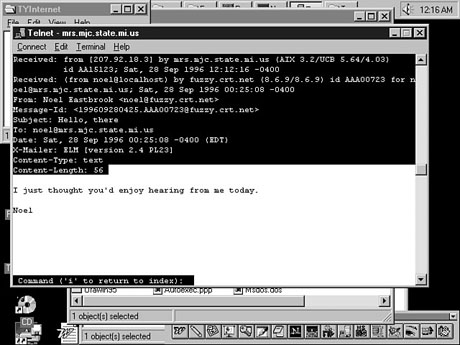
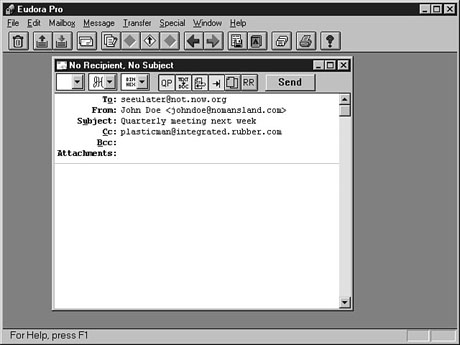
Anatomy of an E-Mail MessageThe e-mail message is the cornerstone of all communications on the Internet. But what is in an e-mail message and how do the parts work together? Every e-mail message contains two basic parts: the header and the body. To help you understand this description, think of any typical letter you write and mail to someone. You write your letter on paper, which then goes in an envelope, where you provide the recipient's name, address, city, state, and ZIP code. You can think of an e-mail message header as a digital envelope and the body as your electronic letter. Message HeadersBecause your e-mail message will go through dozens of high-speed computer networks on the way to its destination, an e-mail header is by necessity more complex than the name and address you put on an envelope. Figure 5.1, for example, shows a typical e-mail message header. Fortunately, you don't need to know or worry about what all the different items in a message header are. Instead, slow down your racing heart by viewing what a typical message header looks like when you compose e-mail, as shown in Figure 5.2. The following are the different headers you need to be concerned about when sending e-mail:
Imagine if you had to put all this information on your next letter to Grandpa. Now this header is more like it. You really need to know only a few header elements.
When all is said and done, a message header looks something like the one pictured in Figure 5.3. A typical e-mail header is simple and easy to understand.
The BodyThe body of an e-mail message is even easier to describe. It's simply the text that you want the person on the other end to see when he or she receives your message. In the next section, "E-Mail Etiquette and Conventions," I talk about some of the common rules to follow, but here are a few general rules:
After all your hard work and diligence, you may end up with a short and concise message like the one shown in Figure 5.4. Often, a short e-mail message is effective. E-Mail Etiquette and ConventionsE-mail etiquette is one of those areas that could easily take up a whole guide. In fact, you can find entire guides about the etiquette and standards for e-mail use. In the following sections, I talk about only a few of the bigger areas involved in how to "make friends and influence people" through e-mail. Mind Your MannersWould you go to a foreign country for an extended visit without trying to learn about (and adapt to) that country's culture? If you did, you might end up getting funny stares because you refused an offer of food, or you might get kicked out of the country because you didn't realize that laughing out loud at someone's mistake is considered a grave insult. Well, the same is true on the Internet. As I talked about earlier, the Internet culture has been around for 25 years. Typing a message in the wrong way might just get you flamed. New Term: Flame: On the Internet, a flame is a message that is, um, quite hot. Flames are messages that often contain profanity, question your heritage, and basically berate and belittle people. Flames can be either justified or unjustified. DO be as polite and courteous in e-mail as you would be face-to-face. People are more often inclined to be rude when they have a sense of anonymity. DO exercise self-control. I use what I call the "24-hour rule." If I receive an e-mail message that offends me or makes me mad, I wait 24 hours before replying. More often than not, I realize the person who sent me the insulting message isn't worth my time. The rest of the time, I come to the conclusion that I have more important things to do. DO try to be considerate by using proper grammar and punctuation so that the recipient can understand what you're saying. Lots of run-on sentences with oodles of spelling errors make for a bad reading experience. DO use common sense. If you write a message for which you want a response, tell the recipient to please respond. If you're writing to someone you don't know for the first time, introduce yourself first. Courtesy and common sense are qualities to which almost everyone responds. DON'T SCREAM. TYPING IN ALL CAPITALS IS
CONSIDERED SCREAMING AND IS OFFENSIVE. Type as you would write a normal letter, using
proper punctuation and syntax. DON'T spam. Spam is any mass-mailed material meant for self-promotion, advertisement, or pure silliness. Spam, or electronic junk mail, is probably one of the most offensive acts on the Internet and, if you happen to send spam to an Internet veteran, you could find your e-mail account full of megabytes of junk until you apologize. Tips for Brevity and ClarityBelieve it or not, you can shorten and clarify even when you're typing in simple text message. The following are some commonly used abbreviations on the Internet:
To further help you clarify your point, you also can
use a couple other accepted conventions:
EmoticonsConveying emotions in an e-mail message is tough. It is, in many people's opinions, one of the reasons that so much flaming and miscommunication occur on the Net. Face it, people interpret communication based not just on words, but on tone of voice, curvature of the lips, position of the body, and more. None of these factors are present in e-mail. It's just you, the text, and the reader. Using emoticons (short for emotional icons) is one way of trying to get across the emotion in what you say. The following is a short list of but a few of the thousands of emoticons that you will see in your e-mail travels:
Look at the sample e-mail message in Figure 5.5. It incorporates many of the items listed in this section. Can you spot them all? This message has many elements of effective e-mail. SummaryIn this lesson, I took you through a quick tour to understanding e-mail. You learned that the user ID, an @ sign, and a domain name make up every e-mail address on the Internet. You also discovered some of the practical reasons you might want to use e-mail. I then went on to explain the different parts of a message header (To:, From:, Subject:, CC:, BCC:, and Attachments:), as well as appropriate material for message bodies. Finally, I described some of the nuances of using e-mail, such as etiquette, proper ways to make your messages more concise and clear, and how to add emotion to what you write. WorkshopThe following workshop helps solidify the skills that you learned in this lesson. Q&AQ I've heard that emoticons can really annoy some people. If this is true, should I use them? A Hey, some people get annoyed if you look at them. Should you stop looking at people? Yes, some people really dislike emoticons, but these people will usually tell you. For the most part, when you use emoticons appropriately, many people will appreciate your attempts to communicate more effectively. Q I like to see all the little details. Can I see the entire header of all my messages? A If you really want to see the entire header, most e-mail clients provide ways of viewing it. Look for preferences or options in your client that talk about how to "expand headers" or "display header information." Q I have a friend who gave me an e-mail address that didn't look like any of your examples. Is it likely that this address is correct? A If the address has a continuous string of characters, followed by an @ sign and then another continuous string of characters (some of which are usually periods), it is probably a valid address. Just make sure that no commas or spaces appear in the address, and give it a try. QuizTake the following quiz to see how much you've learned. Questions1. Which e-mail address is likely invalid? (a) example.no1@another.world.com(b) 99%clx!!x%@uunet.net example 3@another.galaxy.com 2. Do e-mail messages contain a Date: header? (a) Yes (b) No 3. Read the following sentence: Is this message likely a(n) (a) Friendly message (b) Flame Inappropriate use of e-mail Answers1. Remember, no matter how weird an e-mail address looks, you only know it's invalid if it has a space or a comma.2. (a) Yes. Just because it doesn't show up doesn't mean it isn't a header. 3. (a) Notice the underscore marks for emphasis and not capital letters. Also note that the sender used a smiley emoticon at the end of the line. ActivityRent a movie or record a favorite TV show; then pick out a minute or two of dialogue you particularly like. See if you can transcribe the dialogue into acceptable "e-mailese." Show the dialogue to a friend or family member to see if he or she can tell you what emotions and feelings are being expressed. (You should pick someone who is familiar with e-mail to review your dialogue; otherwise, you'll have to explain what all your marks and abbreviations mean.)
|
|
|
Popular Tutorials
-
 MS Access
1109
MS Access
1109
-
 C++
1222
C++
1222
-
 HTML
584
HTML
584
-
 JavaScript
616
JavaScript
616
-
 Vbscript
873
Vbscript
873
-
 Oracle
473
Oracle
473
-
 VC++
875
VC++
875
-
 SQL
2959
SQL
2959
-
 XML
514
XML
514
-
 Java
814
Java
814
-
 Perl
455
Perl
455
-
 Linux
451
Linux
451