Web based School
Chapter 13
Scorpion Roundup: Action By Moonlight
CONTENTS
YesterChapter you saw how sound is supported in Java. You also wrote a fairly simple applet to demonstrate how sound can be used in a creative way. ToChapter you go a step further by creating your second complete game, including sound effects and music. The entire lesson toChapter is devoted to the design and development of this game, which will provide you with another invaluable Java game creation experience.
The game you develop toChapter is called Scorpion Roundup, and it uses the all too familiar sprite classes to implement its animation and sprite interactions. It uses the AudioClip class you learned about in yesterChapter's lesson to represent both sound effects and music. Unlike the Traveling Gecko game you developed a few Chapters ago, which used the keyboard exclusively for user input, Scorpion Roundup uses the mouse as the user input device. You'll see why when you get into the game.
The following topics are covered in toChapter's lesson:
- Designing Scorpion Roundup
- Sample applet: Scorpion Roundup
Designing Scorpion Roundup
Unlike Traveling Gecko, Scorpion Roundup isn't directly modeled after any other game. Before getting into how the game plays, you need some background on the premise surrounding the game, because it is based on a very real concept that is pretty interesting.
Scorpions are fairly popular as pets. Not quite as popular as dogs or cats, but what do you expect? They are also useful in captivity for retrieving their poison, which is used in developing antivenin medicine for people and pets stung by them. They are also used to make souvenirs; just visit Sky Harbor Airport in Phoenix, Arizona, and you'll see plenty of scorpions frozen in plastic in the gift shops. The point here is that there are a variety of human uses for scorpions. And where there's a demand, there's a supply. This means that someone has to take on the job of heading out into the desert and catching the rascals.
Catching a scorpion isn't as easy as you might think, though. They are nocturnal creatures, so they only come out at night. The thought of taking off into the desert at night might not appeal to everyone, but conquering your fear of the dark desert isn't the only hurdle when hunting for scorpions: It's hard to find them at night! One of those brave souls that head into the darkness in search of scorpions figured out a neat approach to finding scorpions in the dark-using a black light. Black lights give off a greenish glow that illuminates certain objects, including scorpions. Therefore, to catch scorpions you simply head out into the darkness with a black light and a net. That's the premise of the Scorpion Roundup game. You're a scorpion hunter armed with a net, working within a landscape illuminated by a black light that shows the scorpions with their greenish glow.
| Warning |
Real scorpions are caught by real professionals. For your own safety, I suggest only trying to catch the Java scorpions you meet in toChapter's lesson! |
Based on this description of the game, you might already see why the mouse is the ideal input device for the game. This is because you are controlling a net, which is a hand-held object in real life. The best way to handle controlling a net with the mouse is to make the net a sprite. You also need a scorpion sprite to model the scorpions that you are trying to catch.
At this point, the game is defined enough to move into more specifics. Let's start by taking a look at the sprites in more detail.
Sprites
You've established that the game requires two types of sprites for modeling the net and the scorpions. You also know that the net sprite is to be controlled by the mouse. Basically, all you need the net sprite to do is follow the mouse around, which requires very basic sprite movement. Based on this requirement of the net sprite, it doesn't sound like you need to use a derived class for it; you don't need any functionality beyond that provided in the base Sprite class. This is a correct assumption because deriving a new class is usually only necessary when you need to add new functionality.
This means that Scorpion Roundup really only needs one derived sprite class: the Scorpion sprite class. What should this sprite do? To make the game a little more simple to implement, let's limit the scorpion sprites to traveling in horizontal directions only. The scorpions can run in either the left or right direction, which means that they can also face in either the left or right direction. You're probably thinking that the directional sprite you developed last week might work well here. Unfortunately, it won't work in this case because it was specifically designed for sprites having exactly eight directions; the scorpions in Scorpion Roundup only have two directions (left and right).
The scorpion sprite needs to be frame animated so that the scorpions look like they are moving their legs and running. You've also established that the sprite needs two directions. Anything else? Actually, there is one other thing. The goal of the game is to catch as many scorpions as possible. However, you haven't established how a game is lost; the game has no negative result when you don't catch any scorpions. One solution is to have the scorpions get away when they reach the other side of the screen, rather than wrapping around. Furthermore, you could track how many scorpions get away and end the game when a certain number of them escape. The only place to determine when a scorpion has made it across is within the Scorpion class. Therefore, the Scorpion class needs some method of determining when a scorpion has escaped and modifying a value accordingly.
Game Play
Now that you understand how the sprites work in the game, let's move on to the specifics of the game itself. You've established that the goal of the game is to use a net to catch scorpions that are running across the screen. You lose the game when you miss a certain number of scorpions. You never really win; you just try to catch as many scorpions as possible.
One thing you haven't covered is how the player is to be challenged as the game goes on. Few games remain fun without increasing the challenge as the play progresses, and Scorpion Roundup is no different. The easiest way to make the game harder is to speed up the scorpions themselves. You could also increase the speed at which the scorpions are created; more scorpions on the screen at a time mean more work for the player.
How do you establish when to increase the difficulty of the game? Well, you could just do it behind the scenes based on time or on how many scorpions have been caught. I like the latter approach because it directly increases the difficulty based on the performance of the player. The only catch is that most game players like to know when they have progressed to another difficulty level. This is easy enough to accommodate; just display the current level along with the number of scorpions caught and lost. You then increment the difficulty level when a certain number of scorpions have been caught.
Options
That wraps up the play aspects of the game, but you should consider a few other small issues related to how the player controls the game. The first one is how to start a new game. You might recall that the Traveling Gecko game you developed a few Chapters ago used a New Game button to start new games. That approach was fine in Traveling Gecko because the button was drawn on top of one of the rocks. In Scorpion Roundup, the game appearance would suffer more by having a button drawn on top of everything. The easy way around starting a new game without using a button is to simply allow the player to start a game with a certain key press, such as the N key.
| Note |
You actually could use buttons without covering up any of the game area by using an awt Canvas object as the game area, rather than the applet window. This is a good way to handle sharing the applet window between user interface controls and the game area, but it involves more complexity. I didn't want this added complexity to make the game implementation more difficult to understand. |
The only other issue in Scorpion Roundup that needs to be addressed is music. Because the game uses looped music, it would be nice for the player to be able to easily turn it on and off. Using the keyboard approach again, the M key makes perfect sense as a music toggle key.
That wraps up the design phase for Scorpion Roundup. Hopefully, you're now anxious to dive into the details of implementing all these cool ideas to build a real game!
Sample Applet: Scorpion Roundup
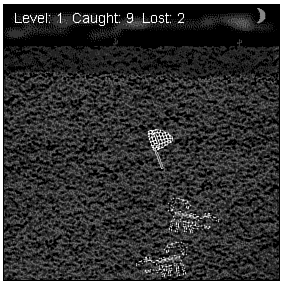
The Scorpion Roundup applet is your second fully functional Java game and shows off the sound skills you developed in yesterChapter's lesson. Figure 13.1 shows a screen shot of a fast and furious game of Scorpion Roundup. The complete source code, executable, images, and sounds for Scorpion Roundup are located on the accompanying CD-ROM.
Figure 13.1 : The Scopion Roundup sample applet in action.
Scorpion Roundup begins by creating the net sprite, which you can move around the play area with the mouse. Scorpions then begin to run across the screen. If you click on a scorpion with the net, you hear a sound indicating that you got him. If you miss, you hear a sound of the net swishing through the air. All the while, the music is playing in the background.
The current difficulty level is displayed in the upper left corner of the screen, along with the number of scorpions caught and lost. The level is incremented and a cheering sound is played each time you catch 15 new scorpions. The scorpions start running faster and appearing quicker with each increasing difficulty level.
If you let five scorpions get away, the game ends and you see a Game Over message. Figure 13.2 shows Scorpion Roundup right after the game ends.
Figure 13.2 : A Scorpion Roundup game that has come to an end.
At this point, you can simply press the N key to start a new game. If you haven't run Scorpion Roundup yet, please load the CD-ROM and try it out. If you're not the type that responds well to the word "please," then by all means skip playing the game and read on!
The Sprite Classes
The only derived Sprite class used in Scorpion Roundup is the Scorpion class, which models a horizontally running scorpion. Listing 13.1 shows the source code for the Scorpion class.
Listing 13.1. The Scorpion class.
public class Scorpion extends Sprite {
public static Image[][] image;
private static Random rand = new Random(System.currentTimeMillis());
public Scorpion(Component comp, int dir, int speedInc) {
super(comp, image[dir], 0, 1, 1, new Point((dir == 0) ?
(comp.size().width - image[dir][0].getWidth(comp)) : 0,
60 + Math.abs(rand.nextInt() % 5) * 44), new Point((dir == 0)
? (-5 - speedInc) : (5 + speedInc), 0), 10,
Sprite.BA_DIE);
}
public static void initResources(Applet app, MediaTracker
tracker, int id) {
image = new Image[2][2];
for (int i = 0; i < 2; i++)
for (int j = 0; j < 2; j++) {
image[i][j] = app.getImage(app.getCodeBase(),
"Res/Scorp" + i + j + ".gif");
tracker.addImage(image[i][j], id);
}
}
protected void setCollision() {
collision = new Rectangle(position.x + 3, position.y + 3,
position.width - 6, position.height - 6);
}
public BitSet update() {
// See if the scorpion escaped
BitSet action = super.update();
if (action.get(Sprite.SA_KILL))
ScorpionRoundup.lost++;
return action;
}
}
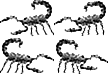
The Scorpion class uses a two-dimensional array of images to show the animations of the scorpion kicking its legs and wagging its tail in each direction. Figure 13.3 shows the images used by the Scorpion class.
Figure 13.3 : The images used by the Scorpion class.
The constructor for Scorpion takes parameters specifying the direction and speed increment for the scorpion, dir and speedInc. The dir parameter determines in which direction the scorpion travels, as well as which side of the screen it starts from, and the parameter can be set to either 0 (left) or 1 (right). The speedInc parameter specifies how much to increase the scorpion's speed beyond its default speed. This parameter is how new scorpions become faster as the difficulty level of the game increases.
The update method in Scorpion is overridden to track when the scorpion makes it across the screen. This works rather indirectly, so bear with me. Notice in the constructor for Scorpion that the bounds action is set to BA_DIE. If you recall, the bounds actions determine what a sprite does when it reaches a boundary (the other side of the applet window, in this case). The BA_DIE bounds action causes the SA_KILL flag to be returned by the default sprite update method, eventually resulting in the sprite being removed from the sprite list. By looking for this flag in Scorpion's overridden update method, you can tell when the scorpion makes it across the screen unscathed. Pretty tricky, huh?
If the scorpion has made it across safely, the ScorpionRoundup.lost variable is incremented. This variable is a public static member of the ScorpionRoundup applet class that can be accessed by other classes, such as Scorpion. You'll learn more about it later in this lesson when you get into the ScorpionRoundup class.
Scorpion Roundup uses a derived version of the SpriteVector class called SRVector. Listing 13.2 contains the source code for the SRVector class.
Listing 13.2. The SRVector class.
public class SRVector extends SpriteVector {
public SRVector(Background back) {
super(back);
}
Sprite isPointInside(Point pt) {
// Iterate backward through the sprites, testing each
for (int i = (size() - 1); i >= 0; i--) {
Sprite s = (Sprite)elementAt(i);
if ((s.getClass().getName().equals("Scorpion")) &&
s.isPointInside(pt))
return s;
}
return null;
}
protected boolean collision(int i, int iHit) {
// Do nothing!
return false;
}
}
The SRVector class overrides two methods in SpriteVector: isPointInside and collision. The overridden isPointInside method is necessary to distinguish between the user clicking a scorpion sprite and clicking the net sprite. Without overriding this method, you would never be able to detect when a scorpion is clicked, because the net sprite would always be in the way. This is a result of the fact that the net sprite follows the mouse around and has a higher Z-order than the scorpions (so it can always be seen). The simple solution is to look only for sprites of type Scorpion in the isPointInside method.
Because the scorpions don't need to be able to collide with each other or the net sprite, it makes sense to do nothing when a collision occurs. This is carried out by simply returning false from the collision method.
You've now seen the sprite classes used by ScorpionRoundup. It's time to check out the applet class.
The ScorpionRoundup Class
The ScorpionRoundup class takes care of all the high-level animation and sound issues, as well as handling user input. First take a look at the member variables defined in the ScorpionRoundup class:
private Image offImage, back, netImage;
private AudioClip music, netHit, netMiss, applause;
private Graphics offGrfx;
private Thread animate;
private MediaTracker tracker;
private SRVector srv;
private Sprite net;
private int delay = 83; // 12 fps
private Font infoFont = new Font("Helvetica",
Font.PLAIN, 14);
private FontMetrics infoMetrics;
private Random rand = new
Random(System.currentTimeMillis());
private boolean musicOn = true;
private static int level, caught;
public static int lost;
You might be curious about a few of these member variables. The four AudioClip member variables hold audio clips for the music and sound effects used in the game. The musicOn member variable is a boolean variable that determines whether the music is on or off. The level, caught, and lost member variables are used to store the state of the game: level is the current difficulty level, caught is how many scorpions have been caught, and lost is how many scorpions have escaped.
The init method in ScorpionRoundup is pretty straightforward-it loads and initializes all the images and sounds used by the game:
public void init() {
// Load and track the images
tracker = new MediaTracker(this);
back = getImage(getCodeBase(), "Res/Back.gif");
tracker.addImage(back, 0);
netImage = getImage(getCodeBase(), "Res/Net.gif");
tracker.addImage(netImage, 0);
Scorpion.initResources(this, tracker, 0);
// Load the audio clips
music = getAudioClip(getCodeBase(), "Res/Music.au");
netHit = getAudioClip(getCodeBase(), "Res/NetHit.au");
netMiss = getAudioClip(getCodeBase(), "Res/NetMiss.au");
applause = getAudioClip(getCodeBase(), "Res/Applause.au");
}
The stop method has been pretty standard in all the applets you've seen thus far. However, in ScorpionRoundup it has an extra line of code that stops looping the music audio clip:
public void stop() {
if (animate != null) {
animate.stop();
animate = null;
}
music.stop();
}
The extra line of code, music.stop(), is important because it ensures that the music is stopped when the thread is stopped. Without this simple method call, the music would continue to play even after a user has left the Web page containing the game.
| Warning |
Be sure to always stop all looped sounds when the applet thread is stopped. You do this simply by calling the stop method on the AudioClip object from within the applet's stop method, as you just saw in ScorpionRoundup. |
The run method in ScorpionRoundup calls the newGame method, which you'll learn about in a moment. Listing 13.3 contains the source code for the run method.
Listing 13.3. The ScorpionRoundup class's run method.
public void run() {
try {
tracker.waitForID(0);
}
catch (InterruptedException e) {
return;
}
// Set up a new game
newGame();
// Update everything
long t = System.currentTimeMillis();
while (Thread.currentThread() == animate) {
srv.update();
repaint();
try {
t += delay;
Thread.sleep(Math.max(0, t - System.currentTimeMillis()));
}
catch (InterruptedException e) {
break;
}
}
}
After setting up a new game, the run method enters the main update loop where it updates the sprite list and forces a repaint. Speaking of updating, the update method does a few new things in ScorpionRoundup; check out Listing 13.4.
Listing 13.4. The ScorpionRoundup class's update method.
public void update(Graphics g) {
// Create the offscreen graphics context
if (offGrfx == null) {
offImage = createImage(size().width, size().height);
offGrfx = offImage.getGraphics();
infoMetrics = offGrfx.getFontMetrics(infoFont);
}
// Draw the sprites
srv.draw(offGrfx);
// Draw the game info
offGrfx.setFont(infoFont);
offGrfx.setColor(Color.white);
offGrfx.drawString(new String("Level: " + level +
" Caught: " + caught + " Lost: " + lost), 10, 5 +
infoMetrics.getAscent());
// Is the game over?
if (lost >= 5) {
Font f = new Font("Helvetica", Font.BOLD, 36);
FontMetrics fm = offGrfx.getFontMetrics(f);
String s = new String("Game Over");
offGrfx.setFont(f);
offGrfx.drawString(s, (size().width - fm.stringWidth(s)) / 2,
((size().height - fm.getHeight()) / 2) + fm.getAscent());
// Stop the music
music.stop();
}
else
// Add a new scorpion?
if ((rand.nextInt() % (20 - level / 2)) == 0)
srv.add(new Scorpion(this, 1 -
Math.abs(rand.nextInt() % 2), level));
// Draw the image onto the screen
g.drawImage(offImage, 0, 0, null);
}
After drawing the sprites, the update method draws the game information in the upper left corner of the applet window. The game information includes the difficulty level, the number of scorpions caught, and the number of scorpions lost. It then checks the lost member variable to see whether it is greater than or equal to 5. If so, the game has ended, so update draws the Game Over message and stops the music. If the game isn't over, update determines whether or not it should add a new scorpion. This determination is based on the current level and a little randomness.
The mouse input in the game is handled by four different methods: mouseEnter, mouseExit, mouseMove, and mouseDown. mouseEnter and mouseExit show and hide the net sprite based on the mouse being inside or outside the applet window:
public boolean mouseEnter(Event evt, int x, int y) {
if (net != null)
net.show();
return true;
}
public boolean mouseExit(Event evt, int x, int y) {
if (net != null)
net.hide();
return true;
}
Showing and hiding the net sprite based on the mouse being in the applet window visually helps tie the net to the mouse pointer. The mouseMove method simply sets the position of the net to the position of the mouse, which causes the net to follow the mouse around:
public boolean mouseMove(Event evt, int x, int y) {
if (net != null)
net.setPosition(new Point(x - 10, y - 10));
return true;
}
The last of the mouse input methods, mouseDown, checks to see whether a scorpion has been caught by calling the isPointInside method:
public boolean mouseDown(Event evt, int x, int y) {
if (lost < 5) {
Sprite s = srv.isPointInside(new Point(x - 5, y - 5));
if (s != null) {
// Remove the scorpion and increase number caught
srv.removeElement(s);
if ((++caught % 15) == 0) {
// Increase the level and play applause sound
level++;
applause.play();
}
else
// Play the net hit sound
netHit.play();
}
else
// Play the net miss sound
netMiss.play();
}
return true;
}
If no scorpion has been caught, the mouseDown method plays the netMiss audio clip. If a scorpion has been caught, the scorpion sprite is removed from the list, and the caught member variable is incremented. If caught is divisible by 15, level is also incremented, and the applause audio clip is played. This results in a new level being reached for every 15 scorpions that are caught.
The keyboard input in Scorpion Roundup is only used to start a new game or toggle the music on and off. The keyDown method checks for these keys and takes the appropriate actions:
public boolean keyDown(Event evt, int key) {
if ((key == (int)'n') || (key == (int)'N'))
newGame();
else if ((key == (int)'m') || (key == (int)'M')) {
musicOn = !musicOn;
if (musicOn)
music.loop();
else
music.stop();
}
return true;
}
Finally, you arrive at the newGame method:
void newGame() {
// Set up a new game
level = 1;
caught = lost = 0;
srv = new SRVector(new ImageBackground(this, back));
net = new Sprite(this, netImage, new Point((size().width -
netImage.getWidth(this)) / 2, (size().height -
netImage.getHeight(this)) / 2), new Point(0, 0), 20,
Sprite.BA_WRAP);
srv.add(net);
if (musicOn)
music.loop();
}
The newGame method does everything necessary to initialize and start a new game: The level, caught, and lost member variables are initialized, the sprite list is re-created, and the net sprite is re-created and added back to the list. The music is also restarted.
That wraps up the details of Scorpion Roundup, your second complete Java game. You are fast becoming a Java game expert! However, before you throw the guide down and start hacking away at a game of your own, make sure you fully understand how this game works. I encourage you to try your hand at enhancing it and adding some new features. For some enhancement ideas, check out the "Exercises" section at the end of this lesson.
Summary
In toChapter's lesson, you built your second complete Java game-Scorpion Roundup. You began by learning a little background on the game, followed by fleshing out the conceptual game design. With the groundwork laid, you saw that it wasn't so bad moving on to the actual game implementation. It was still a lot of work, but it resulted in a pretty neat game that made use of mouse input, sound effects, and music.
With another complete game under your belt, you're probably feeling pretty invincible. It's a good thing too, because tomorrow you're going to shift gears and tackle an often difficult and sobering aspect of game programming-debugging. Tomorrow's lesson covers all the big issues relating to hunting down and ridding your games of bugs. But you don't need to worry about that now; go play a few games of Scorpion Roundup and relax!
Q&A
| Q | Are scorpions really popular as pets? |
| A | Yes they are. If you're interested in adopting your own pet scorpion, the folks at Glades Herp, Inc. would be glad to help you out. They are on the Web and can be found at http://www.tntonline.com/gherp/gherp.asp. |
| Q | Why are the scorpions in the game colored green? |
| A | Because scorpion hunters use black lights to illuminate scorpions at night, thereby making them visible. The black light causes the scorpions to take on a greenish glow. |
| Q | Why isn't the net sprite implemented as a new sprite class? |
| A | Because it doesn't require any new functionality beyond that provided by the Sprite class. You should make a strong effort to only derive new classes when you specifically need to add new functionality. |
| Q | Why is the music in Scorpion Roundup so repetitive? |
| A | The music is implemented as a looped audio clip. Because audio clips tend to take up a lot of space and therefore take a while to transfer over an Internet connection, it is important to keep them as short as possible. Although it is short and repetitive, the music in Scorpion Roundup still manages to add an interesting dimension to the game without taking all Chapter to transfer. |
Workshop
The Workshop section provides questions and exercises to help you get a better feel for the material you learned toChapter. Try to answer the questions and at least think about the exercises before moving on to tomorrow's lesson. You'll find the answers to the questions in appendix A, "Quiz Answers."
Quiz
- Which major U.S. airport is a good place to find scorpion
souvenirs?
- Why do you need the SRVector class?
- Why do scorpions only come out at night?
- Why is the music stopped in the stop method of the ScorpionRoundup class?
- Why is the lost member variable in the ScorpionRoundup class declared as public static?
- Why do you need the SRVector class?
Exercises
- Order your own pet scorpion and give it a loving home.
- Make the net a frame-animated sprite that gives the effect of the net waving in the air.
- Buy a black light and see whether your pet scorpion really looks green.
- Change the sound effects and music to use your own custom audio clips.
- Add some entirely new sound effects, such as a laughter sound when a scorpion gets away.
- Use the Scorpion Roundup code to create an entirely new game. For example, you could change the graphics and sound, modify the code a little, and turn the game into a target shooting game. Just change the background to a picture of a sky, the net to cross-hairs, and the scorpions to clay targets. Then modify the code so that the clay targets arch through the air, and use a gunshot sound instead of the swoosh sound used for the net. You'll have a whole new game!
- Make the net a frame-animated sprite that gives the effect of the net waving in the air.




Popular Tutorials
-
 MS Access
1109
MS Access
1109
-
 C++
1222
C++
1222
-
 HTML
584
HTML
584
-
 JavaScript
616
JavaScript
616
-
 Vbscript
873
Vbscript
873
-
 Oracle
473
Oracle
473
-
 VC++
875
VC++
875
-
 SQL
2959
SQL
2959
-
 XML
514
XML
514
-
 Java
814
Java
814
-
 Perl
455
Perl
455
-
 Linux
451
Linux
451