Web based School
| Traversing Folders |
 |
 |
As you accumulate a large number of Web documents, you will likely begin organizing different Web applications within separate directories subordinate to your root directory -- your main Web directory. The figure below illustrates this idea with three subdirectories within root directory Website, each containing Web pages. Application3 folder, in addition, contains a Media folder for storing all graphic files pertaining to that application.
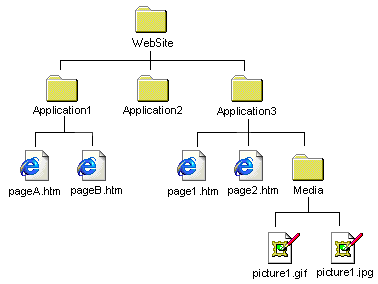
When coding the src attribute in an <img/> tag or the href attribute in an <a href> tag, you need to trace the directory hierarchy from the Web page containing the tag to the location of the actual image or page specified in the link. This means that you may need to go down one or more levels of directories to find the picture or linked page, or that you need to go up the hierarchy to find the picture or page, or that you need to go up the hierarchy into a higher-level directory and then down into the folder containing the image or link.
The reason for this up and down traversing of directories is because linked pages or images are referenced relative to the page containing the link. For sake of argument, in the above illustration suppose that pageA.htm in directory Application1 contains an <img/> tag pointing to picture1.gif in the Media subdirectory of directory Application 3. In order to make the src reference from pageA.htm to picture1.gif the following path is followed:
- Go up one level from the Application1 folder to the WebSite folder.
- Go down one level from the WebSite folder to the Application3 folder.
- Go down one more level from the Application3 folder to the Media folder.
Two types of path specifications are used to traverse a directory hierarchy to locate Web pages and graphic images:
- Code two dots followed by a forward slash ("../") for each level traversed up the folder hierarchy.
- Code a folder name followed by a forward slash ("/") for each level traversed down the folder hierarchy;
Therefore, the URL for an <img src=""/> link from page1.htm to picture1.gif would be
<img src="../Application3/Media/picture1.gif"/>
From the current directory containing page1.htm, back up one level (../) from the Application1 directory to the WebSite directory. From the WebSite directory, go down through the Application3/ and Media/ directories to find picture1.gif.
Normally, path specifications are not as complex as this. It is common for a folder containing Web pages to collect all images used on those page in a single Media subfolder inside the Web page folder. Then, a src link to an image would only need to point down one level of directories:
<img src="Media/picture.gif"/>
The above examples connect from a Web page to an image. The same process is followed when linking from one page to another. In the above directory structure a link appearing on pageA.htm to page2.htm would be
<a href="../Application3/page2.htm">To to page2.htm</a>
It is fairly simple to trace the path from a Web page to a graphic image or other Web page if you focus on the folder structure, starting with the folder containing the page and ending at the folder containing the file. Also, remember to pay attention to the directory tree; you must follow the hierarchy up and down the branches of the tree rather than making lateral references where no lines connect the folders.
|
|
Popular Tutorials
-
 MS Access
1109
MS Access
1109
-
 C++
1222
C++
1222
-
 HTML
584
HTML
584
-
 JavaScript
616
JavaScript
616
-
 Vbscript
873
Vbscript
873
-
 Oracle
473
Oracle
473
-
 VC++
875
VC++
875
-
 SQL
2959
SQL
2959
-
 XML
514
XML
514
-
 Java
814
Java
814
-
 Perl
455
Perl
455
-
 Linux
451
Linux
451



