Overview
What is HTTP Analyzer?
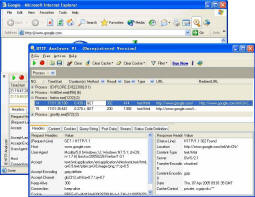
HTTP Analyzer is a utility that allows you to capture HTTP/HTTPS traffic in real-time. It displays a wide range of information, including Header, Content, Cookies, Query Strings, Post data, Request and Response Stream, redirection URLs and more.
In depth
A closer look at HTTP Analyzer
HTTP Analyzer is a utility that allows you to capture HTTP/HTTPS traffic in real-time. It displays a wide range of information, including Header, Content, Cookies, Query Strings, Post data, Request and Response Stream, redirection URLs and more. It also provides cache information and session clearing, as well as HTTP status code information and several filtering options. A useful developer tool for performance analysis, debugging and diagnostics. HTTPS is available if the application uses the Microsoft WININET API(ex.ie, outlook) or Mozilla NSS API(ex. firefox, netscape). HTTP Analyzer includes two forms---Standard Exe and IE Add-in. Standard EXE :Standard windows EXE application. It can capture any process's HTTP/HTTPS traffic in current user session.It has the ability to capture HTTP information in Windows applications without launching them from HTTP Analyzer. HTTPS is available if the application uses the Microsoft WININET API. IE Add-in: An IE Add-in that integrates into the lower part of your IE browser window and can be opened/closed from the IE toolbar.It can only capture HTTP/HTTPS traffic of current IE process.
Requirements
System requirements
MS IE5.5 or plus
Verdict
Should you download HTTP Analyzer?
HTTP Analyzer runs on
Windows 10/11
and is available under the
Shareware
license
— the installer is 5228 KB.
We’ve catalogued it under
General.
✓
Verified clean. Every HTTP Analyzer build on SoftLookup is scanned for viruses, spyware, adware, trojans and backdoors. We re-test on every update.
Sponsored
At a glance
HTTP Analyzer specifications
- Last updated
- Feb 5, 2025
- Requirements
- MS IE5.5 or plus
- License
- Shareware
- Operating system
- Windows 10/11
- File size
- 5228 KB
- Price
- $129
- Page views
- 406
Help fellow users decide. Share your experience with HTTP Analyzer.