Overview
What is Program Sentry?
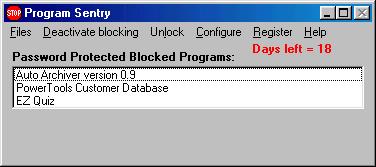
Provides access control and usage management. Allows you to either create a list of blocked programs or a list of allowed programs. Individual programs can be password protected.
In depth
A closer look at Program Sentry
Provides access control and usage management. When installed, it allows you to either create a list of blocked programs or a list of allowed programs. In the blocked programs mode, any program on the list is blocked. In the allowed program mode, any program NOT on the list is blocked. Which mode you choose to use depends on whether you have a few programs you want to block (in which case you would use the blocked program mode), or you have a few programs you want to allow people to use (in which case you would use the allowed program mode). In both modes, you can assign optional passwords to the programs on the list. In blocked program mode, if no password is assigned to a program, it cannot be individually unblocked. If a password is assigned to a blocked program, it can be unblocked using the password. In the allowed program mode, if no password is assigned to the program, it is never blocked. If a password is assigned to the program, it is blocked until someone enters the password for that program. passwords are useful if several people use the computer, and you want each to be allowed to use different programs. You can give each person the passwords to the programs they are allowed to use.
Verdict
Should you download Program Sentry?
Program Sentry runs on
Windows 10/11
and is available under the
Shareware
license
— the installer is 500 KB.
We’ve catalogued it under
Privacy and Access Control.
✓
Verified clean. Every Program Sentry build on SoftLookup is scanned for viruses, spyware, adware, trojans and backdoors. We re-test on every update.
Sponsored
At a glance
Program Sentry specifications
- Last updated
- Jan 22, 2025
- License
- Shareware
- Operating system
- Windows 10/11
- File size
- 500 KB
- Price
- $25
- Page views
- 350
Help fellow users decide. Share your experience with Program Sentry.