Overview
What is SWF to FLA Converter for Mac?
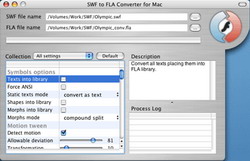
SWF to FLA Converter for Mac converts Macromedia Flash files back into FLA format in one click. Features over 50 options to extract sounds, images, videos, shapes, frames, morphs, texts, buttons, sprites and ActionScripts and convert them to FLA.
In depth
A closer look at SWF to FLA Converter for Mac
SWF to FLA Converter for Mac OS lets Flash designers convert SWF files back into FLA format in a single click. It features a number of unique algorithms to extract all Flash objects from SWF file and store them in a FLA file, which can be edited in native Flash environment. Every group of objects such as morphs, shapes, texts, fonts, motions, sounds, ActionScripts, etc. could be placed in separate FLA library groups, which makes it easier to use and view the resulting FLA file. A folder name can be specified for each FLA library. You can easily restore your lost original FLA files from available SWF files using Eltima's SWF to FLA Converter for Mac, thereby saving you time and efforts to develop or modify your Flash movies. Once your artwork is converted into SWF file it cannot be edited in Macromedia Flash Studio. Though, Eltima's SWF to FLA Converter for Mac OS allows you to extract all resources from SWF and save them in FLA file which is editable. Now, you can easily change Flash objects, modify text or hyperlink, replace sounds, images, etc. and convert it back to SWF file. Additionally, you can customize FLA file workspace by enabling/disabling guides, grids, rulers; specify guides accuracy and so on. Every morph or shape can be placed on different layers to make sure that masks layers are working properly. With SWF to FLA Converter forgotten passwords to your SWF file are not a problem any longer. The application bypasses this protection mechanism while decompiling SWF file resources. Once you have converted it to FLA you can set new protection in your favorite Flash editor. SWF to FLA Converter is the only Mac OS tool to export the whole SWF movie in FLA format that supports Flash MX and ActionScript 2.0.
Requirements
System requirements
Mac OS 10.3 and higher
Verdict
Should you download SWF to FLA Converter for Mac?
SWF to FLA Converter for Mac runs on
Mac OS
and is available under the
Shareware
license
— the installer is 2487 KB.
We’ve catalogued it under
Miscellaneous.
✓
Verified clean. Every SWF to FLA Converter for Mac build on SoftLookup is scanned for viruses, spyware, adware, trojans and backdoors. We re-test on every update.
Sponsored
At a glance
SWF to FLA Converter for Mac specifications
- Last updated
- Mar 1, 2025
- Requirements
- Mac OS 10.3 and higher
- License
- Shareware
- Operating system
- Mac OS
- File size
- 2487 KB
- Price
- $59.95
- Page views
- 450
Help fellow users decide. Share your experience with SWF to FLA Converter for Mac.