Overview
What is Hide Window Hotkey?
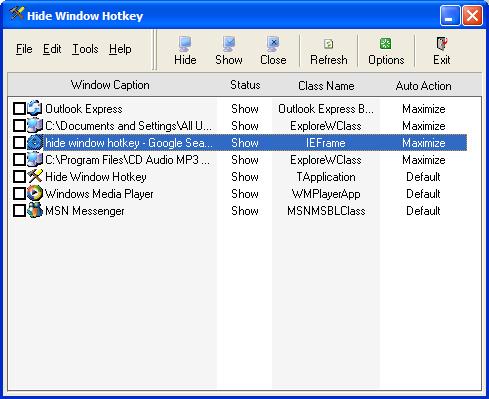
Hide applications window or close them completely through Mouse Hotkey or Keyboard Hotkey.Resize your programs automatically,such as maximize,minimize,normal,minimize to tray.Set specific windows transparency and arrange the windows on taskbar.
In depth
A closer look at Hide Window Hotkey
Hide Window Hotkey is a utility which allows you to hide the windows, and programs which are running on your screen.It will instantly hide or close all (or some) programs on your screen through Mouse Hotkey or Keyboard Hotkey in order to prevent uninvited persons from seeing them.It will serve you well at your work place or at home. By hiding windows you have the freedom to protect your privacy and hide sensitive information from praying eyes.For example,you hide some selected programs by pressing hotkey.At a later time you will be able to return all hidden windows back to the desktop and continue your work.And you also can close those hidden windows through another hotkey.You also can hide the current window through a hotky.
Requirements
System requirements
PC486DX with 8MB RAM and 10 MB free HD
Verdict
Should you download Hide Window Hotkey?
Hide Window Hotkey runs on
Windows 10/11
and is available under the
Freeware
license
— the installer is 883 KB.
We’ve catalogued it under
Shell and Desktop Utilities.
✓
Verified clean. Every Hide Window Hotkey build on SoftLookup is scanned for viruses, spyware, adware, trojans and backdoors. We re-test on every update.
Sponsored
At a glance
Hide Window Hotkey specifications
- Last updated
- Jan 8, 2025
- Requirements
- PC486DX with 8MB RAM and 10 MB free HD
- License
- Freeware
- Operating system
- Windows 10/11
- File size
- 883 KB
- Price
- Free
- Page views
- 446
Help fellow users decide. Share your experience with Hide Window Hotkey.