Overview
What is Computer History Viewer?
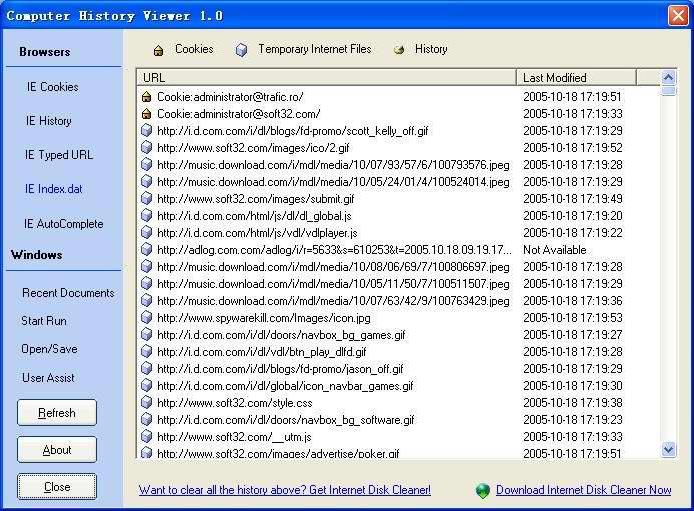
Computer History Viewer could find out the traces of your or other activities created by Internet Explorer and Windows, and displays the list of all URLs that you have visited in the last few days.
In depth
A closer look at Computer History Viewer
Every time you surf the Internet or use other applications on your PC, traces of your activities linger on your hard drive.Each time that you type a URL in the address bar or click on a link in Internet Explorer browser, the URL address is automatically added to the history index file.With Computer History Viewer,you can find out all information from the history file on your computer, and displays the list of all URLs that you have visited in the last few days.Computer History Viewer could view Window's run history, open/save history, recent documents, User Assist History, Internet Explorer's cache, cookies, history, visited URLs, typed URLs, autocomplete memory, index.dat files, and much more.Double click the displayed item will directly open the URLs stored on your computer.
Requirements
System requirements
PC486DX with 8MB RAM and 10 MB free HD
Verdict
Should you download Computer History Viewer?
Computer History Viewer runs on
Windows 10/11
and is available under the
Freeware
license
— the installer is 384 KB.
We’ve catalogued it under
System.
✓
Verified clean. Every Computer History Viewer build on SoftLookup is scanned for viruses, spyware, adware, trojans and backdoors. We re-test on every update.
Sponsored
At a glance
Computer History Viewer specifications
- Last updated
- Jan 9, 2025
- Requirements
- PC486DX with 8MB RAM and 10 MB free HD
- License
- Freeware
- Operating system
- Windows 10/11
- File size
- 384 KB
- Price
- Free
- Page views
- 543
Help fellow users decide. Share your experience with Computer History Viewer.