Overview
What is Cappy Screen Capture?
Capture Screen to PowerPoint, Word, Excel. Save as BMP, JPG, GIF, Send Email, Print, Copy clipboard, Send to editor or MS Paint. Capture full screen, rectangle, ellipse, ROTATE ANY ANGLE, mirror, scale, blend edges, invert color, custom backgrounds.
In depth
A closer look at Cappy Screen Capture
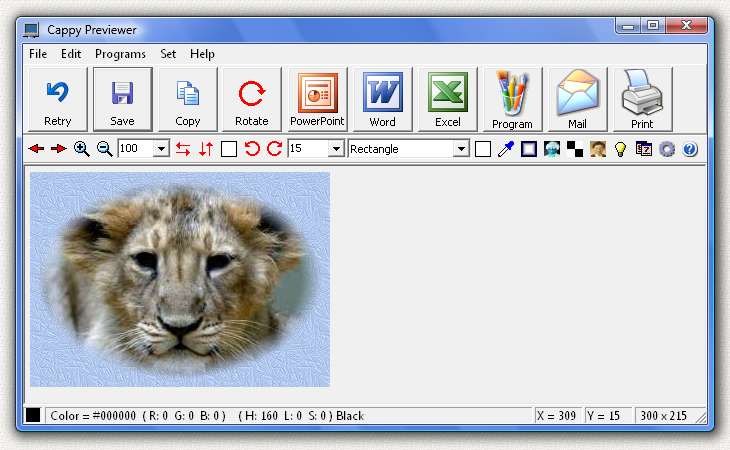
Select an area on the screen and instantly pop the captured image into Microsoft PowerPoint, Word, or Excel. Save the image as a file (BMP, JPG, GIF), send it by email, print it, copy it to the clipboard, or open it in your image editor or Microsoft Paint. You can capture the entire screen, just the contents of one window, or any one of 10 custom shapes: rectangle, ellipse, circle, square, rounded rectangle, racetrack, triangle, diamond, hexagon, octagon. The image can be ROTATED TO ANY ANGLE, mirrored, flipped, scaled, color inverted, made black and white or sepia. It can be stamped with the date, time, or your name. Many custom backgrounds (32 patterns) are provided and the edges can be blended. You can create nice portraits, like the tiger cub shown with blended edges in the screenshot. Cappy can capture any image you can get up on the screen. It does not matter which program is displaying the image. Cappy appears as a small blue computer icon in the tray on the lower right of your screen.
Verdict
Should you download Cappy Screen Capture?
Cappy Screen Capture runs on
Windows 10/11
and is available under the
Shareware
license
— the installer is 4967 KB.
We’ve catalogued it under
Screen Capture.
✓
Verified clean. Every Cappy Screen Capture build on SoftLookup is scanned for viruses, spyware, adware, trojans and backdoors. We re-test on every update.
Sponsored
At a glance
Cappy Screen Capture specifications
- Last updated
- Apr 26, 2026
- License
- Shareware
- Operating system
- Windows 10/11
- File size
- 4967 KB
- Price
- $10
- Page views
- 560
Help fellow users decide. Share your experience with Cappy Screen Capture.