Overview
What is Scrape to Folder?
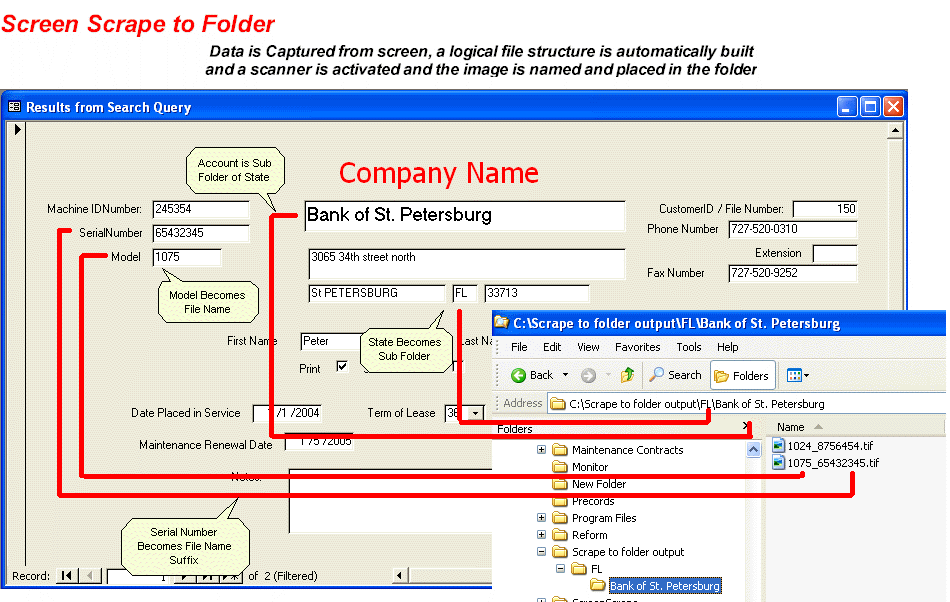
Document Scanning Software that automatically creates file folders and file names based on database information displayed on the screen. Ideal for Accounting Departments where file becomes Vendor Name and Invoice Number. Includes retrival.
In depth
A closer look at Scrape to Folder
Document Scanning Software designed to Image Enable and Application. The operator looks up a record in their current application, clicks on an Icon and the information is captured from the screen and a desktop scanner is activated. The information captured from the current application automatically names files and automatically creates a logical directory structure for the images. Comes with royalty free Retrieval Utility for the captured images as well as a CSV export for integration to Enterprise Document Management Programs Registered users get online assistance in setting up the fields to be captured. - Everyone with the captured application can retrieve - Eliminates duplication of Data Entry - Additional images are automatically appended to the current image file to browse to them -Creates a CSV file for integration into enterprise wide document management programs
Verdict
Should you download Scrape to Folder?
Scrape to Folder runs on
Windows 10/11
and is available under the
Demo
license
— the installer is 3218 KB.
We’ve catalogued it under
Databases.
✓
Verified clean. Every Scrape to Folder build on SoftLookup is scanned for viruses, spyware, adware, trojans and backdoors. We re-test on every update.
Sponsored
At a glance
Scrape to Folder specifications
- Last updated
- Mar 12, 2025
- License
- Demo
- Operating system
- Windows 10/11
- File size
- 3218 KB
- Price
- $499
- Page views
- 562
Help fellow users decide. Share your experience with Scrape to Folder.