Overview
What is Stamp Collector?
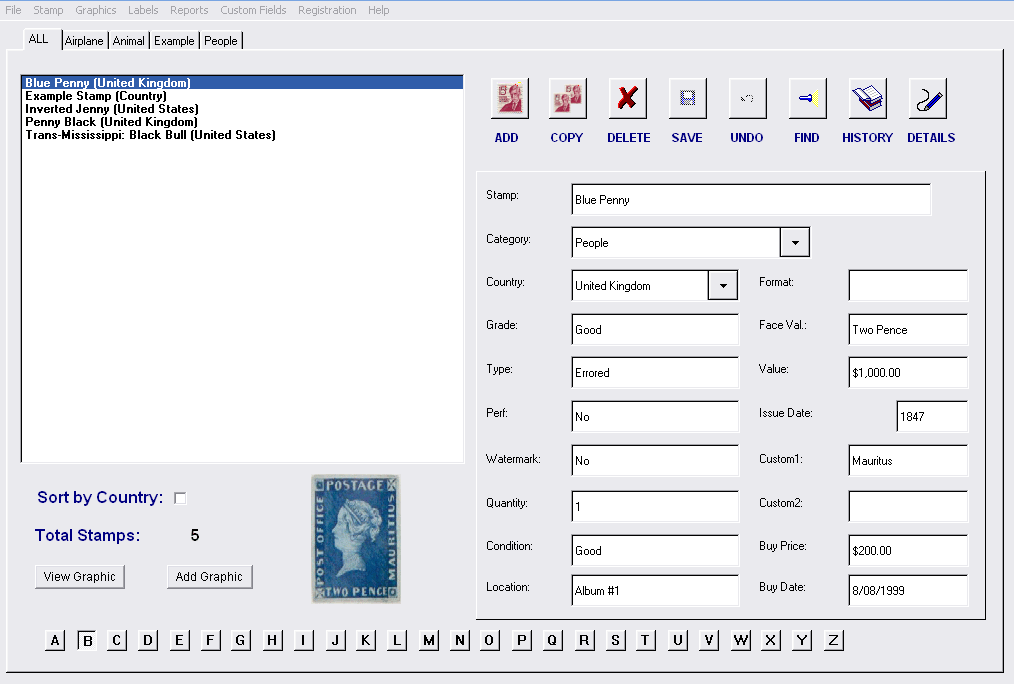
Stamp Collection Organizer is a software program to help track and catalog your stamp collection. The user interface is easy to use and browse through your stamp collection. Features include customizable fields, reports, search, copy, undo, and more.
In depth
A closer look at Stamp Collector
Stamp Collector is a software organizer for the Stamp collector. Stamp Collector was designed with a simple and intuitive user interface in mind. Nearly all the database information is shown on the main screen so you don’t have to constantly click to get an overview of your collection. Stamp Collector allows the user to customize the program for their unique requirements. Some of the custom features include the ability to create custom reports and print outs as well as an option to alter the field labels.There are several data fields supported by the Stamp Collector program. Fields or labels are bits of information you can enter for each Stamp in your collection. For example, the default fields include the stamp, issue #, category, country, condition, location, grade, value, and more. There are 17 stamp fields in all and they each can be changed to fit your collection’s needs. This means that if you would rather name the “Condition” field to “ID”, you can make the change with a few simple key strokes. This change is automatically made throughout the program including the reports and main screen. In addition to the stamp fields or labels, each Stamp has a window entry for Details, History, and Graphic. The Details and History fields allow you to enter longer text entries that might include the Stamp’s description, unique history, past ownership, or pretty much whatever info you want. The graphic field is typically used for a picture of the Stamp, but, again can be used for whatever you want. The main screen shows a a thumbnail of the graphic for the stamp that is currently selected. Other Stamp collector features include search, copy, undo, standard reports that sort on various stamp fields, file export to .csv, and help.
Verdict
Should you download Stamp Collector?
Stamp Collector runs on
Windows 10/11
and is available under the
Shareware
license
— the installer is 777 KB.
We’ve catalogued it under
Collection Organizers.
✓
Verified clean. Every Stamp Collector build on SoftLookup is scanned for viruses, spyware, adware, trojans and backdoors. We re-test on every update.
Sponsored
At a glance
Stamp Collector specifications
- Last updated
- Apr 26, 2026
- License
- Shareware
- Operating system
- Windows 10/11
- File size
- 777 KB
- Price
- $16.95
- Page views
- 570
Help fellow users decide. Share your experience with Stamp Collector.