Windows · Free download · Multimedia and Presentation

Color Detector1.01

Simply point the mouse cursor anywhere on the screen, and it will tell you: the RGB code, the HTML hex code, and the name of the color in plain english, of the pixel where the mouse is pointing. You can also copy the HTML hex code to the clipboard.

Operating system
Windows 10/11
File size
455 KB
License
Freeware
Last updated
Feb 15, 2025

315 downloads·630 page views
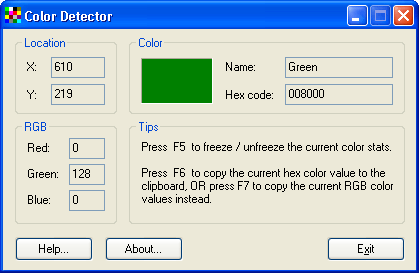
Color Detector 1.01 screenshot
Sponsored

Overview

What is Color Detector?

Simply point the mouse cursor anywhere on the screen, and it will tell you: the RGB code, the HTML hex code, and the name of the color in plain english, of the pixel where the mouse is pointing. You can also copy the HTML hex code to the clipboard.

Verdict

Should you download Color Detector?

Color Detector runs on Windows 10/11 and is available under the Freeware license — the installer is 455 KB. We’ve catalogued it under Multimedia and Presentation.

Verified clean. Every Color Detector build on SoftLookup is scanned for viruses, spyware, adware, trojans and backdoors. We re-test on every update.
Sponsored

At a glance

Color Detector specifications

Publisher
Cosmin Software
Last updated
Feb 15, 2025
License
Freeware
Operating system
Windows 10/11
File size
455 KB
Price
Free
Page views
630

Leave a comment

Help fellow users decide. Share your experience with Color Detector.

Download Color Detector