Overview
What is Stop-the-Pop-Up?
Kill browser, Messenger Service, GAIN and SaveNow pop-ups automatically. The popup stopper has full support for both pop-ups and pop-under ads and will kill them even before they appear on the screen.
In depth
A closer look at Stop-the-Pop-Up
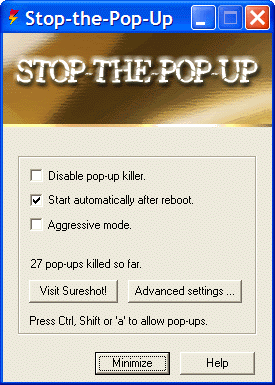
Stop-the-Pop-Up is a pop-up blocker preventing all annoying pop-up windows from appearing as you surf the web. The popup stopper has full support for both pop-ups and pop-under ads and will kill them even before they appear on the screen. Each time a pop up is closed you will hear a cute sound effect. To allow pop-up windows you can temporarily disable the pop-up killer by holding Control, Shift or 'a'. An unique Stop-the-Pop-Up feature is that it will kill all pop ups and rotating banners ads from file sharing programs and the spyware/adware that are bundled with these peer-to-peer programs. Stop-the-Pop-Up supports Kazaa, Morpheus, Grokster, iMesh and Direct Connect. Stop-the-Pop-Up will also kill the new breed of pop-ups called 'Messenger Service spam'. Messenger Service pop ups can spam you even when your web browser is closed. Stop-the-Pop-Up will also recognize and kill hostile activeX controls from companies known to develop spyware or adware. Gator, GAIN, C2, Comet Systems, Cydoor, Marketscore etc, are on Stop-the-Pop-Up's black list. The banner ads in ICQ pro 2003 and MSN Messenger 4.6-5.0 are also removed. Stop-the-Pop-Up can be configured to start automatically after a reboot and resides in the system tray when minimized. Stop-the-Pop-Up is compatible with the most popular web browsers, such as Internet Explorer, Netscape Navigator, Opera, MSN Explorer 7, Mozilla, SBC Yahoo! and NetCaptor. It is light on your system's resources and requires no setup! Pleasant surfing!
Requirements
System requirements
Microsoft Internet Explorer 3.0-6.0, Netscape 4.0-7.0, Mozilla 1.0-1.3, Opera 6.0-7.0, MSN Explorer 7.X, NetCaptor 7.X and SBC Yahoo!
Verdict
Should you download Stop-the-Pop-Up?
Stop-the-Pop-Up runs on
Windows 10/11
and is available under the
Shareware
license
— the installer is 1000 KB.
We’ve catalogued it under
Utilities and Tools.
✓
Verified clean. Every Stop-the-Pop-Up build on SoftLookup is scanned for viruses, spyware, adware, trojans and backdoors. We re-test on every update.
Sponsored
At a glance
Stop-the-Pop-Up specifications
- Last updated
- Jan 28, 2025
- Requirements
- Microsoft Internet Explorer 3.0-6.0, Netscape 4.0-7.0, Mozilla 1.0-1.3, Opera 6.0-7.0, MSN Explorer 7.X, NetCaptor 7.X and SBC Yahoo!
- License
- Shareware
- Operating system
- Windows 10/11
- File size
- 1000 KB
- Price
- $20
- Page views
- 479
Help fellow users decide. Share your experience with Stop-the-Pop-Up.