Overview
What is SuperGIF for Windows?
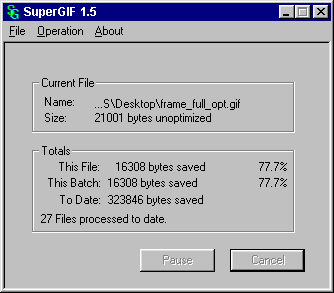
SuperGIF effortlessly makes all your GIF images and animations smaller with a single Drag & Drop. Try it for yourself. SuperGIF can often reduce GIF images over 50%, and does even better with GIF animations, with potential savings over 80%.
In depth
A closer look at SuperGIF for Windows
SuperGIF effortlessly makes all your GIF images and animations smaller with a single Drag & Drop. Try it for yourself. SuperGIF can often reduce GIF images over 50%, and does even better with GIF animations, with potential savings over 80%.Statistics don't say much about what any tool can do for you, though. SuperGIF really just does one thing for you, and it does that very well. SuperGIF ensures that you have the very smallest GIFs possible. Even after you have labored hours tweaking on them and think you have the smallest file possible, nearly every time, SuperGIF will make them even smaller still, without any extra effort.
Verdict
Should you download SuperGIF for Windows?
SuperGIF for Windows runs on
Windows 10/11
and is available under the
Shareware
license
— the installer is 130 KB.
We’ve catalogued it under
Utilities and Tools.
✓
Verified clean. Every SuperGIF for Windows build on SoftLookup is scanned for viruses, spyware, adware, trojans and backdoors. We re-test on every update.
Sponsored
At a glance
SuperGIF for Windows specifications
- Last updated
- Feb 13, 2025
- License
- Shareware
- Operating system
- Windows 10/11
- File size
- 130 KB
- Price
- $29.95
- Page views
- 475
Help fellow users decide. Share your experience with SuperGIF for Windows.