Overview
What is Arm Map Explorer?
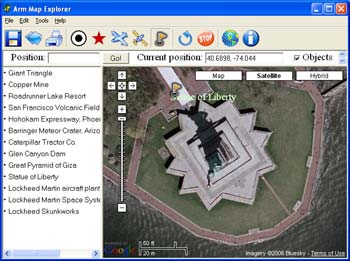
Arm Map Explorer recreates all the functionalities of Google Maps while adding new ones like viewing a map with a coordinate grid on it, getting precise coordinates of any location on a map, moving to a needed location based on specified coordinates.
In depth
A closer look at Arm Map Explorer
Arm Map Explorer recreates all the functionalities of Google Maps on your desktop while expanding them with new extras. Map Explorer lets you locate and view any place on the planet using dynamic interactive maps. These maps are draggable, which means there is no need for you to click and wait for graphics to reload each time you want to view adjacent parts of a map. Basically, viewing locations on maps in Map Explorer resembles the way you use a regular street map.
Requirements
System requirements
256MB RAM, Pentium-1000 MHz, 52MB HDD
Verdict
Should you download Arm Map Explorer?
Arm Map Explorer runs on
Windows 10/11
and is available under the
Freeware
license
— the installer is 1006 KB.
We’ve catalogued it under
Search Enabling Web Sites.
✓
Verified clean. Every Arm Map Explorer build on SoftLookup is scanned for viruses, spyware, adware, trojans and backdoors. We re-test on every update.
Sponsored
At a glance
Arm Map Explorer specifications
- Last updated
- Mar 1, 2025
- Requirements
- 256MB RAM, Pentium-1000 MHz, 52MB HDD
- License
- Freeware
- Operating system
- Windows 10/11
- File size
- 1006 KB
- Price
- Free
- Page views
- 410
Help fellow users decide. Share your experience with Arm Map Explorer.