Overview
What is Studio Complete?
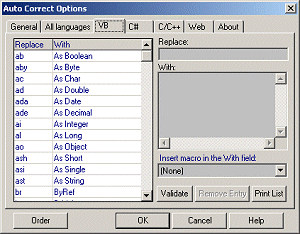
Visual Studio .NET add-in that completes code as you write it. Instead of multiline coding constructs such as if..then..else, you just write a 3-letter shortcut. Works with any .NET language such as VB, C/C++, C#, HTML, XML, XSLT.
In depth
A closer look at Studio Complete
Visual Studio .NET add-in that completes code as you write it. Instead of multiline coding constructs such as if..then..else, you just write a 3-letter shortcut. Studio Complete immediately expands the shortcut to the full code. Gain performance by typing less. Works with any .NET language such as VB, C/C++, C#, HTML, XML, XSLT.
Requirements
System requirements
Visual Studio .NET
Verdict
Should you download Studio Complete?
Studio Complete runs on
Windows 10/11
and is available under the
Shareware
license
— the installer is 1095 KB.
We’ve catalogued it under
General.
✓
Verified clean. Every Studio Complete build on SoftLookup is scanned for viruses, spyware, adware, trojans and backdoors. We re-test on every update.
Sponsored
At a glance
Studio Complete specifications
- Last updated
- Jan 6, 2025
- Requirements
- Visual Studio .NET
- License
- Shareware
- Operating system
- Windows 10/11
- File size
- 1095 KB
- Price
- $49
- Page views
- 573
Help fellow users decide. Share your experience with Studio Complete.