Overview
What is Junk Mail Remover?
Delete junk mail: spam, virus, trojan, and e-mails with big attachments fast and easily. If your connection is slow (dial-up, GPRS, etc) or you have to pay for internet traffic, Junk Mail Remover will save your time and money.
In depth
A closer look at Junk Mail Remover
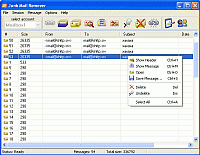
Delete junk mail (spam, virus, trojan, and e-mails with big attachments) fast and easily. If your connection is slow (dial-up, GPRS, etc) or you have to pay for internet traffic, this program will save your time and money.Junk Mail Remover connects to your mail POP3-server and downloads all headers or headers of large messages only. You can analyze message attributes (sender, recipient, subject, size) and decide which e-mails are needless. Then you mark them for deletion and the program removes marked messages from mail server. Filters and SpamAssasin support can help marking messages automatically. After this you can download remaining messages which are clear from viruses, huge attachments, and other junk.
Verdict
Should you download Junk Mail Remover?
Junk Mail Remover runs on
Windows 10/11
and is available under the
Shareware
license
— the installer is 887 KB.
We’ve catalogued it under
Privacy and Access Control.
✓
Verified clean. Every Junk Mail Remover build on SoftLookup is scanned for viruses, spyware, adware, trojans and backdoors. We re-test on every update.
Sponsored
At a glance
Junk Mail Remover specifications
- Last updated
- Feb 19, 2025
- License
- Shareware
- Operating system
- Windows 10/11
- File size
- 887 KB
- Price
- $19.95
- Page views
- 410
Help fellow users decide. Share your experience with Junk Mail Remover.