Overview
What is AcePlanner?
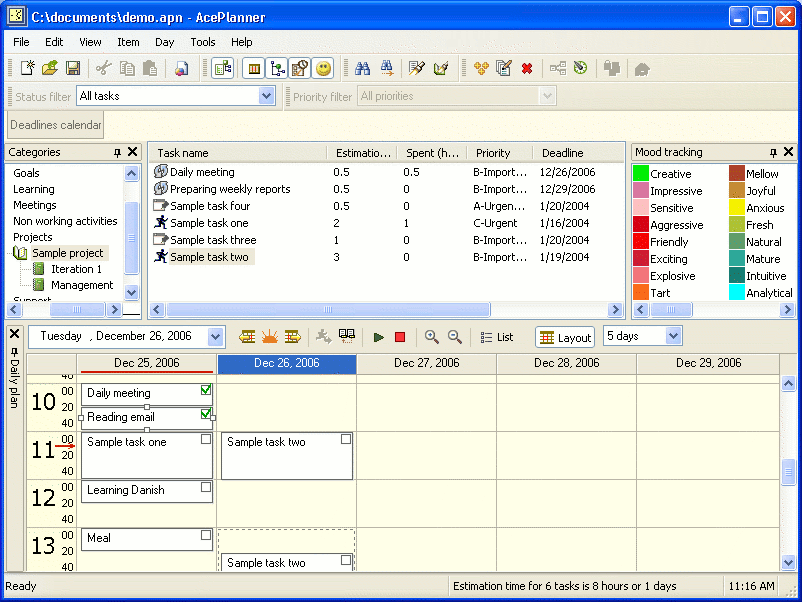
This intuitive time management software provides possibility to organize tasks, planning a day using previously defined to do items, tracking daily mood changes via colors and prepare various time reports for printing.
In depth
A closer look at AcePlanner
This intuitive time management software provides possibility to organize tasks and placing them to a daily schedule, selecting most important first. Software helps estimating and indirectly tracking time spent. It allows arranging deadlines of work items sequentially using estimates and available hours. This feature helps forecasting possible completion date. Double calendar shows plans and reality in task deadlines comparing to completion dates. It generates printer friendly time reports, including timesheets, work breakdown and detailed estimations, weekly plans and weekly time spending by categories. Software includes module for mood tracking and mood orchestration with colors, as well as moods map report.
Verdict
Should you download AcePlanner?
AcePlanner runs on
9x/NT/2000/ME/XP/Windows 10/11
and is available under the
30-day Trial
license
— the installer is 2740 KB.
We’ve catalogued it under
Information Organizers.
✓
Verified clean. Every AcePlanner build on SoftLookup is scanned for viruses, spyware, adware, trojans and backdoors. We re-test on every update.
Sponsored
At a glance
AcePlanner specifications
- Last updated
- Feb 2, 2025
- License
- 30-day Trial
- Operating system
- 9x/NT/2000/ME/XP/Windows 10/11
- File size
- 2740 KB
- Price
- $39.95
- Page views
- 497
Help fellow users decide. Share your experience with AcePlanner.