Overview
What is Go2PDF?
Go2PDF : Converts any document into high-quality PDF format
In depth
A closer look at Go2PDF
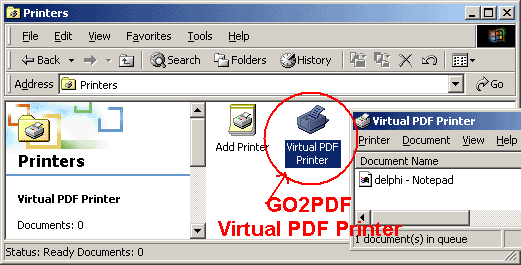
Go2PDF is a software tool which can turn any printable application into a PDF file, whether we are talking about images, text documents, spreadsheets, presentations or other types of files. It can be easily worked with. Once installed, you can access the virtual PDF printer from the 'Control Panel' area, and add files to the list by using the 'drag and drop' method. The file queue displays the name, status, owner, number of pages, size, date of submission, along with the port for each entry. When you establish the output directory and filename, you can proceed with the conversion procedure. Processing multiple items at the same time is possible.
Requirements
System requirements
Windows Server 2012 / Windows 2008 64-bit / Windows 2003 / Windows 8 64-bit / Windows 8 / Windows 7 64-bit / Windows 7 / Windows Vista 64-bit / Windows Vista / Windows XP
Verdict
Should you download Go2PDF?
Go2PDF runs on
Windows 9X/ME/2K/XP/2003
and is available under the
Time-limited Trial
license
— the installer is 653 KB.
We’ve catalogued it under
Word Processing.
✓
Verified clean. Every Go2PDF build on SoftLookup is scanned for viruses, spyware, adware, trojans and backdoors. We re-test on every update.
Sponsored
At a glance
Go2PDF specifications
- Last updated
- Feb 22, 2025
- Requirements
- Windows Server 2012 / Windows 2008 64-bit / Windows 2003 / Windows 8 64-bit / Windows 8 / Windows 7 64-bit / Windows 7 / Windows Vista 64-bit / Windows Vista / Windows XP
- License
- Time-limited Trial
- Operating system
- Windows 9X/ME/2K/XP/2003
- File size
- 653 KB
- Price
- Free
- Page views
- 1013
Help fellow users decide. Share your experience with Go2PDF.