Overview
What is Turbo Browser?
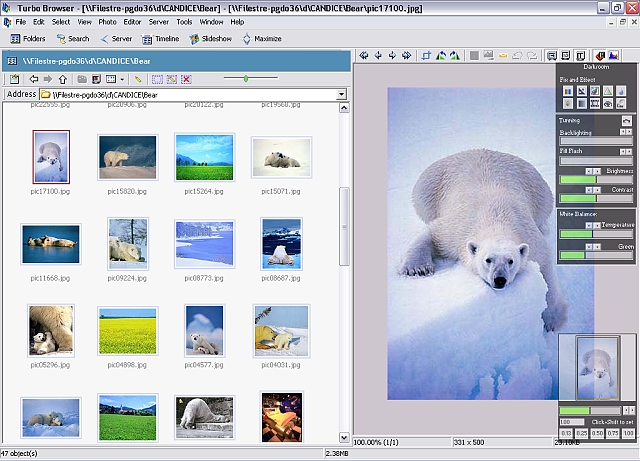
Photo and Document Productivity Tools Suite - Opens 200+ file formats, from photos, multimedia, documents, to HTML. It comes with comprehensive photo and text editors. It also lets you tag and process group of photos and files - all in one place.
In depth
A closer look at Turbo Browser
This Windows Productivity Tools Suite lets you edit and organize files all in one place. It lets you browse, batch convert, edit, optimize, and print photos and images, manage all your files from Acrobat PDF, digital photos, to Office Documents, Organize and Create DVD/CD, slideshow, group rename, change properties, upload, download, edit and publish Web sites. This latest release also supports all popular digital camera RAW formats.
Verdict
Should you download Turbo Browser?
Turbo Browser runs on
Windows 9X/ME/2K/XP/2003
and is available under the
Shareware
license
— the installer is 4396 KB.
We’ve catalogued it under
Graphics Editing and Painting.
✓
Verified clean. Every Turbo Browser build on SoftLookup is scanned for viruses, spyware, adware, trojans and backdoors. We re-test on every update.
Sponsored
At a glance
Turbo Browser specifications
- Last updated
- Feb 22, 2025
- License
- Shareware
- Operating system
- Windows 9X/ME/2K/XP/2003
- File size
- 4396 KB
- Price
- $69.95
- Page views
- 555
Help fellow users decide. Share your experience with Turbo Browser.