Overview
What is PDF4Free?
PDF4Free : Create PDF files from any printable document located on your computer and edit metadata using this lightweight virtual printing tool
In depth
A closer look at PDF4Free
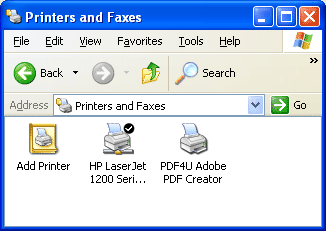
Working with Portable Document Format files can be harder than you might think, especially when it comes to creating this kind of documents. In case you need to convert or create PDFs it is best to enlist the help of specialized software. An application that tries to address this demand is PDF4Free PDF4Free comes with a relatively new approach and will install as a printer driver on your system. This means that there's no dedicated interface, so in case you wish to take advantage of its powerful features, just hit the print button in any application and select it.
Requirements
System requirements
Windows 10 64-bit / Windows 10 / Windows Server 2012 / Windows 2008 / Windows 2003 / Windows 8 64-bit / Windows 8 / Windows 7 64-bit / Windows 7 / Windows Vista 64-bit / Windows Vista / Windows XP / Windows 2000
Verdict
Should you download PDF4Free?
PDF4Free runs on
9x/NT/2000/ME/XP/Windows 10/11
and is available under the
Demo
license
— the installer is 750 KB.
We’ve catalogued it under
Word Processing.
✓
Verified clean. Every PDF4Free build on SoftLookup is scanned for viruses, spyware, adware, trojans and backdoors. We re-test on every update.
Sponsored
At a glance
PDF4Free specifications
- Last updated
- Mar 12, 2025
- Requirements
- Windows 10 64-bit / Windows 10 / Windows Server 2012 / Windows 2008 / Windows 2003 / Windows 8 64-bit / Windows 8 / Windows 7 64-bit / Windows 7 / Windows Vista 64-bit / Windows Vista / Windows XP / Windows 2000
- License
- Demo
- Operating system
- 9x/NT/2000/ME/XP/Windows 10/11
- File size
- 750 KB
- Price
- Free
- Page views
- 730
Help fellow users decide. Share your experience with PDF4Free.