Overview
What is ImageDIG?
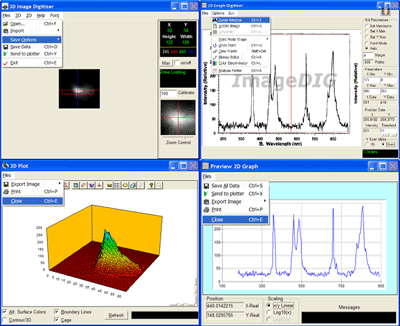
ImageDIG consists of three integrated modules which allow the user to convert 2D flat images into 3D (x,y,z) data or if a graph, convert the graph in image form into 2 dimensional numerical data for further analysis. The third is 2D analyis plotter.
In depth
A closer look at ImageDIG
ImageDIG consists of three integrated modules which allow the user to convert 2D flat images into 3D (x,y,z) data or if a graph, convert the graph in image form into 2 dimensional numerical data. The third module is a full analysis plotting utility where the user can import either the 2D or 3D data saved above or import any number of columns of data from a file. The data can then be analyzed using several statistical functions and plotted.ImageDIG was developed because other functionally similar programs (2D) either had a steep learning curve, incomplete or confusing to use. However, no other program includes an image to 3D numerical data converter and a general purpose x/y plotter.
Requirements
System requirements
133MHz Pentium, Ram 32MB, 16bit 800x600 video
Verdict
Should you download ImageDIG?
ImageDIG runs on
Windows 9X/ME/2K/XP/2003
and is available under the
Shareware
license
— the installer is 5788 KB.
We’ve catalogued it under
Images and Multimedia.
✓
Verified clean. Every ImageDIG build on SoftLookup is scanned for viruses, spyware, adware, trojans and backdoors. We re-test on every update.
Sponsored
At a glance
ImageDIG specifications
- Last updated
- Apr 1, 2026
- Requirements
- 133MHz Pentium, Ram 32MB, 16bit 800x600 video
- License
- Shareware
- Operating system
- Windows 9X/ME/2K/XP/2003
- File size
- 5788 KB
- Price
- $49.95
- Page views
- 492
Help fellow users decide. Share your experience with ImageDIG.