Overview
What is Print Studio?
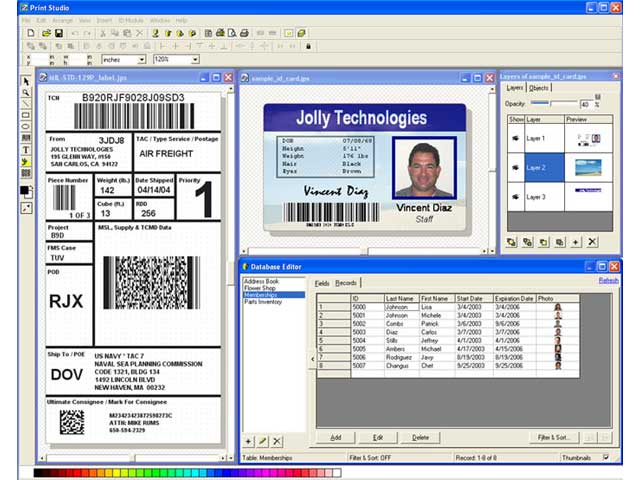
Containing features such as advanced database integration, templates for thousands of label types, easy image acquisition, and a rich set of design tools, Print Studio 2E streamlines the bulk printing of labels, cards and other industrial media.
In depth
A closer look at Print Studio
A complete office solution for all your labeling and printing needs (label, bar code, photo id badge with magnetic stripe, envelope, CD label, and more). Print Studio provides a wide variety of powerful, yet easy to use tools (such as shapes, gradient, artistic text, layers and blending, watermark effect, and more). Whether you are looking for an addressing label software, a photo badge designer, a professional barcode labeler, or an artistic CD label maker; this one program includes everything you need. Print Studio 2E includes 2500+ predefined templates for industry standard labels (including templates for CD/DVD, badges and most of Avery products), and 15+ industry standard bar codes. Distinguishing features include: double-sided printing, mail merging, print-time data feeding, serialized text, integrated database management tool, raster and vector graphics, dot matrix and thermal printer support.
Requirements
System requirements
64 MB RAM, 40 MB Hard Disk
Verdict
Should you download Print Studio?
Print Studio runs on
Windows 9X/ME/2K/XP/2003
and is available under the
Demo
license
— the installer is 15625 KB.
We’ve catalogued it under
Desktop Publishing.
✓
Verified clean. Every Print Studio build on SoftLookup is scanned for viruses, spyware, adware, trojans and backdoors. We re-test on every update.
Sponsored
At a glance
Print Studio specifications
- Last updated
- Jan 13, 2025
- Requirements
- 64 MB RAM, 40 MB Hard Disk
- License
- Demo
- Operating system
- Windows 9X/ME/2K/XP/2003
- File size
- 15625 KB
- Price
- $399.99
- Page views
- 544
Help fellow users decide. Share your experience with Print Studio.