Overview
What is APBackUp?
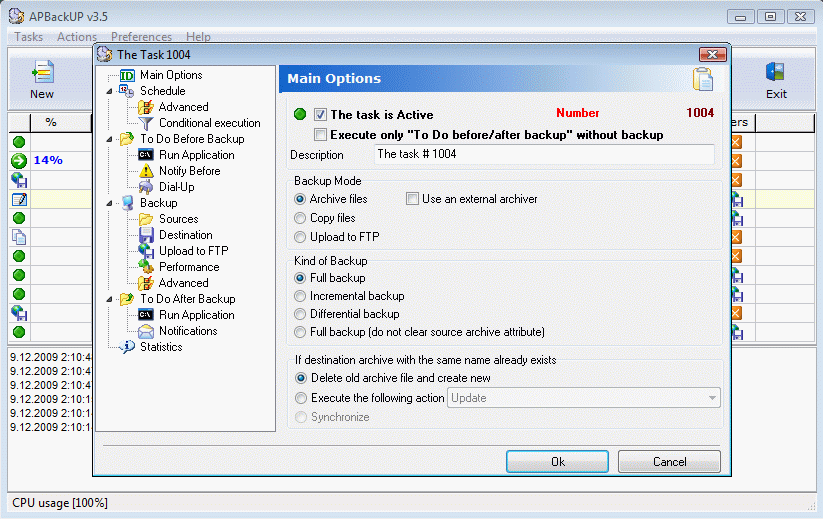
APBackup makes it easy to back up your data to virtually any type of storage media: hard or network drive, DVD, CD-R/W, FTP.
In depth
A closer look at APBackUp
Good for home or office, this backup program is reliable and easy-to-use. APBackUp helps you create complete backups of important data automatically. APBackup makes it easy to back up your data to virtually any type of storage media: hard or network drive, DVD, CD-R/W, FTP or LAN. It will help you organize your backups and schedule automatic backups. Backup files can be stored in standard ZIP format, so they can be viewed and restored with most ZIP file utilities. APBackup can use special plug-ins to backup data with ANY other compression tools (WinRar, ARJ, JAR,...). Also it allows you to copy your data without compression. APBackup also features an intuitive user interface making even the most advanced features easily accessible to beginners and professionals. Key features:
Verdict
Should you download APBackUp?
APBackUp runs on
9x/NT/2000/ME/XP/Windows 10/11
and is available under the
Time-limited Trial
license
— the installer is 2960 KB.
We’ve catalogued it under
Backing Up.
✓
Verified clean. Every APBackUp build on SoftLookup is scanned for viruses, spyware, adware, trojans and backdoors. We re-test on every update.
Sponsored
At a glance
APBackUp specifications
- Last updated
- Mar 4, 2025
- License
- Time-limited Trial
- Operating system
- 9x/NT/2000/ME/XP/Windows 10/11
- File size
- 2960 KB
- Price
- $39
- Page views
- 533
Help fellow users decide. Share your experience with APBackUp.