Overview
What is Auto Window Manager?
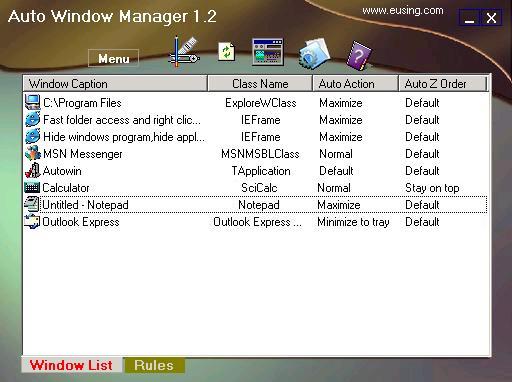
Auto Window Manager resize your programs automatically every time they start,such as maximize,minimize,normal,minimize to tray.It also set application windows transparency,minimize them to tray,stay on top,align and resize from window system menu.
In depth
A closer look at Auto Window Manager
Auto Window Manager automatically manages any window you specify. For instance, some web browsers open up in a non-maximized window. Using Auto Window Manager,you can set those windows to automatically maximize (minimize, normal, minimize to tray,stay on top) every time they're opened. It works with almost any program, including web browsers, Notepad, etc. Auto Window Manager stays running in the system tray, so it stays out of your way while it works.
Requirements
System requirements
PC486DX with 8MB RAM Display adaptor with 256 color support 10 MB free HD
Verdict
Should you download Auto Window Manager?
Auto Window Manager runs on
9x/NT/2000/ME/XP/Windows 10/11
and is available under the
Freeware
license
— the installer is 650 KB.
We’ve catalogued it under
Utilities and Tools.
✓
Verified clean. Every Auto Window Manager build on SoftLookup is scanned for viruses, spyware, adware, trojans and backdoors. We re-test on every update.
Sponsored
At a glance
Auto Window Manager specifications
- Last updated
- Mar 1, 2025
- Requirements
- PC486DX with 8MB RAM Display adaptor with 256 color support 10 MB free HD
- License
- Freeware
- Operating system
- 9x/NT/2000/ME/XP/Windows 10/11
- File size
- 650 KB
- Price
- Free
- Page views
- 503
Help fellow users decide. Share your experience with Auto Window Manager.