Overview
What is Photo-Album?
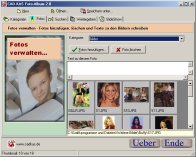
Manage and categorize your digital photos. You can add your photos to different categories and write a comment to each photos. You can see each photo as Thumbnail. You can view and print each photo. Also you can present the photos as Slideshow.
In depth
A closer look at Photo-Album
Manage and categorize your digital photos. You can add your photos to different categories and write a comment to each photos. You can see each photo as Thumbnail. You can view and print each photo. You can use the distribute function to distribute the photos and the album file on cd. Also you can present the photos as Slideshow. Through the numerous fade effects the show gets the necessary dynamics.
Verdict
Should you download Photo-Album?
Photo-Album runs on
Windows 9X/ME/2K/XP/2003
and is available under the
Demo
license
— the installer is 731 KB.
We’ve catalogued it under
Desktop Tools.
✓
Verified clean. Every Photo-Album build on SoftLookup is scanned for viruses, spyware, adware, trojans and backdoors. We re-test on every update.
Sponsored
At a glance
Photo-Album specifications
- Last updated
- Jan 6, 2025
- License
- Demo
- Operating system
- Windows 9X/ME/2K/XP/2003
- File size
- 731 KB
- Price
- $14.99
- Page views
- 523
Help fellow users decide. Share your experience with Photo-Album.