Overview
What is ACA Audio Recorder?
ACA Audio Recorder : Capture speaker sound, or record from different input devices to several different audio file formats, schedule sessions, and configure output quality
In depth
A closer look at ACA Audio Recorder
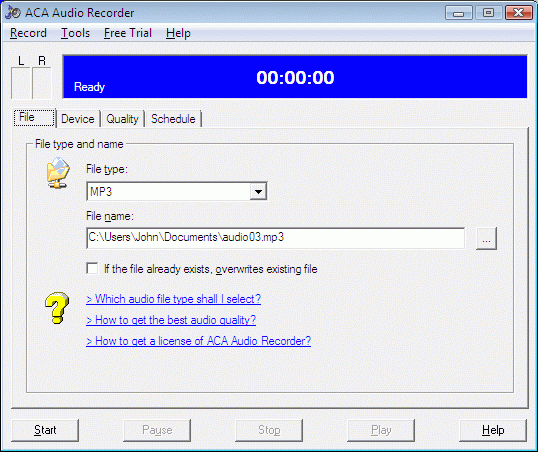
Recording sound on a computer can be easily done even from speaker volume by making the right tweaks. Windows comes with a default recorder, but it’s set of features is not for professional use. Luckily, there are tons of advanced alternatives like ACA Audio Recorder which can schedule recordings, and export under more file formats. The visual design feels rather bulky for the depth of features it has to offer. What’s more, there’s no wavelength display, neither during, or after a recording session, but there are two indicators for volume of left and right channels. In addition, a large timer lets you know for how long you’ve been recording. By default, the application can only record from a connected microphone, with an additional drop-down menu to select volume connector. It’s also possible to capture speaker audio, but you need to manually change system settings, and configure input for recording accordingly.
Verdict
Should you download ACA Audio Recorder?
ACA Audio Recorder runs on
9x/NT/2000/ME/XP/Windows 10/11
and is available under the
Time-limited Trial
license
— the installer is 1.3 MB.
We’ve catalogued it under
Audio Encoders.
✓
Verified clean. Every ACA Audio Recorder build on SoftLookup is scanned for viruses, spyware, adware, trojans and backdoors. We re-test on every update.
Sponsored
At a glance
ACA Audio Recorder specifications
- Last updated
- Mar 12, 2025
- License
- Time-limited Trial
- Operating system
- 9x/NT/2000/ME/XP/Windows 10/11
- File size
- 1.3 MB
- Price
- $24.95
- Page views
- 500
Help fellow users decide. Share your experience with ACA Audio Recorder.