Overview
What is FlexiMusic Composer?
FlexiMusic Composer : Add audio files on multiple layers, import from a rich instruments library and edit sound to build music without the need of instruments
In depth
A closer look at FlexiMusic Composer
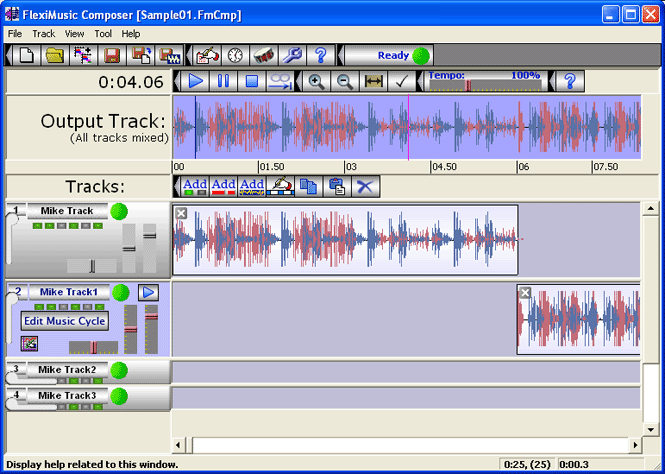
Advancement in technology enable us to perform a wide variety of activities, specialized or not, for business or personal use, from the comfort of your desktop. Music makes no exception, with modern applications almost replacing instruments when it comes to composition and FlexiMusic Composer is a suitable example in this regard. Just like any other application, the first impression is heavily affected by the visual design. This program tries not to make one, with custom elements that seem a little old, but considering updates are a thing of the past, it's something you can easily overlook. By default, several tracks filled with a few audio files are placed on your canvas. Apart from audio layers, there's an output track you can use to preview your work. An upper toolbar holds all playback options, with options to even select a simple portion and have it looped, a slider to adjust tempo, zoom tools for the track view, as well as other general and file related configurations.
Requirements
System requirements
Windows 9X / Windows XP / Windows 2000
Verdict
Should you download FlexiMusic Composer?
FlexiMusic Composer runs on
9x/NT/2000/ME/XP/Windows 10/11
and is available under the
Shareware
license
— the installer is 10.5 MB.
We’ve catalogued it under
Audio Encoders.
✓
Verified clean. Every FlexiMusic Composer build on SoftLookup is scanned for viruses, spyware, adware, trojans and backdoors. We re-test on every update.
Sponsored
At a glance
FlexiMusic Composer specifications
- Last updated
- Mar 12, 2025
- Requirements
- Windows 9X / Windows XP / Windows 2000
- License
- Shareware
- Operating system
- 9x/NT/2000/ME/XP/Windows 10/11
- File size
- 10.5 MB
- Price
- $20
- Page views
- 523
Help fellow users decide. Share your experience with FlexiMusic Composer.