Overview
What is Default Printer?
Select your default printer, rename it, share it or delete it with only one mouse click.
In depth
A closer look at Default Printer
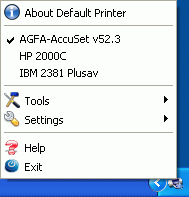
Default Printer is an utility which helps you to switch your active printer fast. There are many different printers - black and white laser, color ink-jet, color laser and others. Even fax is present in the system as usual printer. The idea behind this tool is very simple - after installation, Default Printer's icon appears in your system tray and lets you choose your default printer (the printer you are about to use) with just one mouse click. Other advantages of this software are the following: an option that allows you to switch fast using floating window and the capability to setup printing preferences by right-clicking on printer icon in floating window. Beside these facilities we offer you the option of customizing your tray icon appearance ( replacing it with your favorite icon), and a set of 4 tools (add a printer, rename the default printer, remove the default printer, share the default printer), that will speed up your work.
Requirements
System requirements
P I 166, 16 MB RAM, 2 MB HDD
Verdict
Should you download Default Printer?
Default Printer runs on
9x/NT/2000/ME/XP/Windows 10/11
and is available under the
Shareware
license
— the installer is 972 KB.
We’ve catalogued it under
General.
✓
Verified clean. Every Default Printer build on SoftLookup is scanned for viruses, spyware, adware, trojans and backdoors. We re-test on every update.
Sponsored
At a glance
Default Printer specifications
- Last updated
- Jan 27, 2025
- Requirements
- P I 166, 16 MB RAM, 2 MB HDD
- License
- Shareware
- Operating system
- 9x/NT/2000/ME/XP/Windows 10/11
- File size
- 972 KB
- Price
- $18
- Page views
- 563
Help fellow users decide. Share your experience with Default Printer.