Overview
What is PDF reDirect?
PDF reDirect : Create PDF files from any application in a quick, convenient manner by turning to this comprehensive software solution that packs a user-friendly interface
In depth
A closer look at PDF reDirect
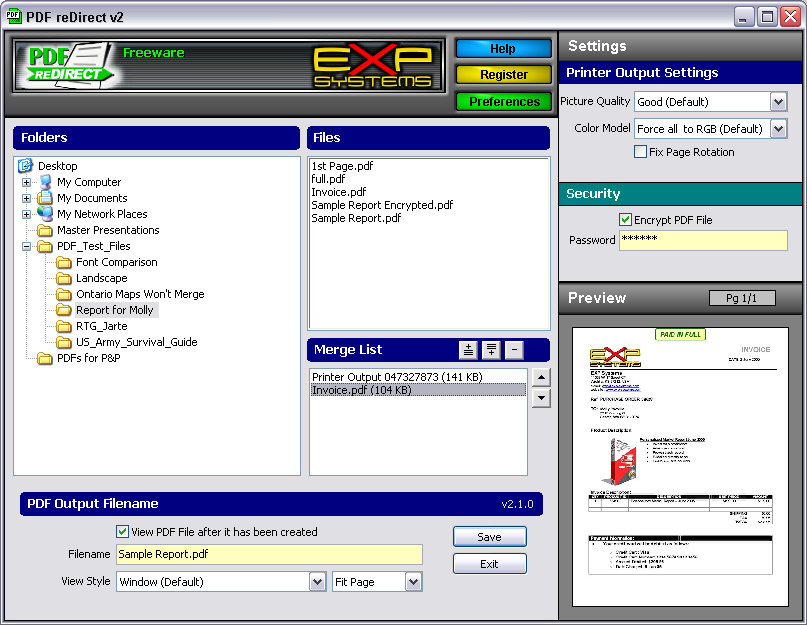
PDF reDirect Thanks to its uncomplicated interface and intuitive layout, you can easily figure out how to work with this tool, whether you are an experienced user or not. Once you have added items to the merge list (joining multiple files is possible), you can specify the output filename and destination, in order to proceed with the conversion procedure.
Requirements
System requirements
Windows 10 64-bit / Windows 10 / Windows 8 64-bit / Windows 8 / Windows 7 64-bit / Windows 7 / Windows Vista 64-bit / Windows Vista / Windows XP 64-bit / Windows XP / Windows 2000
Verdict
Should you download PDF reDirect?
PDF reDirect runs on
9x/NT/2000/ME/XP/Windows 10/11
and is available under the
Freeware
license
— the installer is 7.1 MB.
We’ve catalogued it under
Word Processing.
✓
Verified clean. Every PDF reDirect build on SoftLookup is scanned for viruses, spyware, adware, trojans and backdoors. We re-test on every update.
Sponsored
At a glance
PDF reDirect specifications
- Last updated
- Feb 10, 2025
- Requirements
- Windows 10 64-bit / Windows 10 / Windows 8 64-bit / Windows 8 / Windows 7 64-bit / Windows 7 / Windows Vista 64-bit / Windows Vista / Windows XP 64-bit / Windows XP / Windows 2000
- License
- Freeware
- Operating system
- 9x/NT/2000/ME/XP/Windows 10/11
- File size
- 7.1 MB
- Price
- Free
- Page views
- 644
Help fellow users decide. Share your experience with PDF reDirect.