Overview
What is SmartVersion?
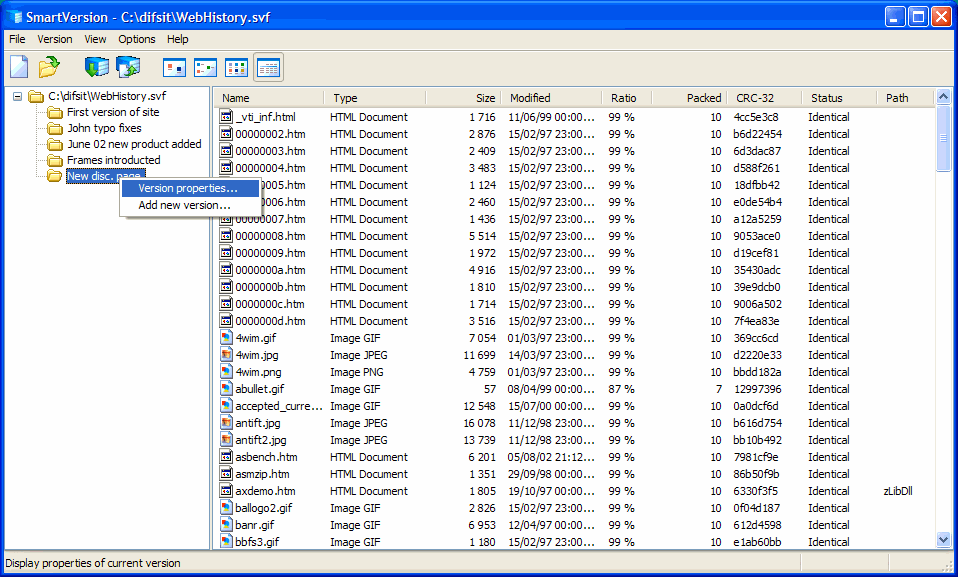
SmartVersion offers a centralized location for archiving multiple versions of one file. Examples may include Word, Excel or HTML files. The program allows you to save the hard disk space and internet bandwidth if file versions are sent over the web.
In depth
A closer look at SmartVersion
SmartVersion offers users a centralized location to archive different versions of one file for their fast retrieval. This is especially useful for people who need to save their work in incremental steps. Examples include programmers keeping track of different versions of their software at the various stages, business people working on proposals, graphic designers who make frequent adjustments to their art, writers experimenting with different ideas for manuscripts, and webmasters experimenting with different styles of webpages. Traditionally, when users work on files which often need to be changed, they either constantly overwrite previous versions so they work on a single file only, or save each version as a separate file. Overwriting seems to be a convenient and resource saving method of working, until they need to retrieve previous versions of their work. They can do this by either undoing all their work, or starting everything from scratch. Alternatively, if users try saving every single version of their work as separate files, this inevitably results in unnecessary, virtually identical extra files which waste valuable hard disk space. SmartVersion provides a practical alternative by keeping track of subsequent versions of files saved as patches of the original file. For example, as a landscape designer, you may want to use Smart Version to create several versions of your landscape project with proposed changes. They can be emailed to your client for a review and feedback. Only the first version of the file has the size of the original project. Then, as you both move along with the project, you email each other only Smart Version files, which contain only changes. Therefore the size of the file is small and it can be easily emailed even over a slow internet connection. Upon receiving this file, you open it in Smart Version. After specifying the location of the first version of this patch, you extract the latest version with all the changes.
Verdict
Should you download SmartVersion?
SmartVersion runs on
9x/NT/2000/ME/XP/Windows 10/11
and is available under the
Time-limited Trial
license
— the installer is 343 KB.
We’ve catalogued it under
File Compression.
✓
Verified clean. Every SmartVersion build on SoftLookup is scanned for viruses, spyware, adware, trojans and backdoors. We re-test on every update.
Sponsored
At a glance
SmartVersion specifications
- Last updated
- Jan 5, 2025
- License
- Time-limited Trial
- Operating system
- 9x/NT/2000/ME/XP/Windows 10/11
- File size
- 343 KB
- Price
- $30
- Page views
- 558
Help fellow users decide. Share your experience with SmartVersion.