Overview
What is Advanced eLearning Builder?
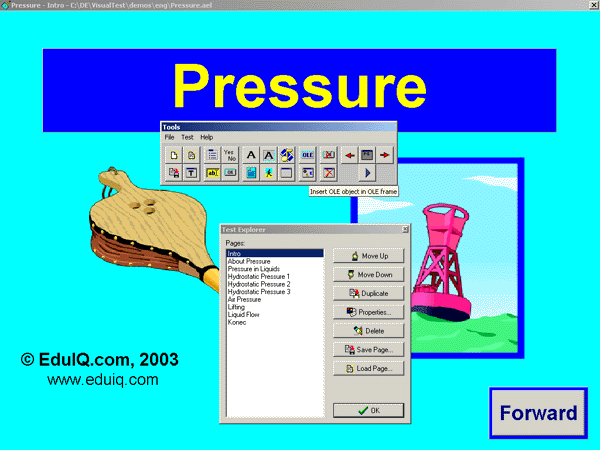
The Advanced eLearning Builder authoring tool is designed for creating e-learning materials such as e-tests, tutorials, quizzes, etc. The system enables the creation of e-tests in visual mode.
In depth
A closer look at Advanced eLearning Builder
The Advanced eLearning Builder authoring tool is designed for creating e-learning materials such as e-tests, tutorials, quizzes, etc. he created test can be compiled to EXE form. The system enables the creation of e-tests, just with several mouse clicks, which contain several types of exercises. By planning exercises in visual mode, exercises can be designed, corrected, examined, complemented, and updated in a simple and survivable way. Various elements such as gap-fill tasks, multiple choices, and alternative questions are used to set tests questions. Additionally, many other elements such as various types of texts, graphics, multimedia, Object Linking and Embedding - OLE, and buttons ensure that your test has an attractive look and professional feel. And, all these elements can be easily moved and resized using a mouse. Elements offer various customization possibilities including changing colors, fonts, and contents; thus, creating and modifying all kinds of e-tests is quick and easy. Visual design mode allows the building of e-learning materials in a simple and comprehensive way. Therefore, you can always see exactly how the final test to be deployed to students will look. Additionally, built-in dynamic resolution assures you that a test will automatically adjust to all possible screen resolutions that end-users may have so the look won't be deformed in any way.Advanced eLearning Builder also contains many pre-defined test templates that allow you to make professional looking tests in no time at all. This way, creating e-tests is as easy as editing text in a word processor, which allows beginners to start using the application immediately.An additional feature of Advanced eLearning Builder is test flow control, which allows you to write teaching sequences that can adjust to the students' knowledge and supply students with additional information when needed. This way, individualization is granted.
Requirements
System requirements
P 300Mhz, 64Mb Ram
Verdict
Should you download Advanced eLearning Builder?
Advanced eLearning Builder runs on
9x/NT/2000/ME/XP/Windows 10/11
and is available under the
Time-limited Trial
license
— the installer is 2207 KB.
We’ve catalogued it under
Teaching Tools.
✓
Verified clean. Every Advanced eLearning Builder build on SoftLookup is scanned for viruses, spyware, adware, trojans and backdoors. We re-test on every update.
Sponsored
At a glance
Advanced eLearning Builder specifications
- Last updated
- Mar 7, 2025
- Requirements
- P 300Mhz, 64Mb Ram
- License
- Time-limited Trial
- Operating system
- 9x/NT/2000/ME/XP/Windows 10/11
- File size
- 2207 KB
- Price
- $79
- Page views
- 548
Help fellow users decide. Share your experience with Advanced eLearning Builder.