Overview
What is MyUninstaller?
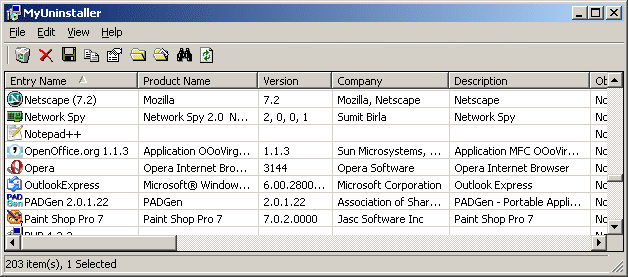
MyUninstaller is an alternative utility to the standard Add/Remove applet of Windows operating system. It displays the list of all installed application, and allows you to uninstall an application, delete an uninstall entry, and more.
In depth
A closer look at MyUninstaller
MyUninstaller is an alternative utility to the standard Add/Remove applet of Windows operating system. It displays the list of all installed application, and allows you to uninstall an application, delete an uninstall entry, and save the list of all installed applications into a text file or HTML file.MyUninstaller also provides additional information for most installed applications that the standard Add/Remove applet doesn't display: product name, company, version, uninstall string, installation folder and more.
Verdict
Should you download MyUninstaller?
MyUninstaller runs on
9x/NT/2000/ME/XP/Windows 10/11
and is available under the
Freeware
license
— the installer is 40 KB.
We’ve catalogued it under
Uninstallers and Disk Cleaners.
✓
Verified clean. Every MyUninstaller build on SoftLookup is scanned for viruses, spyware, adware, trojans and backdoors. We re-test on every update.
Sponsored
At a glance
MyUninstaller specifications
- Last updated
- Feb 24, 2025
- License
- Freeware
- Operating system
- 9x/NT/2000/ME/XP/Windows 10/11
- File size
- 40 KB
- Price
- Free
- Page views
- 559
Help fellow users decide. Share your experience with MyUninstaller.