Overview
What is HTML Email Archiver for Outlook?
Archiving messages, contacts, tasks and other items of Microsoft Outlook into HTML or CHM format, publishing Microsoft Outlook folders on the Internet, moving data from Outlook to other software and hardware platforms, including mobile devices.
In depth
A closer look at HTML Email Archiver for Outlook
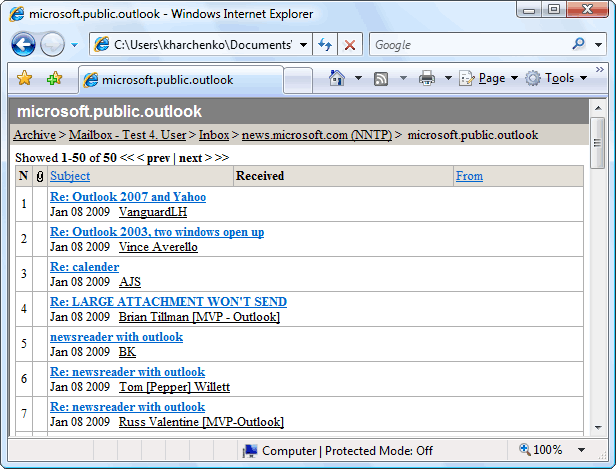
HTML Email Archiver is a unique program working with all types of Microsoft Outlook folders and used for a wide range of tasks: archiving into platform-independent HTML format or platform-dependent CHM format, publishing Microsoft Outlook folders on the Internet, moving data from Microsoft Outlook onto other software and hardware platforms, including mobile devices. Archives created in this program reproduce the structure of Microsoft Outlook folders, can contain messages or other elements in any language and with any types of attachments, support sorting by several criteria and can be searched with advanced options. An archive created in the program can be easily taken for a Microsoft Outlook or Outlook Web Access file at first sight. The program creates two types of archives: one complies with HTML 3.2 standard and is supported by all mobile devices and the other corresponds to the HTML 4.0 standard. In the long run, the number of the standard is not crucial, but an archive of the first type has a different design of pages and is optimized for low screen resolution, such as 172x220, and looks more like the interface of Pocket Outlook than of its "big brother". Due to this, such archives are conveniently viewed not only on palmtop computers, but also on smartphones with small screens. Nevertheless, both archive types support the structure of Outlook folders, sorting messages by several criteria and archiving folders and elements of all types. The HTML format is indispensable if you want to record an archive to a compact disk or publish it on the Internet. That is why it is not necessary to create an "eternal" archive, but only to move data, HTML Email Archiver can create an archive in CHM format that is also created in its other usual or mobile version. HTML Email Archiver allows you to access Microsoft Outlook data at any moment and on any device, as well as from anywhere in the world if you publish your archive on the Internet.
Requirements
System requirements
Microsoft Outlook 2000 or later
Verdict
Should you download HTML Email Archiver for Outlook?
HTML Email Archiver for Outlook runs on
9x/NT/2000/ME/XP/Windows 10/11
and is available under the
Time-limited Trial
license
— the installer is 3800 KB.
We’ve catalogued it under
E-Mail Tools.
✓
Verified clean. Every HTML Email Archiver for Outlook build on SoftLookup is scanned for viruses, spyware, adware, trojans and backdoors. We re-test on every update.
Sponsored
At a glance
HTML Email Archiver for Outlook specifications
- Last updated
- Jan 18, 2025
- Requirements
- Microsoft Outlook 2000 or later
- License
- Time-limited Trial
- Operating system
- 9x/NT/2000/ME/XP/Windows 10/11
- File size
- 3800 KB
- Price
- $49
- Page views
- 411
Help fellow users decide. Share your experience with HTML Email Archiver for Outlook.