Overview
What is Print Tools for Outlook?
As a rule, it automatically prints out messages and/or attachments; prints any Microsoft Outlook items; has manual mode and wizard to print items within a date range; prints documents from ZIP and RAR archives; prints only specified file types.
In depth
A closer look at Print Tools for Outlook
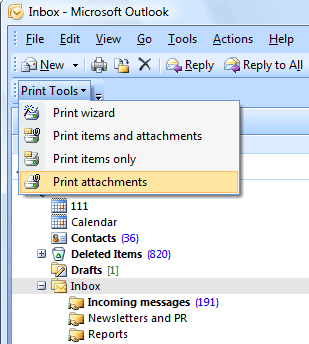
Print Tools for Outlook is a Microsoft Outlook add-in. It will help you automatically print incoming and outgoing messages with attachments (as well as messages and attachments separately) without even opening them. The plug-in automatically unpacks and prints packed ZIP and RAR attachments, and supports manual and automatic working modes. Program settings necessary for the automatic working mode are intuitively clear and few in number. Messages printed with Print Tools look exactly the same as those printed by the standard means of Microsoft Outlook. But the plug-in makes up for some of its shortcomings. Thus, you have to change the format of an HTML message to RTF or TXT to be able to print the message with the list of attachments, because none of Microsoft Outlook versions adds the list of attachments to the message header in the HTML format. Using Print Tools, you can forget about this problem. Using Microsoft Outlook rules together with the Print Tools plug-in allows you to create a system that will automatically print messages and/or files attached to them. Although Microsoft Outlook has a standard printing rule, you can neither specify (or forbid) specific file types nor print an attachment separately from its message. Print Tools makes it possible to print any message and attachment (as well as Notes, Tasks, etc.) of any format. To start printing, just click the Print Tools button on the Microsoft Outlook toolbar. The program is ready to work right after you install it. Make your work with correspondents easier! Designed for Microsoft Outlook 2000, 2002/XP and 2003.
Requirements
System requirements
Microsoft Outlook 2000/2002/XP/2003
Verdict
Should you download Print Tools for Outlook?
Print Tools for Outlook runs on
9x/NT/2000/ME/XP/Windows 10/11
and is available under the
Time-limited Trial
license
— the installer is 3003 KB.
We’ve catalogued it under
E-Mail Tools.
✓
Verified clean. Every Print Tools for Outlook build on SoftLookup is scanned for viruses, spyware, adware, trojans and backdoors. We re-test on every update.
Sponsored
At a glance
Print Tools for Outlook specifications
- Last updated
- Feb 17, 2025
- Requirements
- Microsoft Outlook 2000/2002/XP/2003
- License
- Time-limited Trial
- Operating system
- 9x/NT/2000/ME/XP/Windows 10/11
- File size
- 3003 KB
- Price
- $24
- Page views
- 429
Help fellow users decide. Share your experience with Print Tools for Outlook.