Overview
What is Precision Image Digitizer?
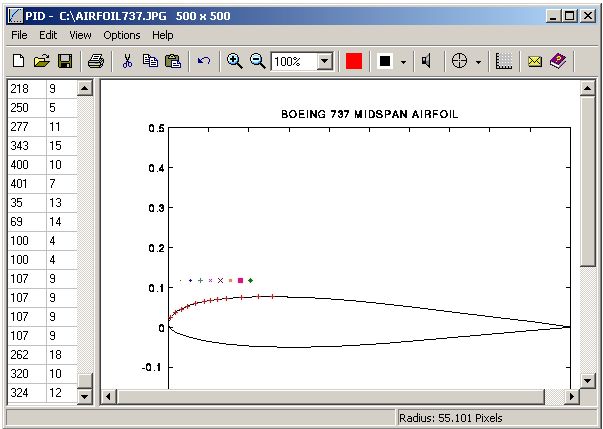
Precision Image Digitizer - Trace & record the coordinates of your selected points in a JPG, GIF, or BMP. Point and click on the points in the image that you would like to record. Export points to text or AutoCad DXF file.
In depth
A closer look at Precision Image Digitizer
Precision Image Digitizer - Trace & record the coordinates of your selected points in a JPG, GIF, or BMP. Point and click on the points in the image that you would like to record. The coordinates are displayed on the screen as you click them and they can then be exported to an ASCII text file, exported to an AutoCad DXF file, or printed. These files can then be imported into any other program capable of reading in text files or DXF files. You can also use the Windows clipboard to copy and paste images into and out of the program. The point coordinates are measured in pixels from the zero location (0, 0) at the lower left of the image. The horizontal axis is X, the vertical axis is y. You can assign a scale factor to the coordinates so the numbers on the bottom of the screen are displayed in real units such as inches. Setting the scale factor is very easy. Just click on two points on the image where you know the distance between the points. 32 bit - Runs on Windows 98, ME, NT, 2000, and XP.
Verdict
Should you download Precision Image Digitizer?
Precision Image Digitizer runs on
Windows 9X/ME/2K/XP/2003
and is available under the
Shareware
license
— the installer is 4387 KB.
We’ve catalogued it under
Graphics Editing and Painting.
✓
Verified clean. Every Precision Image Digitizer build on SoftLookup is scanned for viruses, spyware, adware, trojans and backdoors. We re-test on every update.
Sponsored
At a glance
Precision Image Digitizer specifications
- Last updated
- Mar 12, 2025
- License
- Shareware
- Operating system
- Windows 9X/ME/2K/XP/2003
- File size
- 4387 KB
- Price
- $10
- Page views
- 633
Help fellow users decide. Share your experience with Precision Image Digitizer.