Overview
What is PrinterExpress?
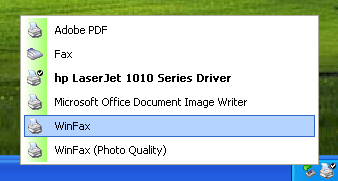
Using PrinterExpress, you only have to click once on the PrinterExpress icon located in the system tray (next to the time), and you can easily make any printer on your network your default printer.
In depth
A closer look at PrinterExpress
PrinterExpress is a very useful program for people who work with many different printers on a network. The inconvenience of having to use the Print dialog every time you want to print can quickly become a hassle. Using PrinterExpress, you only have to click once on the PrinterExpress icon located in the system tray (next to the time), and you can easily make any printer on your network your default printer. So when you need to print a document, or many documents, you can simply click on the Print icon in your favorite program instead of going through the tedious process of File->Print…-> (select printer) ->OK. The program easily pays for itself, just by the amount of time you will save in your work day.
Verdict
Should you download PrinterExpress?
PrinterExpress runs on
Windows 9X/ME/2K/XP/2003
and is available under the
Shareware
license
— the installer is 190 KB.
We’ve catalogued it under
General.
✓
Verified clean. Every PrinterExpress build on SoftLookup is scanned for viruses, spyware, adware, trojans and backdoors. We re-test on every update.
Sponsored
At a glance
PrinterExpress specifications
- Last updated
- Mar 12, 2025
- License
- Shareware
- Operating system
- Windows 9X/ME/2K/XP/2003
- File size
- 190 KB
- Price
- $15.99
- Page views
- 586
Help fellow users decide. Share your experience with PrinterExpress.