Overview
What is PDF Filler?
Fill out PDF forms without the need for Adobe Acrobat software and preview filled PDF forms with a press of the button.
In depth
A closer look at PDF Filler
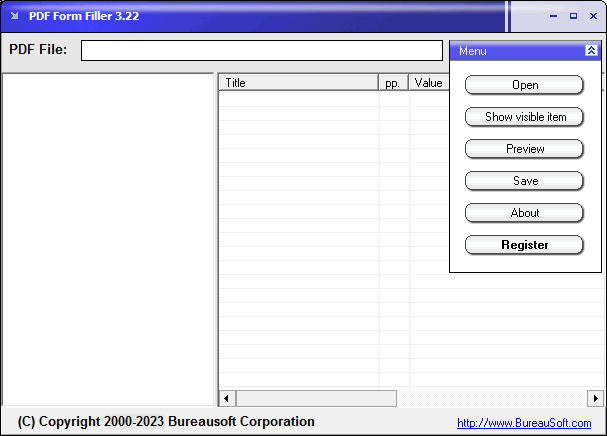
PDF Filler enables you to fill out interactive PDF forms without the need for Adobe Acrobat. You can fill PDF forms with any field type; fill in text, make choice, select items, answer yes or no etc. In the process of filling out a PDF Form, you may click the Preview button at any time to open your current work with Adobe Acrobat Reader software to see if everything is okay. Filled PDF forms can be saved or saved as a new PDF file by clicking the Save button. Discount is available for volume purchase.
Requirements
System requirements
Windows 98/ME/NT/2000/XP/2003
Verdict
Should you download PDF Filler?
PDF Filler runs on
Windows 95/98/Me/NT/2000/Windows 10/11
and is available under the
Shareware
license
— the installer is 1040 KB.
We’ve catalogued it under
Word Processing.
✓
Verified clean. Every PDF Filler build on SoftLookup is scanned for viruses, spyware, adware, trojans and backdoors. We re-test on every update.
Sponsored
At a glance
PDF Filler specifications
- Last updated
- Feb 6, 2025
- Requirements
- Windows 98/ME/NT/2000/XP/2003
- License
- Shareware
- Operating system
- Windows 95/98/Me/NT/2000/Windows 10/11
- File size
- 1040 KB
- Price
- $49
- Page views
- 622
Help fellow users decide. Share your experience with PDF Filler.