Overview
What is Desktop Calendar?
Desktop Calendar : Easily manage your important tasks from your desktop
In depth
A closer look at Desktop Calendar
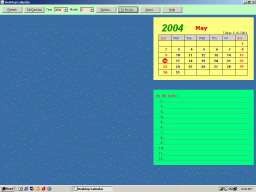
Desktop Calendar is a very basic calendar that comes with an event reminder and a simple layout to fit any Windows desktop. It’s almost impossible not to figure out how to use the program, not only because everything’s so basic, but also thanks to the fact that Desktop Calendar uses quite an intuitive approach. After launch, the program places the calendar in the top left corner of the screen and in order to move it around, you need to press the “Shift” key on the keyboard and click any of the controls under the calendar to drag it to a new location.
Requirements
System requirements
Windows 8 64-bit / Windows 8 / Windows 7 / Windows Vista / Windows XP / Windows 2000
Verdict
Should you download Desktop Calendar?
Desktop Calendar runs on
9x/NT/2000/ME/XP/Windows 10/11
and is available under the
Freeware
license
— the installer is 508 KB.
We’ve catalogued it under
Word Processing.
✓
Verified clean. Every Desktop Calendar build on SoftLookup is scanned for viruses, spyware, adware, trojans and backdoors. We re-test on every update.
Sponsored
At a glance
Desktop Calendar specifications
- Last updated
- Mar 11, 2025
- Requirements
- Windows 8 64-bit / Windows 8 / Windows 7 / Windows Vista / Windows XP / Windows 2000
- License
- Freeware
- Operating system
- 9x/NT/2000/ME/XP/Windows 10/11
- File size
- 508 KB
- Price
- Free
- Page views
- 665
Help fellow users decide. Share your experience with Desktop Calendar.