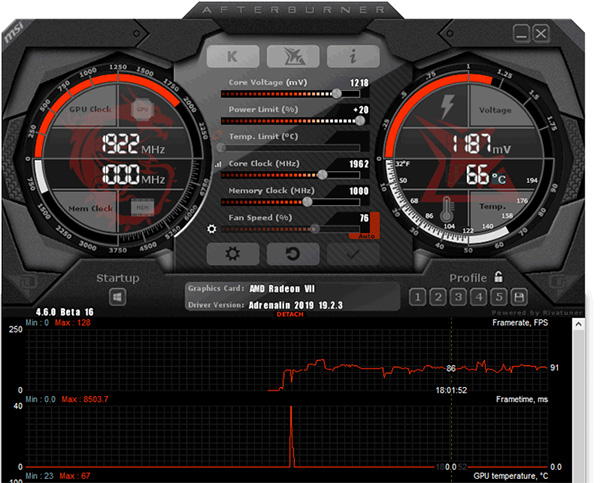
MSI Afterburner : Unleash the true power of your graphics card for an enhanced gaming experience with the help of this practical and thorough application
MSI Afterburner is ultimate graphics card utility, developed by the Guru3D RivaTuner team. The Beta releases sometimes have an expiration limit, the stable and final build releases do not. We recommend using a final build. We have written a GeForce GTX series 1000 and newer overclocking guide right here as over time a number of things changed like Curve based tweaking as well as automated tweaking. Not just that, we have also updated RTSS, our statistics server that enables the overlay with MSI AfterBurner to offer DirectX 12 overlay support. Please read the full release notes for all changes (as there are quite a few of them). Have fun tweaking. Does your overlay not work anymore after an update? Please perform a full uninstall of RTSS and AfterBurner (with profiles removal) and then perform a CLEAN install of it.
The world’s most recognized and widely used graphics card overclocking utility which gives you full control of your graphics cards. It provides an incredibly detailed overview of your hardware and comes with some additional features such as customizing fan profiles, benchmarking and video recording. MSI Afterburner is available completely free of charge and can be used with graphics cards from all brands. Video game enthusiasts are constantly on the look for a method to squeeze the most juice out of their video cards. MSI Afterburner The application's core is based on RivaTuner.
OVERCLOCKING TOOLS
Exploring and exceeding the limits of your graphics card might sound scary, but it’s actually easier than you think. MSI Afterburner Overclocking tools provide easy and precise access to your graphics card settings. While increasing your GPU’s clock frequency and voltage, the fan speed control will enable you to find the perfect balance between performance and temperature.
OC SCANNER
The latest version of MSI Afterburner features OC Scanner for RTX 20 series graphics cards. OC Scanner is an automated function that will find the highest stable overclock settings for your card. Giving you a free performance boost for a smooth in-game experience thanks to higher FPS.
HARDWARE MONITOR
The Hardware Monitor shows critical hardware information in real-time; temperature, usage, clock speed, and voltage. You can display selected information on-screen to keep an eye on key statistics while you are in game.
CUSTOM FAN PROFILES
Heat dissipation is an essential factor for graphics card performance. Afterburner lets you fully customize a predefined fan speed curve, allowing you to determine cooling performance all the way!
ON-SCREEN DISPLAY
The On Screen Displayed in the corner of screen is your best friend in games. It provides you real-time information of your system’s performance, so you can keep a close eye on the effect of your overclocking settings while gaming.
CUSTOM USER SKINS
Choose the look & feel that you like the best! MSI Afterburner comes with a selection of different skins that dynamically change how the program looks and what’s being displayed. Select one from the settings menu or download a custom skin online.
Afterburner uses the RivaTuner core along with an MSI designed user interface. Developed with MSI video cards in mind, the utility will work for all other brands of video cards as well. Like the ASUS GPU Tweak utility, that means MSI Afterburner will work with both NVIDIA and AMD based graphics cards.
MSI Afterburner is available completely free of charge and can be used with graphics cards from all brands. Afterburner is the gold standard of overclocking utilities.
MSI Afterburner should work with almost any video card sold nowadays. Though you might get extra features, say if your card is made by EVGA and you use their overcloking tool
How to measure your frame rate
A lot of games have options to display your frame rate in-game. Unfortunately you will often need to know the appropriate commands. Therefore it is much easier to use a tool that works in any game.
For this purpose we will use MSI afterburner. It is free software distributed by MSI (although originally developed for EVGA). It’s official purpose is to overclock your graphics card. However it supports a wide range of monitoring functions, including the ability to publish them in an “on screen” overlay.
Download MSI Afterburner
Download the latest MSI Afterburner (4.4.2 at the time of writing). The MSI Afterburner installation archive (.zip) is about 36 MB and it includes the RivaTuner Statistics Server.
Install MSI Afterbruner
Extract the zip file and run the included setup. Make sure you leave the RivaTuner Statistics Server enabled. After that just keep pressing next until installation is complete.
Configure MSI Afterburner – Go to settings
Click the settings button in the bottom right corner of MSI Afterburner.
Select the monitoring tab
Find and enable Framerate
In the list of “Active hardware monitoring graphs” find Framerate. Now make sure there is a checkmark in front of it.
Enable On-Screen Display
Now also make sure the checkbox “Show in On-Screen Display” is selected. Repeat step 6 for GPU usage and additional values
I personally recommend also tracking and enabling of “in OSD” for: GPU usage, Fan speed, Memory usage
Now you are done. Simply start a game and the top left corner will show the values selected for “in OSD”!
MSI Afterburner Version 4.6.2 features:
Added new MSI Steampunked skin by Drerex design
Improved skin engine:
Optimized skin rendering performance for skins using multiple overlapped animated indicators
Added position smoothing support to skinned indicators
Now skinned applications can forcibly disable indicator animation if necessary
Skin format reference guide has been updated to v1.8 to document these changesWindows 10 64 bit / Windows 10 / Windows 8 64 bit / Windows 8 / Windows 7 64 bit / Windows 7 / Windows Vista 64 bit / Windows Vista / Windows XP 64 bit / Windows XP
MSI Afterburner runs on
Windows 10/11
and is available under the
Freeware
license
— the installer is 37.7 MB.
We’ve catalogued it under
General.
Help fellow users decide. Share your experience with MSI Afterburner.