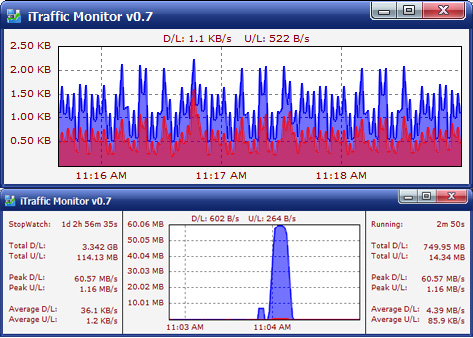
iTraffic Monitor : Straightforward and clean utility which enables you to view a graphical representation of the network traffic and generate reports
iTraffic Monitor is a software application which was built specifically to aid people in monitoring their network traffic, viewing periodical reports and configuring a few options.
iTraffic Monitor is a network monitor and reporting tool. It provides real time graph of network traffic. Detailed stats provide daily/weekly/monthly/yearly stats. Stop watch, Session stats.
- Monitor and review your Internet or network bandwidth usage with ease.
- How fast your internet connection? We can graph it for your review.
- How much data do you transfer? We show you a real-time graph or numerical display, as well as daily, weekly, monthly, or yearly reports.
- Requires minimal desktop space and system resources.
Advanced Network Filtering
By utilizing WinPcap we're able to filter out local network traffic or traffic between specific IP addresses, this is very important for people connected to the internet via a local area network (LAN). Very few network monitors can do this, The ones that do usually cost a lot. WinPcap is part of the installation, during installation you can uncheck it and use iTraffic Monitor without it. Though you lose this ability.
Stop Watch
The main graph shows you the current transfer speed. But if you need a 100% accurate measurement of the transfer speed to or from your computer, you can use the Bandwidth Stop Watch Feature. It enables you to measure bandwidth usage in a specific time interval.
Smooth installation and clear-cut interface
The setup process is a piece of cake as it does not come bundled with any unpleasant surprises and it is over in a jiffy. After finalizing it, you come by a pretty simple and intuitive interface. Moreover, so as not to become obtrusive, you can send it to the system tray with just a click of the button. Consequently, all user categories can find their way around it, regardless of their previous experience with the IT world.
View information in real time and options you can tweak
The main window depicts your network traffic in real time, using a color coded system, so that you can easily figure out the download and upload speed. In addition to that, you can enable a browse mode, so that you can easily access earlier data with the help of a scroll bar.A stop watch can be started or stopped, so that you can view total, peak and average download and upload, while it is also possible to bring up session stats. Last but not least, reports can be generated for the last day, week, month or year, including information such as total downloaded and uploaded data, and the amount of MB processed.
Performance and conclusion
The amount of resources necessary is low at all times, while the response time is good. The interface is suitable to all types of users and we did not pick up on any hangs, errors or bugs during our tests.Taking all of this into account, we can safely say iTraffic Monitor is a pretty efficient piece of software when it comes to monitoring your network traffic.
iTraffic Monitor runs on
Windows 10/11
and is available under the
Freeware
license
— the installer is 2.2 MB.
We’ve catalogued it under
Networking.
Help fellow users decide. Share your experience with iTraffic Monitor.