Movavi Screen Recorder : Record monitor activity and save it to video files or take snapshots using this intuitive tool with support for numerous file types and online publishing
With the help of Movavi Screen Recorder you can seamlessly record monitor activity and save it to video files, as well as share the clips on social networking websites. This is an intuitive and fun-to-work-with tool that doesn't require heavy experience in video processing utilities.
Clear-cut installer and GUI
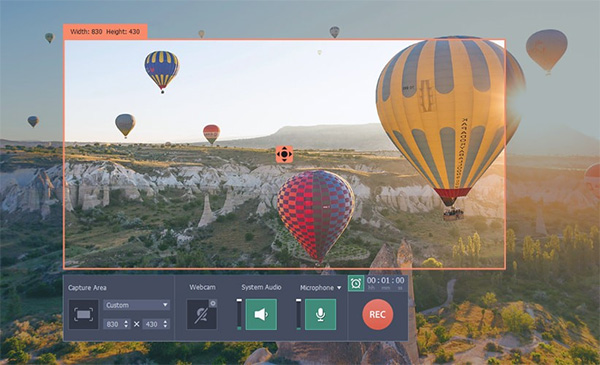
The setup operation is swift and uncomplicated, thanks to the fact that it includes only familiar options. Movavi Screen Recorder is wrapped in a clean interface with a comfortable look, consisting of a rectangular frame which for capturing screen activity, along with a control panel.You can resort to drag-and-drop support for repositioning the capturing screen, as well as change its resolution into anything you want. Audio recording is optional and can be activated or deactivated with one click. The same rule applies to the microphone.
Extensive file type support, online sharing, and video effects
Once a video is recorded, all you have to do is specify the output profile to save it to the disk. Movavi Screen Recorder offers support for numerous formats in this regard, whether we're talking about general video files (e.g. AVI, FLV, MP4, WMV) or HD video. It can also prepare the clips for playback compatibility on external devices powered by Apple, Android, BlackBerry, HTC and other makers.Furthermore, the app can automatically import the new video into the iTunes library or upload it to Facebook, YouTube, VKontakte, Vimeo, FTP or Amazon S3. It lets you take snapshots and save them as image files, record keystrokes, include or exclude the mouse cursor from the video footage, highlight the cursor and clicks, as well as use mouse click sound.
Evaluation and conclusion
The tool ran on a decent amount of CPU and RAM during our tests, delivered quality video clips, and didn't hang, crash or display error dialogs. It offers support for keyboard shortcuts and can be easily handled by anyone with minimal skills. Taking everything into account, Movavi Screen Recorder comes equipped with a surprisingly rich and intuitive set of features for screen recording, so you can definitely give it a shot.
Windows 10 64 bit / Windows 10 / Windows 8 64 bit / Windows 8 / Windows 7 64 bit / Windows 7 / Windows Vista 64 bit / Windows Vista / Windows XP
Movavi Screen Recorder runs on
Windows 10/11
and is available under the
Demo
license
— the installer is 35.3 MB.
We’ve catalogued it under
Graphics Editing and Painting.
Help fellow users decide. Share your experience with Movavi Screen Recorder.